
AI Trip Planner
AI-driven tool for personalized, efficient travel itinerary creation.
Watch AI Trip Planner in Action
Key Takeaways
- What it is
- AI-driven tool for personalized, efficient travel itinerary creation.
- Pricing
- Freemium
- Best for
- Personalized Itineraries
- Real-Time Updates
- Budget Optimization
- Rating
- 4.3/5
What is AI Trip Planner?
AI Trip Planner is an innovative tool designed to transform the way we plan our travel adventures. It leverages cutting-edge artificial intelligence to offer personalized travel itineraries, catering to both individual travelers and professionals in the travel industry. With AI Trip Planner, users can effortlessly create detailed and customized travel plans, ensuring a seamless and enjoyable travel experience.
AI Trip Planner stands out with its advanced AI-driven personalization, a game-changer for travel planning. Its ability to dynamically adjust itineraries based on real-time data and user feedback sets it apart in the travel industry, offering an unparalleled level of customization and convenience.
Who is Using AI Trip Planner?
Travel Enthusiasts
Individuals looking for a hassle-free travel planning experience.
Travel Agencies
Professionals seeking to offer customized travel packages to clients.
Business Travelers
Employees needing efficient planning for work-related trips.
Event Planners
Organizers of destination events such as weddings and conferences.
Uncommon Use Cases
Utilized by educational institutions for teaching travel planning courses; adopted by digital nomads for planning extended stays.
Key Features
Rating Breakdown
Pricing Plans
Free Tier
Free
- Experience AI Trip Planner with a free trial
Which AI Trip Planner plan should you pick?
Start with Discover to test AI Trip Planner; upgrade to Moon when you need custom integrations, scheduled automation, custom domains, or payments.
Discover
Good for trying the planner and basic app building with one app, 20 builder messages, and 20 monthly AI credits.
Rocket
Good for building an online business with unlimited apps, 100 builder messages, and 1,000 monthly AI credits.
Moon
Good for launching a business that needs custom domains, payments, priority support, and custom integrations.
Spaceship
Good for scaling with higher builder-message and AI-credit limits, premium support, and custom integrations.
Galaxy
Good for maximizing growth and revenue with the highest published usage limits.
AI Trip Planner Use Cases
Personalized travel planning
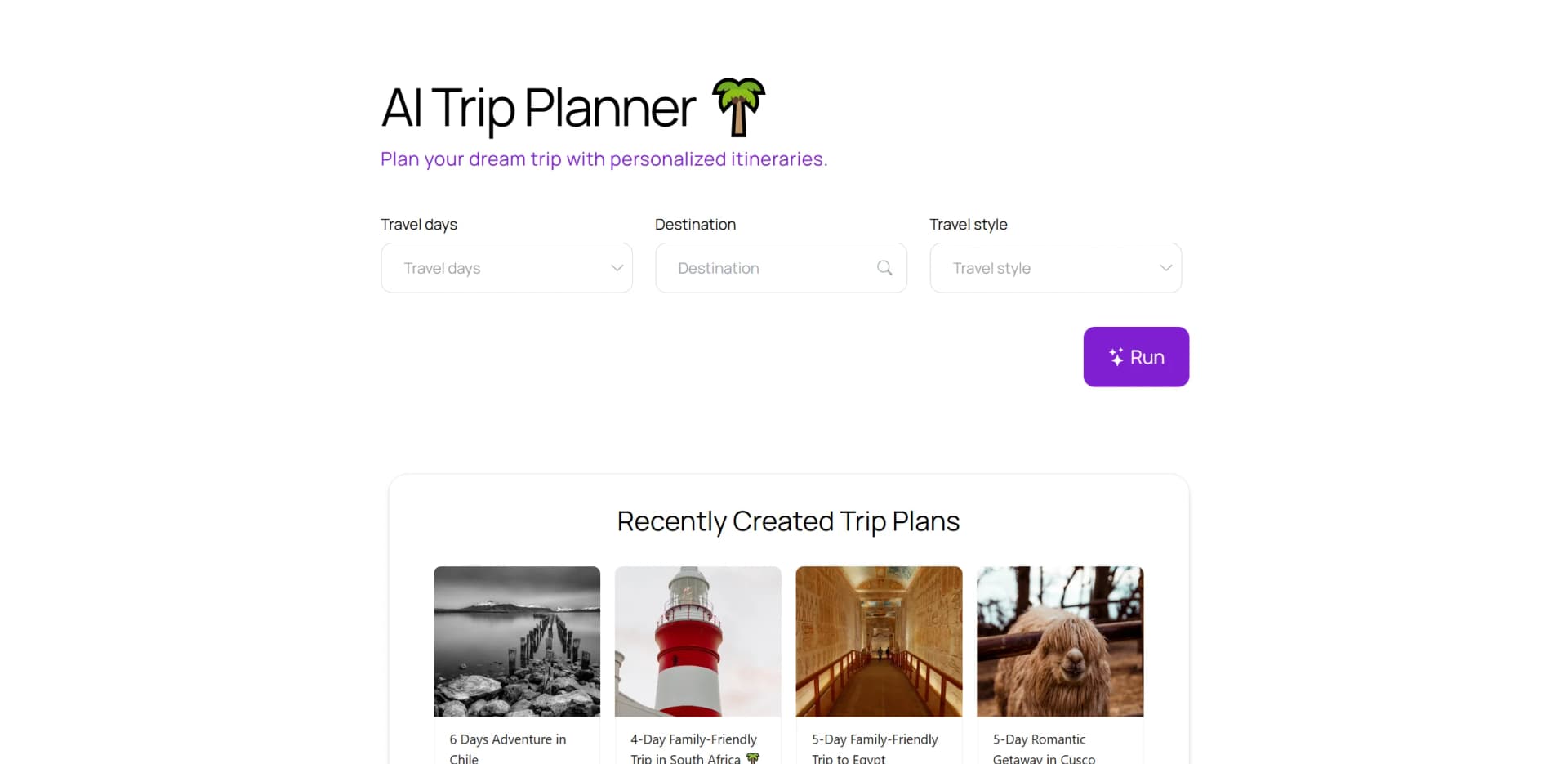
Specify a destination, duration, and travel style to generate a day-by-day itinerary.
Outcome: A structured trip plan with activities, meals, hotels, and tours.
Flight and hotel discovery
Use the itinerary's flight and hotel discovery actions to continue researching travel arrangements.
Outcome: Travel options connected to the planned itinerary.
Tour and activity discovery
Review recommended tours and activities attached to itinerary destinations.
Outcome: A richer itinerary with bookable-style activity suggestions.
Custom travel app creation
Use BuildAI's no-code builder to create a branded travel planning app.
Outcome: A publishable AI-powered travel application.
Workflow Ideas with AI Trip Planner
Generate a personalized itinerary
- 1Open AI Trip Planner
- 2Provide the destination, number of days, and travel style
- 3Review the generated day-by-day itinerary
Refine a trip plan
- 1Review recommended activities, restaurants, hotels, and tours
- 2Rerun or modify the app-generated plan
- 3Use the resulting itinerary for travel research
Publish a customized travel app
- 1Describe the travel app you want to build
- 2Refine its data, layout, branding, and user experience
- 3Publish the app for users through a web link
How AI Trip Planner fits into your stack
Browser
AI Trip Planner is delivered as a published web app at a BuildAI.Space URL. Users interact with personalized itinerary pages containing destinations, daily schedules, hotels, flights, and tours.
Knowledge and files
The BuildAI platform provides file uploads and document/image data extraction that can be incorporated into apps. These capabilities are documented as platform integrations rather than as dedicated native functionality of the trip-planner interface.
Automation and APIs
BuildAI supports custom API integrations and scheduled tasks for published apps, including recurring syncs, reports, reminders, and other automated operations.
Pros
- +Time Efficiency: Significantly reduces the time spent on planning by automating itinerary creation.
- +Cost-Effective: Identifies budget-friendly travel options that align with user preferences.
- +Enhanced Travel Experience: Ensures personalized recommendations, enhancing the overall travel experience.
- +User-Friendly Interface: Designed with an intuitive interface that makes it easy for users to navigate and plan their trips.
Cons
- −Initial Learning Curve: May require some time for new users to fully explore and utilize all features.
- −Limited Integration: Currently, integration with certain third-party travel services is limited.
Limitations & when to consider alternatives
Known limitations
- Scheduled automation requires a paid plan. Scheduled Tasks are available on the Moon plan or higher and require custom integrations.
- Scheduled task runs consume credits. Each scheduled task run costs one AI credit, with additional charges for credit-consuming actions.
- Scheduled tasks have a three-minute timeout. Tasks running longer than three minutes are stopped and marked as timed out.
- Recurring schedules use UTC. Recurring scheduled tasks use UTC; local timezone display is provided for one-time tasks.
- The mobile installation is browser-based. The documentation describes adding the app to a device homepage through a browser install popup rather than a native store app.
Look elsewhere when
- You need a native iOS or Android application.
- You need a documented public developer API.
- You need fine-tuning of model weights on proprietary data.
How to Use AI Trip Planner
- 1
Open the trip planner
Go to the AI Trip Planner app from BuildAI's AI Tools area.
- 2
Define the trip
Enter a destination, trip duration, and travel preference such as family-friendly, cultural, relaxation, or adventure.
- 3
Review the itinerary
Inspect the generated daily schedule, including suggested meals, attractions, tours, and hotel stops.
- 4
Research bookings
Use the Find flights, Book a Tour, and hotel-related actions to continue travel research.
- 5
Rerun or refine
Use the app's rerun capability or modify the requested preferences to produce another itinerary.
- 6
Create a custom version
If the template is not sufficient, use BuildAI's builder to create and publish a branded travel app.
Who is AI Trip Planner For?
Entrepreneurs
BuildAI is positioned for entrepreneurs who want to launch apps without a technical co-founder.
Founders
Founders can turn ideas into working products, publish them, and begin acquiring customers.
Businesses
Businesses can create internal systems, client portals, workflows, dashboards, and intake forms.
App creators
Users can create, customize, publish, and monetize AI-powered apps.
Frequently Asked Questions
Do I need technical skills to build my app?
No. BuildAI says users can describe what they want and build without coding.
How quickly can I get started?
Users can start building immediately after signing up.
How quickly can I launch my app?
BuildAI says apps are created instantly and can typically launch within hours after refinement.
Is it possible to use my own data?
Yes. Users can add their own data and make it accessible in a structured way.
Can I customize the look and feel?
Users can customize colors, logos, and layouts; premium plans add custom domains and remove branding.
What are builder messages?
Builder messages tell BuildAI's AI what to create or modify in an app.
Community reviews
1 review from people who use AI Trip Planner.
Sign in to leave a review for AI Trip Planner.
דניאל וידאל
AI Trip Planner Alternatives
Looking for alternatives to AI Trip Planner? Here are similar tools in the same category:
Learn to Master AI Trip Planner
With Skill Leap courses
Get in-depth training on AI Trip Planner and 50+ other AI tools with our expert-led video courses.
Start 7-Day Free Trial