
Anara
Enhance research by interpreting and organizing documents.
Key Takeaways
- What it is
- Enhance research by interpreting and organizing documents.
- Pricing
- Freemium · $20 per month · $30 per seat/month
- Best for
- Advanced Document Understanding
- Referenced Responses
- Cross-Referencing Collections
- Rating
- 4.5/5
What is Anara?
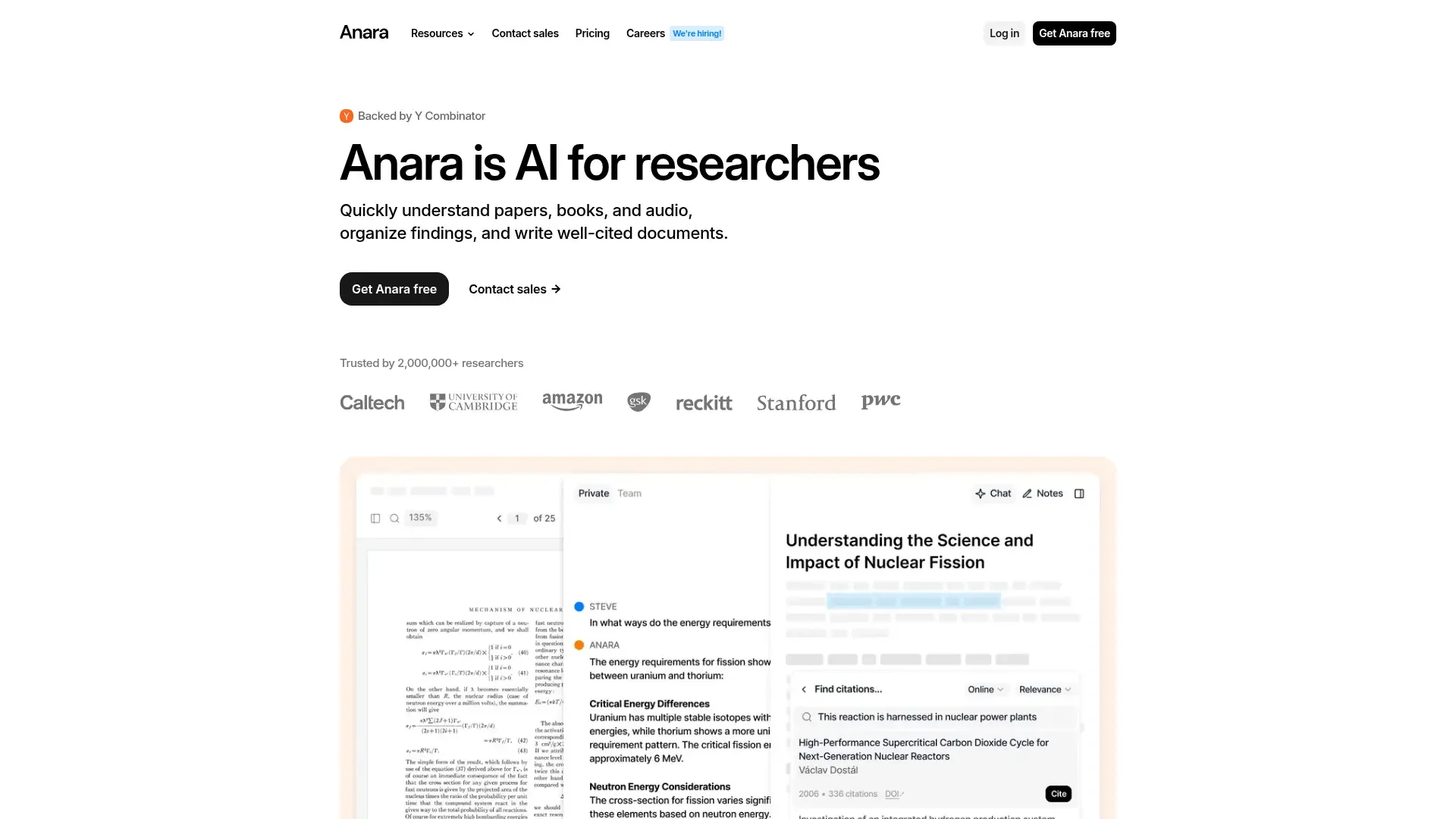
Anara is a cutting-edge AI tool designed specifically for researchers. It aims to simplify and enhance the research process by providing users with quick and accurate insights into papers, books, and audio files. Anara is tailored for academic professionals and students who need to organize findings, understand complex documents, and write well-cited research papers efficiently.
Anara stands out with its ability to provide referenced responses, a crucial feature for researchers who need to verify the accuracy of their sources. Its integration of AI for understanding multiple formats—like handwritten notes and poorly formatted documents—sets it apart in the research industry.
Anara offers a powerful solution for researchers looking to optimize their workflow. With its advanced document understanding, collaborative features, and AI-driven writing assistance, it proves to be an invaluable tool for anyone in academia or related fields. While it may have a slight learning curve, the time saved and efficiency gained make it a worthy investment.
Who is Using Anara?
Academic Researchers
Relying on Anara for efficient literature reviews and manuscript preparation.
PhD Students
Utilizing the tool for annotations and organizing research findings.
Medical Professionals
Engaging with Anara to quickly understand and summarize complex medical documents.
Data Scientists
Employing it for analyzing and referencing scientific papers.
Uncommon Use Cases
Used by freelance writers for enhanced content creation; Adopted by corporate trainers for developing training materials.
Key Features
Rating Breakdown
Pricing Plans
Free
Free
- Includes 1,000 AI words/day, 5 uploads/day, 1 recording/day, and up to 120 pages or 20MB per upload
Pro
$20 per month
- Includes unlimited AI words, uploads, and recordings, plus access to premium models (Claude 3.5, GPT-4.1, o4, DeepSeek, Gemini 2.5), 10,000 pages or 300MB per upload, and priority support
Team
$30 per seat/month
- Includes all Pro features plus team collaboration, shared workspace, admin panel, and dedicated account manager
Which Anara plan should you pick?
Start with Free for basic document research, upgrade to Plus for biomedical connectors, Pro for full models and productivity connectors, or Max for Deep Search and heavy usage.
Free
Good for exploring Anara with limited uploads, daily AI usage, and Zotero or Mendeley connectors.
Plus
Good for researchers who need more usage and access to biomedical research connectors.
Pro
Good for regular research work requiring all AI models, OCR, semantic image recognition, and cloud or productivity connectors.
Max
Good for heavy research workloads requiring substantially more usage, Deep Search, and unlimited folder collaborators.
Enterprise
Good for organizations needing SSO/SAML, SCIM provisioning, advanced security, compliance support, and custom terms.
Anara Use Cases
Literature review
Search papers and uploaded documents, compare findings, and synthesize evidence across sources.
Outcome: A cited, verifiable literature-review draft.
Paper discovery
Describe a research topic and review ranked papers with verified DOIs before importing selected items.
Outcome: A curated research bibliography.
Systematic data extraction
Apply a fixed extraction template to papers and organize findings into structured outputs.
Outcome: Consistent extracted research data.
Citation-assisted writing
Draft in the note editor, highlight claims, and search the library or web for supporting citations.
Outcome: Writing with inline formatted references.
Clinical and biomedical research
Search PubMed, ClinicalTrials.gov, bioRxiv, medRxiv, PDB, ChEMBL, and Open Targets.
Outcome: Evidence grounded in specialized scientific databases.
Workflow Ideas with Anara
Build a literature review
- 1Search academic papers for the research topic
- 2Import and organize the relevant papers into a folder
- 3Ask Anara to synthesize findings with citations
Prepare study materials
- 1Search the workspace for relevant notes and documents
- 2Ask Anara to create flashcards from the collected material
- 3Review and refine the generated study set
Research and cite a draft
- 1Write the draft in Anara's note editor
- 2Highlight claims that need support
- 3Use Search citation to insert formatted references
How Anara fits into your stack
Browser
Anara runs as a web app for uploading and organizing documents, reading PDFs, chatting with AI, and writing notes. Its Chrome extension clips webpages, PDFs, and YouTube videos directly into the library.
Knowledge and files
The central workspace stores searchable research materials, notes, annotations, citations, and imported content. Users can connect Zotero, Mendeley, Google Drive, OneDrive, Dropbox, SharePoint, Notion, and scientific databases.
Docs and writing
Anara provides a note editor with AI writing assistance, citation insertion, document export, and a Microsoft Word side-panel add-in for research and drafting.
Desktop / IDE
A dedicated Mac desktop app provides the Anara research workspace outside the browser. The product also supports a Microsoft Word add-in, but its documented coding capability is limited to coding-related questions rather than an IDE workflow.
Pros
- +Efficiency in Research: Anara significantly reduces the time required to conduct literature reviews and write research papers.
- +User-Friendly Interface: The intuitive design ensures that both tech-savvy and less experienced users can navigate and utilize the tool effectively.
- +Collaborative Capabilities: The platform supports real-time collaborative editing and a shared repository for team projects.
- +Multilingual Support: Anara offers support in over 90 languages, making it accessible to a global audience.
Cons
- −Initial Learning Curve: New users may require some time to familiarize themselves with the comprehensive features.
- −Limited Integration Options: Currently, Anara has limited compatibility with certain third-party platforms.
Limitations & when to consider alternatives
Known limitations
- No dedicated mobile app. Anara is accessible on mobile browsers, but the documented experience is optimized for desktop.
- Usage limits vary by plan. The Free plan has a daily usage limit, while paid plans use weekly limits; imports and AI activity consume usage.
- Upload size limits on lower tiers. Free uploads are limited to 20 MB or 120 pages, Plus to 100 MB or 600 pages, and Pro to 300 MB or 10,000 pages.
- Paywalled papers may be abstract-only. Imports by URL or DOI may contain only metadata and an abstract when the full paper is not publicly accessible.
- Clipper cannot capture protected pages. The Chrome Clipper cannot capture content behind login screens or paywalls.
Look elsewhere when
- You need a native mobile app.
- You need Windows or Linux desktop support.
How to Use Anara
- 1
Create an account
Sign up at anara.com with Google, Apple, Microsoft, or email; Anara creates a workspace automatically.
- 2
Upload or import sources
Upload supported files or import references through Zotero, Mendeley, URLs, DOIs, or connected services.
- 3
Ask questions
Open a document, folder, or library chat and ask questions; Anara returns answers linked to source passages.
- 4
Use connectors
Open Settings > Connectors and authorize services such as Google Drive, Notion, Slack, or PubMed.
- 5
Write with citations
Create a note, draft alongside your sources, and use Search citation to insert references in the selected format.
- 6
Export the result
Export notes to Word, PDF, HTML, or LaTeX while retaining formatted citations.
Who is Anara For?
Researchers
Search, synthesize, organize, and cite information across scientific papers and research documents.
Academics and PhD candidates
Build literature reviews, manage research libraries, draft notes, and insert formatted citations.
Life sciences professionals
Search biomedical databases, clinical-trial sources, research files, and connected scientific platforms.
Legal professionals
Use document-grounded research and structured drafting workflows for legal research and evidence review.
Consultants and knowledge workers
Synthesize client or field research into cited briefs and structured deliverables.
Frequently Asked Questions
Is Anara free to try?
Yes. The free plan allows file uploads, document chat, and cited answers without requiring a credit card.
What file types can I upload?
Anara supports documents, images, audio, and video, including PDF, Word, PowerPoint, Excel, Markdown, EPUB, PNG, JPG, MP3, and MP4.
Can Anara work across my entire library at once?
Yes. You can ask questions across a folder or your entire library, with answers grounded in relevant passages.
Can I bring in my existing reference library?
Yes. Anara supports Zotero and Mendeley imports and connects to services such as OneDrive, Notion, and Dropbox.
What happens if I reach my usage limit?
New AI requests pause until the limit resets, unless paid users add credits or upgrade their plan.
Does Anara have a mobile app?
No dedicated mobile app is currently available; Anara can be accessed through a mobile browser.
Community reviews
Be the first to share your experience.
Sign in to leave a review for Anara.
Anara Alternatives
Looking for alternatives to Anara? Here are similar tools in the same category:
Learn to Master Anara
With Skill Leap courses
Get in-depth training on Anara and 50+ other AI tools with our expert-led video courses.
Start 7-Day Free Trial