
Atomic Bot
Delegate email, scheduling, docs, and browser work 24/7.
Key Takeaways
- What it is
- Delegate email, scheduling, docs, and browser work 24/7.
- Pricing
- Freemium
- Best for
- Guided OpenClaw setup
- Persistent memory
- Local or cloud execution
- Rating
- 4.3/5
What is Atomic Bot?
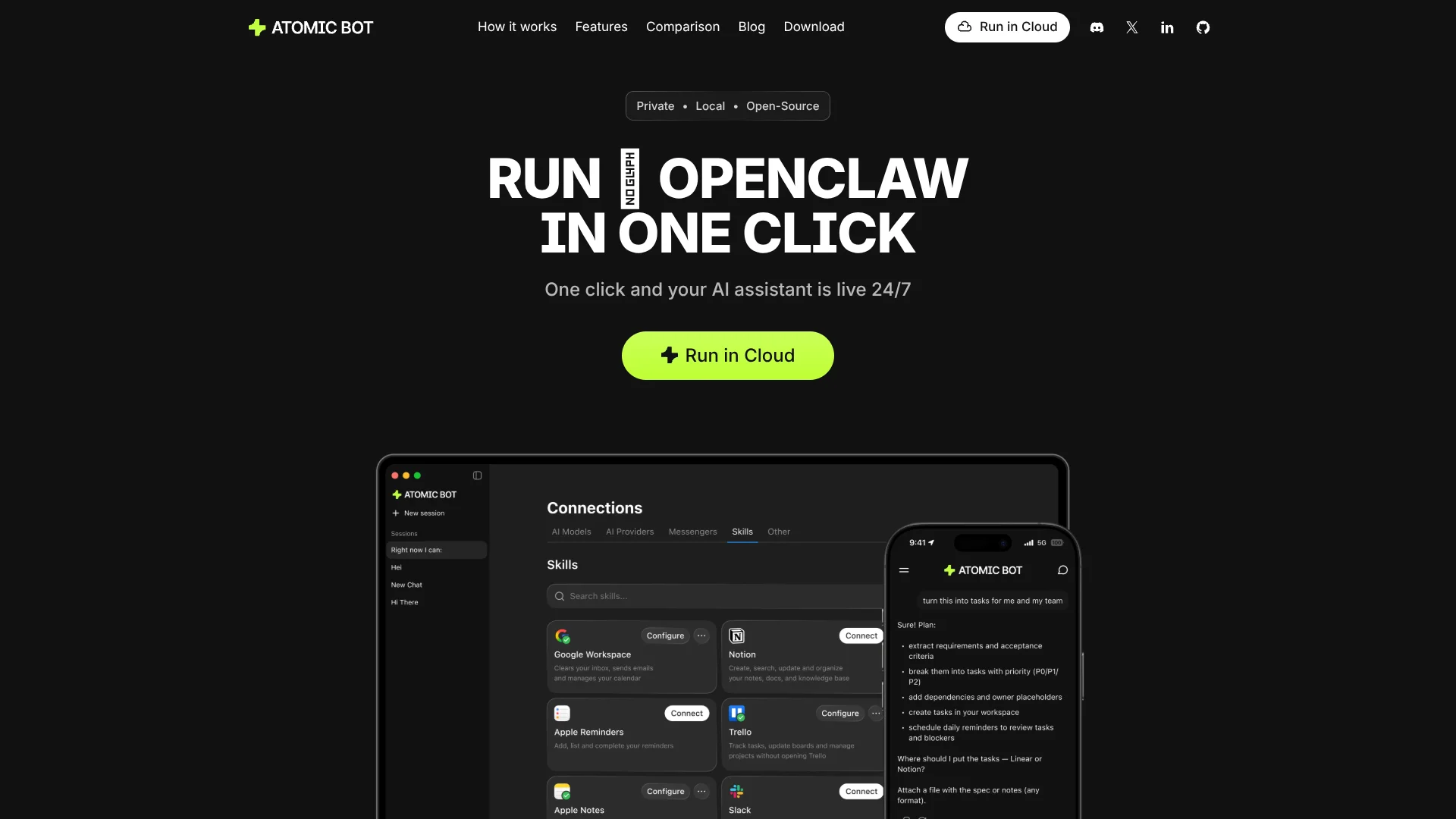
Atomic Bot packages the open source OpenClaw agent stack into a polished desktop and cloud app so regular users can run a 24/7 AI coworker without wrestling with terminals and scripts. Instead of manual installs, users download the app, sign in with Google, connect Gmail, calendar, files, and other tools, then let an AI agent handle real work such as email triage, scheduling, document digestion, and browser actions. It runs locally on macOS or Windows or in a personal cloud setup, and it supports multiple LLM backends including Claude, GPT, and Gemini.
Atomic Bot sits in a sweet spot between raw open source projects and closed SaaS automation suites. It brings the full power of OpenClaw into a regular desktop app that non engineers can install, while still exposing all the knobs advanced users expect, from model choice to custom skills and hybrid local or cloud deployment. The combination of real browser control, persistent memory, and deep app integrations gives it a distinctly “agentic” feel. Add open source code and a fast moving community, and it becomes an unusually transparent way to get serious AI agents running on personal hardware.
Atomic Bot offers an appealing path for anyone who wants a capable AI agent that can actually click buttons, read files, and run day to day workflows while staying close to their own data. It keeps the open nature and flexibility of OpenClaw while sanding down many setup and usability rough edges. Teams and individuals who are comfortable with API driven tools and willing to think about security for third party skills will find a lot of value here, especially if they want to experiment with personal agents before committing to heavier enterprise automation platforms.
Who is Using Atomic Bot?
Indie developers and tinkerers
Using it to script personal workflows, scrape data through the browser, and experiment with multi step agents.
Solo founders and small startups
Delegating inbox triage, investor follow ups, customer outreach, and calendar wrangling to an always on agent.
Knowledge workers and consultants
Summarizing long PDFs, contracts, and research packets into concise briefs and action lists.
Operations and support teams
Automating routine support emails, CRM updates, and escalation workflows tied to multiple SaaS tools.
Uncommon Use Cases
Adopted by students who connect it to course portals and assignment calendars; Used by home lab enthusiasts running it on dedicated mini PCs as “AI butlers” for their digital infrastructure.
Key Features
Rating Breakdown
Pricing Plans
Free
Free
- Atomic Bot with manual API key setup
Optional paid plan
- Users who do not want to set up API keys manually
Which Atomic Bot plan should you pick?
Start with Base for a personal always-on agent; upgrade to Pro or Max when you need more compute, storage, context, or monthly AI credits.
Base
Good for personal agents needing 4 vCPU, 8 GB RAM, 80 GB SSD, and $5 in monthly AI credits.
Pro
Good for heavier workflows needing 8 vCPU, 16 GB RAM, 160 GB SSD, and $10 in monthly AI credits.
Max
Good for demanding agents needing up to 64 vCPUs, 128 GB RAM, up to 1280 GB SSD, and $20 in monthly AI credits.
Atomic Bot Use Cases
Gmail management
Clean up threads, draft replies, and send follow-ups.
Outcome: Less manual inbox work.
Calendar autopilot
Schedule meetings, move events, and set reminders.
Outcome: Faster calendar administration.
Document summarization
Read long PDFs and documents and extract summaries, action items, and key takeaways.
Outcome: Quicker document review.
Browser automation
Open websites, click through flows, fill forms, submit information, and collect results.
Outcome: Routine web tasks are completed automatically.
File organization
Find, rename, and sort downloads and other files.
Outcome: A cleaner, more organized file system.
Workflow Ideas with Atomic Bot
Daily inbox follow-up
- 1Connect Gmail
- 2Review and clean up email threads
- 3Draft replies and send follow-ups
Recurring competitor monitor
- 1Create a scheduled monitoring task
- 2Track selected trends, competitors, or mentions
- 3Receive a recurring digest
Document-to-action workflow
- 1Provide a PDF or document
- 2Summarize the contents and extract action items
- 3Use the resulting actions in connected tools
How Atomic Bot fits into your stack
Browser
Atomic Bot provides a web interface for cloud agents and can control websites by opening pages, clicking through flows, filling forms, and collecting information.
Desktop / IDE
Atomic Bot is available as a local desktop application for Mac, Linux, and Windows, with agents running on the user's device.
Team chat and tickets
Agents can be reached through Telegram, WhatsApp, Discord, Slack, and Signal, allowing users to chat with the agent from messaging surfaces.
Automation and APIs
Atomic Bot connects external tools and APIs through integrations and MCP servers, and supports recurring tasks, monitoring, and browser-driven workflows.
Knowledge and files
The product reads documents and PDFs, summarizes them into action items, organizes files, and stores information for later retrieval.
Pros
- +Real task execution, not just chat: Controls email, calendars, files, and the browser so users can offload repetitive workflows, not only question answering.
- +Strong privacy posture: Can keep all data on a local machine, with cloud usage optional, which helps privacy conscious users and teams.
- +High customizability: OpenClaw skills, multiple models, and a large integration set make it easy for advanced users to build very tailored agents.
- +Lower total cost potential: The app itself is free, and users can pick whichever LLM plans or API keys offer the best value for their workload.
- +Good bridge for non‑terminal users: Brings a complex open source agent stack into a GUI that product managers, founders, and non developers can actually operate.
- +Community and ecosystem energy: OpenClaw’s fast growing community means new skills, integrations, and how to guides appear quickly.
Cons
- −Setup still has moving parts: Even with a GUI, users must understand API keys, model choices, and permissions across connected apps.
- −Depends on third party LLMs and skills: Reliability, costs, and security are influenced by model providers and community built skills, which some companies may find hard to govern.
- −Early stage UX and docs: Compared to mature SaaS automation suites, onboarding materials and support channels still feel more “enthusiast” than enterprise.
Limitations & when to consider alternatives
Known limitations
- Cloud plans are paid. Managed cloud deployment starts at the Base plan for $19 per month.
- AI credits are limited by plan. Base, Pro, and Max include $5, $10, and $20 in monthly AI credits respectively.
- Local agents stop when the computer sleeps. The desktop app runs on the user's computer, while cloud deployment is required for continuous 24/7 operation.
- Cloud deployment does not provide root access. Atomic Bot manages the dedicated VPS, so users do not administer the underlying server directly.
- Provider API usage may cost extra. Users can bring their own Claude, GPT, Gemini, or OpenRouter keys, which are billed by the respective provider.
Look elsewhere when
- You need a public developer API.
- You need shared workspaces with user roles.
- You need SSO or SAML.
- You need a browser extension.
How to Use Atomic Bot
- 1
Choose local or cloud deployment
Install Atomic Bot on macOS or Windows for local execution, or launch a cloud agent for continuous 24/7 operation.
- 2
Select an agent
Choose OpenClaw, Hermes, Codex, DeepSeek Harness, or another available agent from the interface.
- 3
Connect your models
Use included plan credits or add your own Claude, GPT, Gemini, OpenRouter, or local-model credentials.
- 4
Connect skills and services
Add tools such as Gmail, Google Calendar, Slack, GitHub, Notion, Trello, Telegram, or browser automation.
- 5
Give the agent a task
Ask it to handle email, documents, browser flows, calendar work, file organization, or research.
- 6
Schedule recurring work
Create monitoring, reminder, digest, or other recurring tasks so the agent can initiate work without another prompt.
Who is Atomic Bot For?
Non-technical users
The guided installer avoids terminal commands, configuration files, and manual setup.
Windows users
Atomic Bot provides a one-click Windows installation for running OpenClaw.
People automating personal work
It handles email, calendars, documents, browser actions, files, and recurring tasks.
Teams deploying assistants
Teams can provide non-technical members with packaged AI assistants without requiring manual CLI installation.
Privacy-conscious users
Local deployment keeps the agent and its data on the user's own device.
Frequently Asked Questions
What is Atomic Bot?
Atomic Bot is a native app for running OpenClaw and Hermes Agent locally or in the cloud.
Is Atomic Bot free?
The local app is free to use. Optional paid cloud plans provide managed hosting and included AI credits.
Does Atomic Bot run locally or in the cloud?
It supports both local execution on your computer and cloud deployment on a dedicated VPS.
Do I need to use Terminal?
Terminal is optional; most users can install and run Atomic Bot through the app interface.
What can Atomic Bot do?
It can manage Gmail, schedule calendar events, summarize documents, automate browser tasks, organize files, and run recurring monitoring tasks.
Can I access Atomic Bot from my phone?
Cloud agents can be accessed through a mobile browser or connected messaging services such as Telegram, WhatsApp, Discord, Slack, and Signal.
Community reviews
Be the first to share your experience.
Sign in to leave a review for Atomic Bot.
Atomic Bot Alternatives
Looking for alternatives to Atomic Bot? Here are similar tools in the same category:
Learn to Master Atomic Bot
With Skill Leap courses
Get in-depth training on Atomic Bot and 50+ other AI tools with our expert-led video courses.
Start 7-Day Free Trial