Automateed
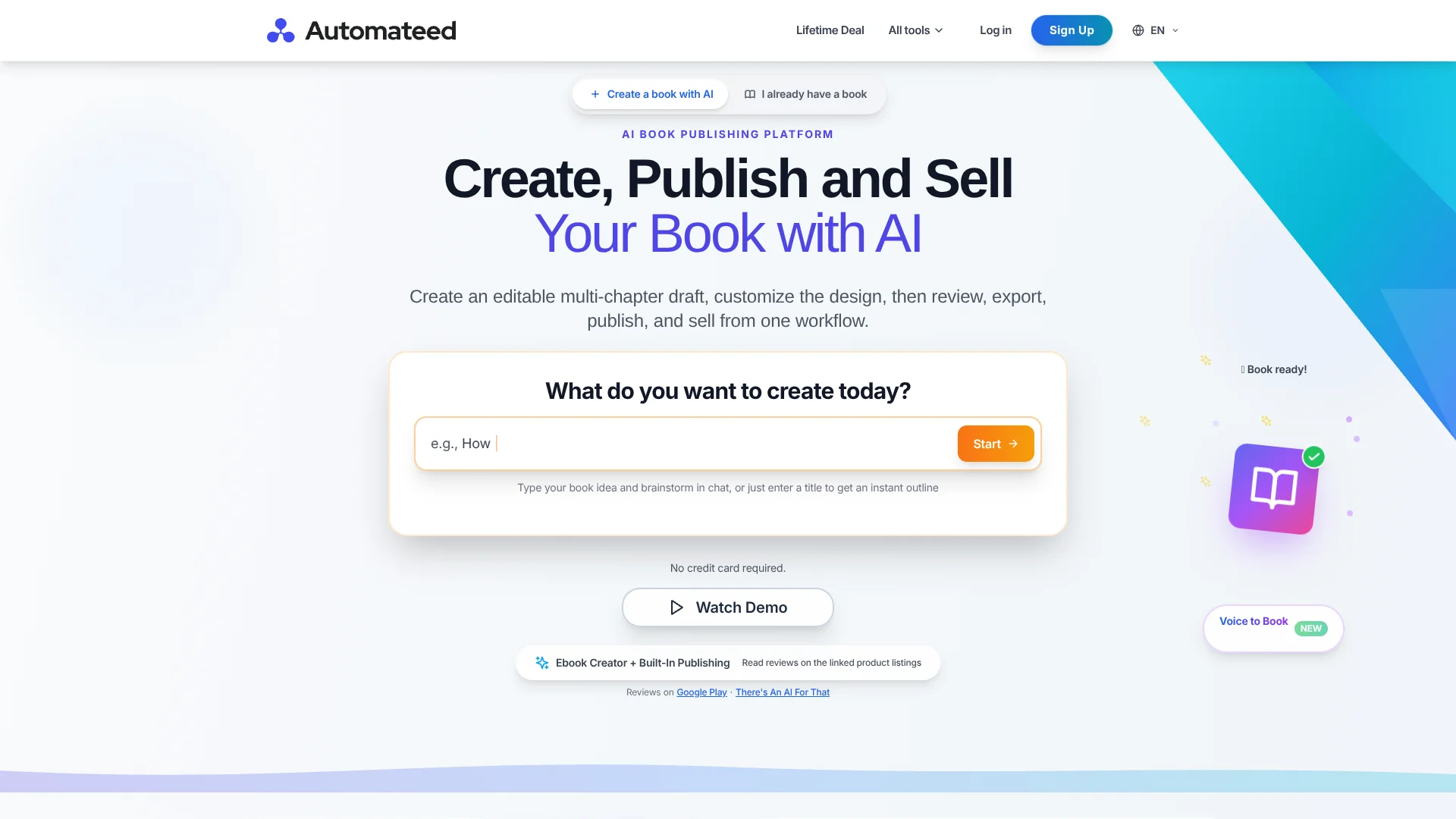
Turn your book idea into an editable draft for self-publishing.
Key Takeaways
- What it is
- Turn your book idea into an editable draft for self-publishing.
- Pricing
- Freemium · $25 per month · $50 per month · $149 one-time · $239 one-time · $299 one-time · $997 one-time
- Best for
- Format-specific book creators
- Editable AI drafts
- Cover and illustration tools
- Rating
- 3.9/5
What is Automateed?
Automateed turns a book idea or manuscript into an editable draft, illustrated pages, cover options, and exportable files. It is built for authors and self-publishers who want AI to help with planning and production while keeping control of the text. Its guided workflows also cover cookbooks, workbooks, and storybooks.
A book project can lead into other author products in the same account: Automateed can turn book content into an audiobook or course, and provide a website, sales funnel, and email broadcasts. That gives authors a path from an AI-generated draft to materials they can offer readers.
First-time authors, self-publishers, educators, and creators packaging their knowledge are likely to get the most from its format-specific workflows. The generated text still needs fact-checking and editing, and Automateed does not replace a writer’s judgment. Reach for it when book production is the bottleneck, not when you need a finished manuscript without review.
Who is Using Automateed?
Self-published authors
A guided outline, editable chapters, cover options, and export tools help move a book toward publication.
Novelists
Character and plot planning gives a long-form draft a structure to revise against.
Teachers
Workbook and storybook workflows can produce draft learning materials to check for age and lesson fit.
Course creators
Course planning and lesson drafts help turn subject knowledge into a structured learning product.
Uncommon Use Cases
A small business owner preparing a customer education guide; a blogger organizing related articles into a book
Key Features
Rating Breakdown
Pricing Plans
Free plan
Free
- Limited book preview
- No credit card required
Standard Plan
$25 per month
- 8 ebook generations per month
- Unlimited task generations
Pro Plan
$50 per month
- 30 ebook generations per month
- Unlimited task generations
Entry Lifetime
$149 one-time
- 4 ebooks, 40 images, and 100 tasks per month
- Monthly credits reset
Standard Lifetime
$239 one-time
- 8 ebooks, 80 images, and 200 tasks per month
- Monthly credits reset
Pro Lifetime
$299 one-time
- 12 ebooks, 120 images, and 300 tasks per month
- Monthly credits reset
Elite Lifetime
$997 one-time
- 100 ebooks, 1,000 images, and 10,000 tasks per month
- Monthly credits reset
Which Automateed plan should you pick?
Start with the free preview to assess the workflow, choose Standard for up to 8 monthly ebook generations, and consider Pro when you need up to 30.
Standard Plan
Good for authors who need up to 8 ebook generations per month.
Pro Plan
Good for authors producing more books, with up to 30 ebook generations per month.
Entry Lifetime
Good for a one-time purchase with a monthly allowance of 4 ebooks, 40 images, and 100 tasks.
Standard Lifetime
Good for a one-time purchase with a monthly allowance of 8 ebooks, 80 images, and 200 tasks.
Pro Lifetime
Good for a one-time purchase with a monthly allowance of 12 ebooks, 120 images, and 300 tasks.
Elite Lifetime
Good for a one-time purchase with a monthly allowance of 100 ebooks, 1,000 images, and 10,000 tasks.
Automateed Use Cases
Draft a nonfiction ebook
A topic and outline become a chapter draft that the author can edit and fact-check.
Outcome: An editable manuscript with supported PDF, EPUB, or DOCX export options.
Create an illustrated storybook
A story idea or short uploaded manuscript becomes a draft with illustrated pages.
Outcome: A reviewable storybook with a print-ready PDF export.
Prepare a cookbook
Recipe drafts and food images give an author material to test and refine before publication.
Outcome: A formatted cookbook draft for review and export.
Turn expertise into a course
Course planning and lesson drafts help organize a subject into teachable modules.
Outcome: A course draft and hosted course page after publishing.
Make an audiobook edition
Narration tools turn supported ebook projects into audio that can be offered alongside a book.
Outcome: A narrated audiobook with a downloadable MP3.
Workflow Ideas with Automateed
From idea to ebook
- 1Choose a book format and describe the intended reader and topic.
- 2Review and adjust the generated outline.
- 3Generate and edit chapters, then check the cover and layout.
- 4Export the finished project in a supported format.
Book to course
- 1Choose a subject and plan course modules.
- 2Generate lesson drafts, quizzes, or assignments.
- 3Revise the material and add a required video lesson for a paid course.
- 4Publish the course page and connect it to the book or author site.
Illustrated storybook
- 1Set the story premise and intended age band.
- 2Review the story draft and generated illustrations.
- 3Check the page layout and age suitability.
- 4Export the PDF or publish a web edition.
How Automateed fits into your stack
Book drafting and editing
Automateed supports outlining, chapter generation, and manuscript revision inside a book project. Authors remain responsible for reviewing the final text.
Book design and exports
Cover options, illustrations, layout controls, and supported PDF, EPUB, and DOCX exports help prepare a book for its next publishing step.
Publishing and sales
Authors can prepare marketplace listings and use book-related sales funnels. The site also describes publishing to KDP.
Author products
Course and audiobook tools extend a book project into related products. Live author websites require a separate hosting subscription.
Mobile access
The Automateed Android app provides mobile access to its ebook creation tools; the main creator also runs in a web browser.
Pros
- +Purpose-built book formats: Workflows account for the different structures of novels, cookbooks, and workbooks.
- +Editable output: Generated chapters remain available for revision before export.
- +Free preview: The site offers a no-card way to review a book preview before paying.
- +Author product options: Books can connect to courses, audiobooks, websites, and sales funnels.
Cons
- −Generation caps: Standard and Pro monthly plans include 8 and 30 book generations, respectively.
- −Editorial work remains: AI-generated text can be generic or inaccurate, so authors need to review it.
Limitations & when to consider alternatives
Known limitations
- Free access is a preview. The free tier is limited; full-length book generation and EPUB and DOCX exports are paid features.
- Monthly generation limits. The Standard plan includes 8 ebook generations per month, while Pro includes 30.
- Live author website hosting costs extra. Publishing an author website live uses a separate hosting subscription.
- Audiobook project support is limited. Audiobook narration is available for ebook-type projects, not illustrated storybooks.
Look elsewhere when
- You need to work offline in a desktop writing application.
- You need a classroom platform with student accounts, rosters, and assignments.
- Your project needs a finished manuscript without editorial review.
How to Use Automateed
- 1
Start with a preview
Try the free preview without a card to see how Automateed handles your topic.
- 2
Choose a book workflow
Select the format that matches the project, such as a novel, workbook, or cookbook.
- 3
Shape the outline
Review the proposed structure and revise it before generating the full draft.
- 4
Edit and check the content
Revise the chapters, add your own expertise, and verify factual claims before publication.
- 5
Review the design and export
Check the cover, images, layout, and exported file in the format your publishing destination supports.
- 6
Publish or build a related offer
Prepare a marketplace listing or continue into tools for courses, audiobooks, and author websites.
Who is Automateed For?
Authors and self-publishers
Book planning, drafting, cover design, and export tools support a project from outline to publishing files.
Digital entrepreneurs
Books, courses, and lead magnets can become products to offer an audience.
Content creators and influencers
Creators can package their expertise into books and courses readers can revisit.
Educators
Workbook, storybook, and course workflows support teaching materials that need editing before use.
Marketing agencies
The drafting and design workflow can help produce branded guides and client materials.
Frequently Asked Questions
Is there a free plan?
Yes. Automateed offers a limited free preview without a credit card; full-length generation and some export formats require a paid plan.
How much do the monthly plans cost?
Standard is $25 per month and includes 8 ebook generations. Pro is $50 per month and includes 30.
What file formats can I export?
Supported book workflows offer PDF, EPUB, and DOCX exports. Available formats depend on the project type.
Can I create books in multiple languages?
Yes. Automateed supports book creation and translation in more than 100 languages.
Can I use Automateed on a phone?
Yes. An Automateed ebook creator app is available on Google Play, and the creator also runs in a browser.
Community reviews
3 reviews from people who use Automateed.
Sign in to leave a review for Automateed.
William Bear
Diva Litzi
Miljana Kalinić
Automateed Alternatives
Looking for alternatives to Automateed? Here are similar tools in the same category: