B12
Launch client-ready websites, scheduling, and billing in minutes.
Watch B12 in Action
Key Takeaways
- What it is
- Launch client-ready websites, scheduling, and billing in minutes.
- Pricing
- Freemium · $42 per month · $1 per month
- Best for
- AI Website Generation in 60 Seconds
- Built-in Image and Logo Creation
- AI Agent for Ongoing Edits
- Rating
- 4.4/5
What is B12?
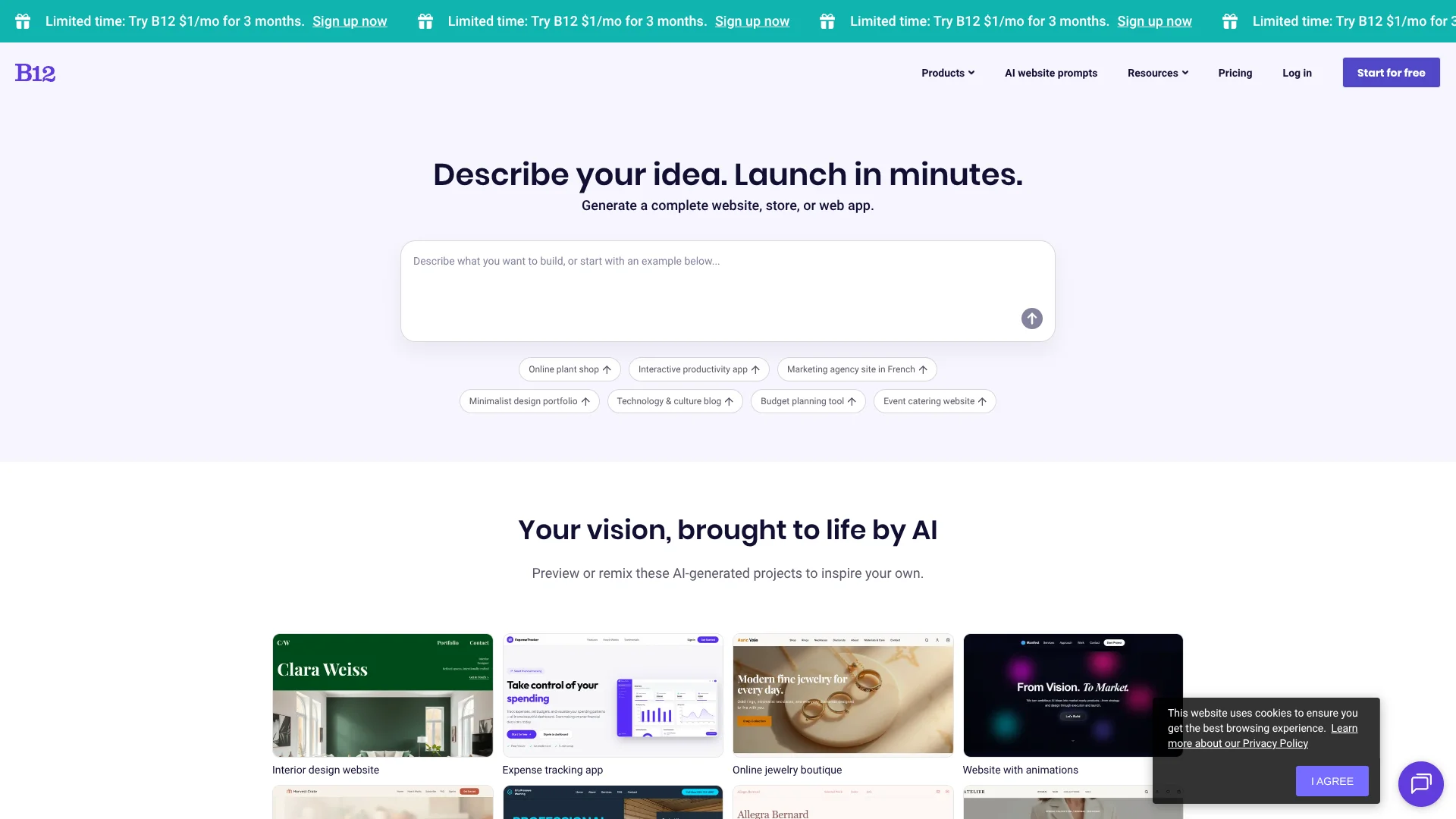
B12 is an AI-first website builder and client engagement suite that creates full websites, online stores, or simple web apps from a short text description. It targets service-based businesses that want a professional online presence plus built-in tools for intake, scheduling, billing, and email. Its AI website agents extend across popular assistants so users can go from idea to launch in minutes.
B12 stands out by tightly coupling generative AI with the full client lifecycle. Website Generator GPT in the GPT Store can build a multi-page site, complete with images, straight from a ChatGPT chat, then hand it off to B12 for editing and launch. Its AI website agents on ChatGPT, Meta AI, Claude, and Poe broaden that entry point so users can start wherever they already work. Combined with AI-powered editing and built-in scheduling, invoicing, and email, it behaves less like a simple site builder and more like an online headquarters for service businesses.
Viewed as a package, B12 offers a strong mix of AI website creation, everyday editing, and client workflow tools that suits small service businesses wanting more than a static brochure. The free plan and GPT-based starting points make experimentation easy, while paid tiers deliver operational value for firms that depend on appointments, invoices, and ongoing client communication. For teams that prefer to let AI handle the heavy lifting yet still keep control via a friendly editor, B12 is an attractive option.
Who is Using B12?
Service-based small businesses
Coaches, consultants, agencies, and local firms building conversion-focused sites with scheduling and invoicing.
Legal and professional services
Law practices, accountants, and similar firms needing polished sites that handle intake, documents, and payments.
Creative professionals
Designers, photographers, and marketing studios showcasing portfolios while automating client communication and billing.
Specialized B2B providers
Logistics, insurance, and niche service companies that want quick setup without hiring a full web team.
Uncommon Use Cases
Nonprofits spinning up donation or campaign sites quickly; educators and course creators hosting simple learning portals tied to scheduling and email.
Key Features
Rating Breakdown
Pricing Plans
Free Plan
Free
- Build and host a B12 site at no cost
- Experiment with AI website creation
- Publish on a B12-provided domain
Entry Paid Tier
$42 per month
- Annual billing or $49.00 per month on a monthly plan
- Adding custom domain support and expanded client tools
Higher Tiers
- Additional plans increase limits and functionality for email marketing
- Scheduling
- Support
- Exact pricing and names vary by current offer
Promotional Offer
$1 per month
- 3 months for new signups
Which B12 plan should you pick?
Start with Free to test B12 and launch on a subdomain; upgrade to Website for a custom domain and business features, or Website + Client Engagement for marketing and client-management tools.
Free
Good for individuals and businesses testing the builder or launching a basic site on a B12 subdomain.
Website
Good for businesses needing a custom domain, more AI credits, analytics, integrations, commerce, and ad removal.
Website + Client Engagement
Good for service businesses needing client intake, email marketing, contact management, contracts, eSignatures, and advanced team management.
B12 Use Cases
Create a business website
Describe the business, audience, services, and preferred style; B12 generates pages, copy, layout, and features.
Outcome: A launch-ready business website.
Launch an online store
Generate product pages, checkout, cart functionality, payments, and invoicing.
Outcome: A functioning ecommerce website.
Build a web app
Describe an app such as a calculator, tracker, or generator; B12 can add logins, dashboards, and databases.
Outcome: A working web application.
Create a multilingual website
Generate content in another language or add third-party translation tools such as Weglot or ConveyThis.
Outcome: A website accessible to visitors in multiple languages.
Build a lead-generation tool
Ask B12 to create an interactive calculator or quote generator with lead capture.
Outcome: An interactive business tool that collects prospects.
Workflow Ideas with B12
Generate and launch a website
- 1Describe the business, audience, goals, and preferred design
- 2Review and refine the AI-generated draft with chat or Visual Edit
- 3Preview the site, connect a domain, and publish
Turn source documents into a site page
- 1Upload a PDF, TXT, image, or CSV file to the AI Agent
- 2Tell the agent how to use the uploaded content
- 3Review the generated page and publish approved changes
Route form submissions to external tools
- 1Create a form endpoint or webhook in a service such as Zapier, Make, or n8n
- 2Provide the endpoint to B12’s AI Agent
- 3Submit a test entry and verify the external workflow runs
How B12 fits into your stack
Browser
B12 is primarily a browser-based website, store, and web-app builder. Users generate sites with prompts, edit visually, modify code, and publish from the web editor.
Docs and writing
The AI Agent generates and revises website copy, blog content, pages, and business materials from natural-language instructions. Users can also upload documents for the agent to read and reuse.
Knowledge and files
B12 accepts images, PDFs, text files, CSVs, audio, video, and code files as inputs for website generation and editing.
Automation and APIs
B12 supports embedded tools, webhooks, API keys, backends, scheduled AI Agent tasks, and integrations such as Stripe, Google Calendar, Google Tag Manager, Weglot, and WhatsApp.
Pros
- +Fast idea-to-site flow: AI agents on ChatGPT, Meta AI, Claude, and Poe make it extremely quick to get a tailored draft. (b12.io)
- +Business-ready toolkit: Website, CRM-like contact hub, scheduling, billing, and email sit together, which cuts down on separate subscriptions. (b12.io)
- +Easy editing experience: Non-technical users can update copy and design through the AI Agent or a familiar no-code editor; experts are available if needed. (b12.io)
- +Strong small-business focus: Features and templates suit lawyers, consultants, agencies, and other service providers that sell time and expertise rather than large catalogs. (b12.io)
Cons
- −Pricing for higher tiers: Past the free plan, entry paid plans start around $42.00 per month with annual billing or $49.00 per month monthly, which may feel steep for hobby projects. (b12.io)
- −Less suited to complex ecommerce: B12 supports taking payments and invoices but is not aimed at high-volume retail stores that need advanced ecommerce features. (b12.io)
- −Feature depth can overwhelm: The mix of AI, marketing tools, and client workflows may be more than very simple brochure sites require.
Limitations & when to consider alternatives
Known limitations
- B12 websites cannot be hosted elsewhere. B12 says other hosting platforms cannot use its website code because the sites are built for B12’s AI-integrated platform.
- PDF uploads are limited. The AI Agent supports PDFs up to 20 pages; longer PDFs may not be fully read.
- Upload size is capped. The maximum file size for AI Agent uploads is 75 MB.
- Mobile editing has feature limitations. Some image-editing features are unavailable when using B12 on mobile.
- Native translation is not included. B12 does not offer native translation features; multilingual sites require manual translation or third-party tools.
Look elsewhere when
- You need an exportable website that can move to another host.
- You need a native mobile app instead of mobile-browser access.
- You need built-in website translation without third-party tools.
- You need model fine-tuning or custom training.
How to Use B12
- 1
Describe your website
Enter your business name, services, audience, goals, and preferred style so B12 can generate an initial draft.
- 2
Refine with the AI Agent
Ask for structural changes such as new pages, rewritten copy, layout changes, or color updates.
- 3
Use Visual Edit for targeted changes
Click headings, images, buttons, or sections to adjust their settings directly.
- 4
Edit code when necessary
Open the code editor to make precise HTML and CSS changes to individual elements or the whole site.
- 5
Add functionality
Use B12’s built-in commerce, forms, backends, scheduling, marketing, or third-party integrations.
- 6
Preview and publish
Review the staging version, connect a custom domain if needed, and publish the approved site.
Who is B12 For?
Small businesses
B12 provides AI-generated websites and built-in tools for scheduling, payments, forms, marketing, and client management.
Startups
Startups can generate a website, online store, web app, or business tool from a single prompt.
Nonprofits
B12 explicitly lists nonprofits among the organizations its AI website builder supports.
Agencies
Agencies can create and manage client websites, invite team members, and use advanced team management.
Professional service firms
B12 offers websites and ongoing support tailored to professional services such as law, insurance, and consulting.
Frequently Asked Questions
What is B12?
B12 is an AI website builder that creates websites, online stores, web apps, portfolios, blogs, and business tools from plain-language prompts.
Is B12 free to try?
Yes. The Free plan lets users generate and edit a website on a B12 subdomain without a credit card.
Can B12 build an online store or web app?
Yes. B12 can create online stores with checkout and web apps with logins and databases.
Can I use my own domain?
Yes. Paid plans support custom domains, with the domain free for the first year.
Can I get human help?
Yes. B12 offers designers, copywriters, and SEO specialists through its Expert Marketplace and service plans.
How quickly does B12 generate a website?
B12 says the first website draft can be generated in about two minutes.
Community reviews
1 review from people who use B12.
Sign in to leave a review for B12.
Thibault BM
B12 Alternatives
Looking for alternatives to B12? Here are similar tools in the same category:
Learn to Master B12
With Skill Leap courses
Get in-depth training on B12 and 50+ other AI tools with our expert-led video courses.
Start 7-Day Free Trial