
CGDream
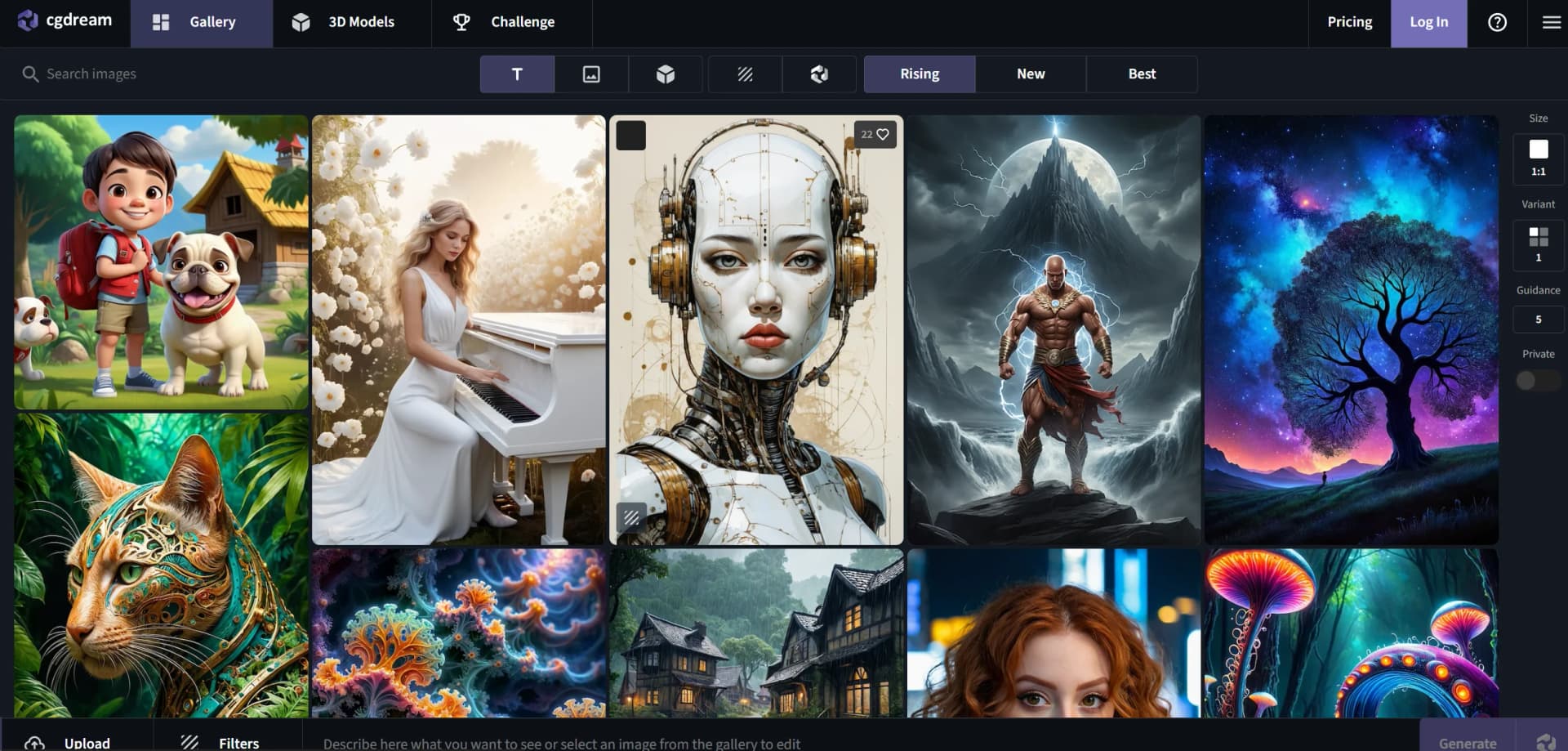
Transform ideas into visuals with AI-driven image and 3D model generation.
Watch CGDream in Action
Key Takeaways
- What it is
- Transform ideas into visuals with AI-driven image and 3D model generation.
- Pricing
- Freemium · $10 per month
- Best for
- Text-to-Image Generation
- Image-to-Image Transformation
- 3D-to-Image
- Rating
- 4.6/5
What is CGDream?
CGDream is an AI-driven image generator designed to transform your ideas into visual realities. This tool caters to creative professionals, digital artists, and anyone interested in visual design, allowing them to create detailed images directly from text prompts or existing images. With its intuitive interface and powerful rendering capabilities, CGDream simplifies the process of image creation, making it accessible to both novices and professionals looking to streamline their design workflows.
CGDream stands out in the crowded field of AI image generators with its unique ability to integrate 3D models into the image generation process. This feature not only enhances the visual depth and realism of the images created but also provides users with a powerful tool to visualize complex scenes and objects effortlessly.
- Discord Community: Join the CGDream Discord community to share results, discuss techniques, and connect with fellow users.
CGDream excels in transforming creative concepts into visual realities, making it an indispensable tool for designers, artists, and digital professionals. Its standout features, including the integration of 3D models, a vast array of custom filters, and AI-assisted prompt improvement, offer users an unmatched advantage in digital image creation. With a free version available and an active community, CGDream caters to a wide range of users, from hobbyists to professionals.
Who is Using CGDream?
Graphic Designers
Utilizing the tool for creating complex designs and visual content.
Digital Artists
Employing CGDream to bring artistic concepts to life effortlessly.
Game Developers
Leveraging the tool for generating textures and environments for games.
Marketing Professionals
Using CGDream to create compelling visuals for campaigns and presentations.
Uncommon Use Cases
Academic researchers use CGDream for visual data representation; hobbyists use it to enhance personal digital art projects.
Key Features
Rating Breakdown
Pricing Plans
Free Tier
Free
- Get started with CGDream with a basic feature set at no cost
Pro Tier
$10 per month
Which CGDream plan should you pick?
Start with the Free plan for experimentation; upgrade to Basic, Pro, or Premium when you need more credits, privacy, concurrent generations, priority, or commercial use.
Free
Good for users testing image generation with 100 daily credits and basic access.
Basic
Good for users who need 10,000 monthly credits, private mode, commercial use, and three concurrent generations.
Pro
Good for heavier users who need 40,000 monthly credits and four concurrent generations.
Premium
Good for high-volume users who need 90,000 monthly credits and five concurrent generations.
CGDream Use Cases
Create images from 3D models
Upload or select a 3D model, control composition and perspective, then generate an image.
Outcome: A visual render guided by the model's structure.
Convert images into 3D models
Upload a clear JPG or PNG image and configure mesh, materials, polygon count, quality, and export format.
Outcome: A downloadable 3D model.
Edit and enhance photos
Upload an image, describe changes, apply filters or inpainting, and upscale the result.
Outcome: A modified, enhanced, or higher-resolution image.
Generate architecture and building concepts
Enter a detailed prompt and optionally use style, structure, image, character, or 3D references.
Outcome: Detailed architectural or building concept visuals.
Create game visual assets
Generate game characters, battle maps, worlds, or environments using prompts and visual controls.
Outcome: Custom visuals for gaming and creative projects.
Workflow Ideas with CGDream
Generate a 3D-guided visual
- 1Upload or select a 3D model
- 2Write a prompt and choose filters or a base model
- 3Generate, review, refine, and download the image
Turn a photo into a 3D model
- 1Upload a clear JPG or PNG image
- 2Choose mesh, materials, polygon count, quality, and format
- 3Generate, preview, refine, and download the model
Edit and upscale an image
- 1Upload the image and describe the desired change
- 2Apply filters, inpainting, or other editing controls
- 3Review the result and use upscaling before downloading
How CGDream fits into your stack
Multiple Input Formats
Accepts various file types for images and 3D models, ensuring flexibility.
Private Mode
Ensures that sensitive designs remain confidential with a toggle privacy feature.
Pros
- +Enhanced Creativity: Allows users to explore limitless creative possibilities without the need for extensive technical skills.
- +Time-Saving: Reduces the time spent on creating and editing images manually.
- +Flexibility: Supports various input methods including text, images, and 3D models.
- +User-Friendly Interface: Designed with straightforward navigation and easy-to-use features.
- +FREE Version Available: Get started with CGDream with a basic feature set at no cost.
Cons
- −Limited Free Version: Some advanced features are restricted to premium users.
- −Possible Queue for Free Version Users: During high traffic periods, free users may experience longer wait times.
Limitations & when to consider alternatives
Known limitations
- CGDream is being retired. The standalone service is scheduled to become unavailable after October 3, 2026.
- Existing files do not transfer automatically. Users must download their generation library before the shutdown date.
- Free images are publicly visible. Free-plan images are publicly visible; private visibility is a premium feature.
- Free users have daily credit limits. Free users receive 100 daily credits and cannot generate after those credits are exhausted until replenishment.
- 3D rendering format compatibility is limited. The 3D rendering tool is not compatible with every 3D software format; standard formats such as FBX or GLB are supported.
Look elsewhere when
- You need a continuing standalone service after October 3, 2026.
- Your existing library must transfer automatically.
- You need commercial use on the free plan.
- You need every 3D software format supported.
How to Use CGDream
- 1
Choose a generation source
Start with text, an uploaded image, or a 3D model depending on the visual you want to create.
- 2
Add guidance
Write a prompt and optionally add LoRA styles, image-to-image, structure, character, or 3D references.
- 3
Select the model and settings
Choose a base model such as Flux Dev, Flux Pro, or Stable Diffusion, then set variations and aspect ratio.
- 4
Generate or use DreamUp
Press Generate for a prompt-led result, or use DreamUp to expand or create a prompt when you need inspiration.
- 5
Refine the output
Use filters, inpainting, cropping, resizing, or upscaling to adjust the image.
- 6
Preview and download
Review the result, make final adjustments, and download the finished image or 3D model.
Who is CGDream For?
Designers
CGDream provides customizable visual generation, filters, image editing, and 3D-model-guided composition.
Architects
Architects can generate architecture and building visuals from text, images, and 3D models.
Game developers
Game developers can create game characters, environments, battle maps, and other visual assets from text or 3D references.
Product designers
Product designers can explore product variations, materials, colors, and shapes using 3D-guided generation.
Students
CGDream identifies students among the audiences served by its plans and positions the tool as requiring no prior 3D-modeling experience.
Frequently Asked Questions
What's happening to CGDream?
CGDream is being retired as a standalone product, and its image-generation features are moving into CGTrader AI.
When will CGDream no longer be available?
Users can continue using CGDream and download their library until October 3, 2026.
Can I create images for free?
Yes. Free users receive 100 daily credits, although private mode, commercial use, concurrent jobs, and high-priority generation require premium access.
What happens if I run out of credits?
Free users must wait for daily credits to replenish or upgrade; premium users can continue in slow-generation mode.
Will existing generations move automatically to CGTrader AI?
No. Files will not transfer automatically, so users should download their library before October 3, 2026.
How do I download past generations?
Generations can be downloaded as ZIP files from the dedicated download page until October 3, 2026.
Community reviews
Be the first to share your experience.
Sign in to leave a review for CGDream.
CGDream Alternatives
Looking for alternatives to CGDream? Here are similar tools in the same category:
Learn to Master CGDream
With Skill Leap courses
Get in-depth training on CGDream and 50+ other AI tools with our expert-led video courses.
Start 7-Day Free Trial