Coool AI
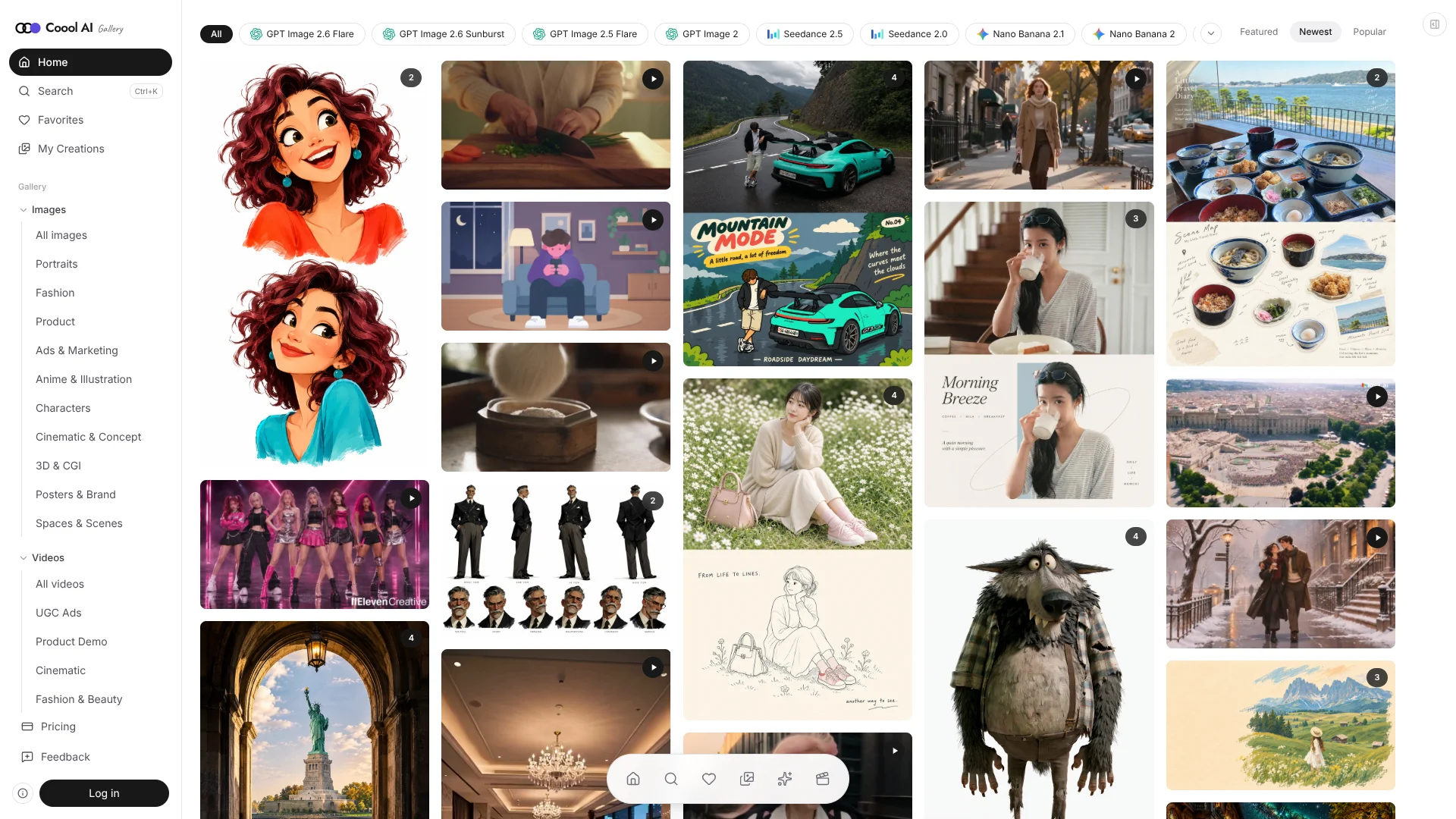
Visual creators find image and video prompts beside the results they produce.
Key Takeaways
- What it is
- Visual creators find image and video prompts beside the results they produce.
- Pricing
- Freemium · $9.90 per month · $23.90 per month · $79.90 per month
- Best for
- Prompt and result gallery
- Searchable prompt collections
- Image and video generation
- Rating
- 4.0/5
What is Coool AI?
Coool AI pairs finished AI-generated images and videos with the prompts behind them, so visual creators can see what a prompt produced before adapting it. Its searchable galleries organize examples by model and creative goal, and the Generate area lets you turn a revised prompt into new images or videos using credits. This helps shorten the trip from finding a visual direction to testing your own version.
A finished result sits alongside its reusable prompt, so you can judge the visual direction before copying or changing the brief. Coool AI then connects those examples to its own image and video generators, where you can choose from supported models and review the credit cost before generating.
It fits creators who want practical examples for product visuals, ads, and other image or video projects, especially when they are still learning how to write prompts. Results vary by model, and subscription credits do not roll over, so it is less suited to people who need predictable output or infrequent generation without watching their credit balance.
Who is Using Coool AI?
Social media creators
UGC ad and lifestyle examples help them shape a visual concept before generating campaign assets.
Product marketers
Product-demo prompts and image examples give them starting points for promotional visuals.
AI image creators
Model-specific prompt collections help them compare visual approaches and adapt a proven-looking brief.
Video creators
Finished clips and video prompts offer examples of motion, camera work, and style to adapt.
Uncommon Use Cases
Compare how different AI models interpret the same visual direction; collect prompt examples for a recurring brand look.
Key Features
Rating Breakdown
Pricing Plans
Free
Free
- 20 trial credits on signup
- Image generation only, up to 2K resolution
- One generation at a time; personal use
Starter
$9.90 per month
- 500 credits per billing period
- Annual billing: $6.90 per month, billed $82.80 yearly
- Image and video generation, commercial use, and up to two concurrent generations
Pro
$23.90 per month
- 1,200 credits per billing period
- Annual billing: $13.90 per month, billed $166.80 yearly
- Up to 8K resolution and four concurrent generations
Max
$79.90 per month
- 4,000 credits per billing period
- Annual billing: $39.90 per month, billed $478.80 yearly
- Priority support, priority queue during busy hours, and up to six concurrent generations
Which Coool AI plan should you pick?
Start with Free to browse prompts and try image generation; choose a paid plan when you need video, commercial use, higher resolution, or more concurrent generations.
Free
Good for exploring public prompt examples and trying personal image generation.
Starter
Good for creators who need image and video generation, commercial use, and link-shared boards.
Pro
Good for heavier generation needs, up to four concurrent generations, and up to 8K resolution.
Max
Good for higher monthly credit needs, up to six concurrent generations, priority support, and a priority queue during busy hours.
Coool AI Use Cases
Develop a product visual
A marketer can start from a finished product image, adapt its prompt, and generate a version for a specific campaign.
Outcome: A new product image generated from a prompt the user has tailored.
Plan a short video ad
Video prompt examples show possible scenes, movement, and camera direction before the creator writes a brief.
Outcome: A reusable prompt direction for a video generation.
Explore a visual style
Model and category galleries make it easier to compare examples before settling on a direction.
Outcome: A selected visual reference and an adapted prompt.
Edit with reference images
Supported image workflows let creators provide references and explain which details should change or remain.
Outcome: An AI-edited image guided by the supplied references and prompt.
Workflow Ideas with Coool AI
From prompt example to campaign image
- 1Browse the image gallery for a result close to the campaign direction.
- 2Copy the prompt and replace its subject, layout, or wording with campaign details.
- 3Choose a model and settings in Generate, check the credit cost, and submit.
Build a video concept
- 1Browse video examples by creative category or model.
- 2Adapt the prompt to describe the subject, action, and camera movement.
- 3Choose a video model and settings, then review the credit cost before generating.
Refine an existing image
- 1Open a supported image-editing workflow.
- 2Add reference images and identify what should change and what should stay.
- 3Review the displayed credit cost and generate an edit.
How Coool AI fits into your stack
Web galleries
Coool AI runs as a website where you can search image and video examples by category or model.
Prompt research
Each gallery example pairs a finished visual with its prompt, making the site useful for comparing and adapting visual directions.
Image and video creation
The Generate area turns adapted prompts into new visuals using selected models and credit-based generation.
Boards
Boards keep creations together, and paid plans allow link sharing for a board.
Pros
- +Examples you can inspect: Finished visuals help you judge a prompt before spending credits to try your own version.
- +Free prompt browsing: Public examples can be browsed and copied without using generation credits.
- +Multiple visual models: Paid plans include access to the image and video models available in Coool AI.
- +Failed-run refunds: Credits are automatically returned for failed, timed-out, or safety-blocked generations.
Cons
- −Credits require attention: Different models and settings can have different costs, so generation totals can be hard to predict.
- −Limited free generation: The Free plan allows image generation only, with one generation at a time and up to 2K resolution.
Limitations & when to consider alternatives
Known limitations
- Free plan is image-only. The Free plan does not include video generation and limits image output to up to 2K resolution.
- Subscription credits expire each period. Unused subscription credits reset at the next billing period instead of rolling over; one-time credits do not expire.
- Successful results are not refunded for subjective dissatisfaction. Credit refunds apply to failed, timed-out, or safety-blocked generations, not successful results a user dislikes.
- Generation results vary. The site notes that results differ by model, and a copied prompt does not guarantee the same output.
Look elsewhere when
- You need a native mobile app or desktop installer.
- You need a documented developer API or automated generation workflow.
- Your team needs shared editing with named users and workspace roles.
- You need image or video results that reproduce a prompt exactly.
How to Use Coool AI
- 1
Find a visual example
Browse the image or video gallery by category or model to find a result that fits your project.
- 2
Adapt its prompt
Copy the example and change its subject, setting, style, or other details to match your brief.
- 3
Choose a generator
Open Generate and select an available image or video model that fits the result you want.
- 4
Add references when editing
For supported image edits, attach reference images and explain which details to change or preserve.
- 5
Check credits before submitting
Review the displayed cost for the selected model and settings before starting a generation.
- 6
Save or share a board
Keep related work on a board; paid plans include the option to share boards with a link.
Who is Coool AI For?
AI visual creators
Prompt examples paired with finished images and videos offer a practical starting point for new visual ideas.
Commercial creators
Starter and higher plans include commercial use for generated images and videos.
Marketing creatives
Collections for UGC ads, product demos, and brand commercials support campaign concept work.
Image and video makers
The galleries and generators cover both still images and video, with examples grouped by model and subject.
Frequently Asked Questions
Does Coool AI have a free plan?
Yes. The Free plan includes 20 trial credits, image generation only, one generation at a time, and up to 2K resolution. It also lets you browse and remix public prompts.
Can I generate videos on the Free plan?
No. Video generation is included in Starter, Pro, and Max, while Free is limited to image generation.
Do unused credits roll over?
Subscription credits reset each billing period and do not roll over. Credits from one-time packs do not expire.
Can I use generated work commercially?
Commercial use is included with Starter, Pro, and Max. The Free plan is for personal use.
Does Coool AI use my content to train its own models?
Coool AI says it does not use personal data or user content to train its own AI models. It sends inputs needed for a generation to third-party model providers to process the request.
Community reviews
Be the first to share your experience.
Sign in to leave a review for Coool AI.
Coool AI Alternatives
Looking for alternatives to Coool AI? Here are similar tools in the same category: