
Dashworks
Centralize enterprise knowledge with AI-powered, secure, and easily integrated answers.
Watch Dashworks in Action
Key Takeaways
- What it is
- Centralize enterprise knowledge with AI-powered, secure, and easily integrated answers.
- Pricing
- $12 per seat per month; $10 per seat per month · $15 per seat per month; $12 per seat per month
- Best for
- Precise AI Answers
- Comprehensive Integrations
- Secure and Private by Design
- Rating
- 4.4/5
What is Dashworks?
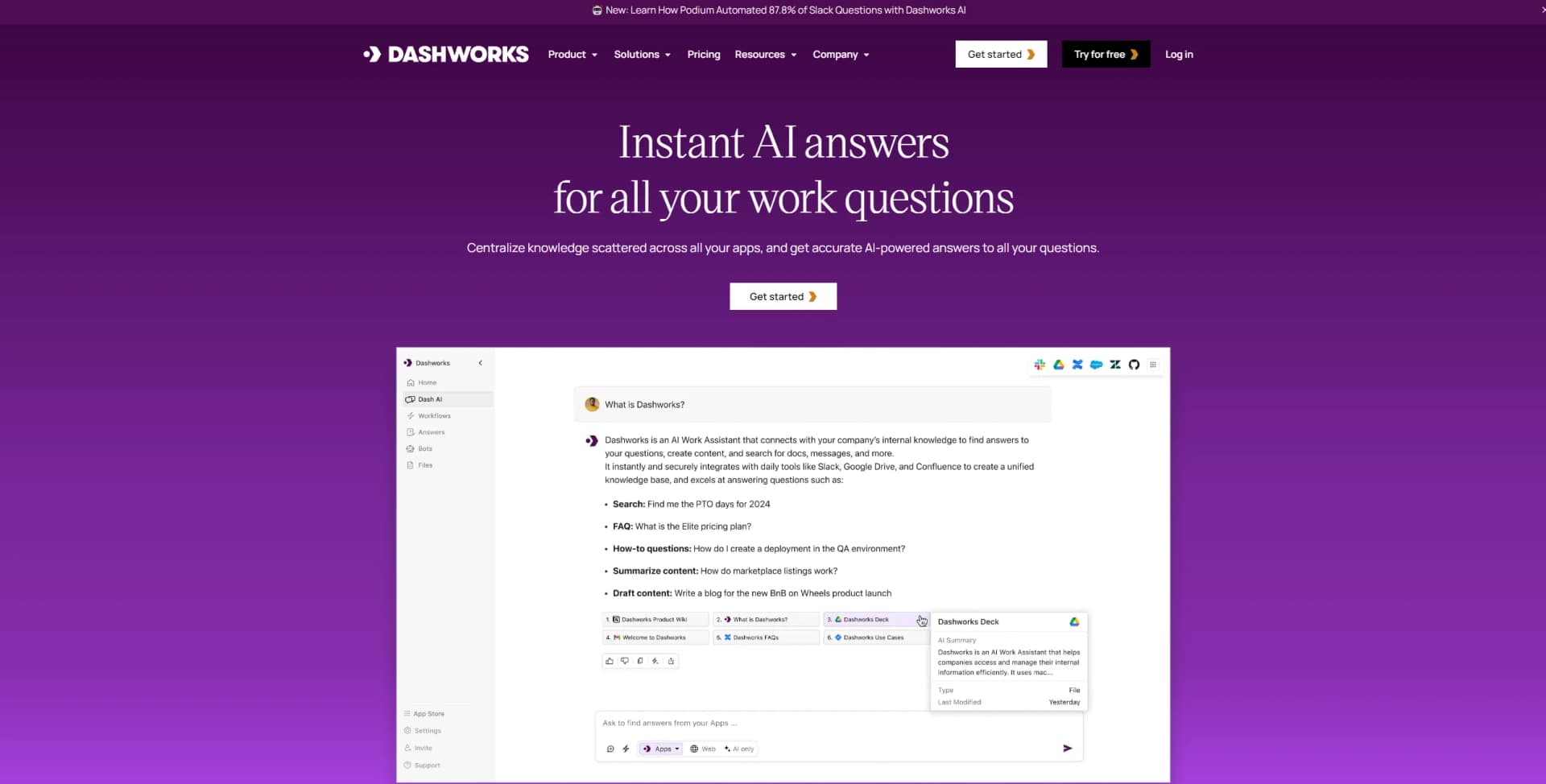
In my quest to find the most innovative and effective AI tools for our readers, I recently explored Dashworks, an AI Knowledge Assistant designed specifically for enterprises. Its core purpose is to centralize knowledge scattered across various apps, providing accurate, AI-powered answers to a wide array of work-related questions. What makes Dashworks particularly intriguing is its promise of delivering precise answers with citations, leveraging generative AI tailored for enterprise knowledge discovery. This tool is not just about organizing information; it's about transforming the way teams access and utilize knowledge within their organizations.
While Dashworks is a powerful tool, there are a few considerations to keep in mind:
- Learning Curve: Some users may require time to fully leverage its advanced features and integrations.
- Dependence on Integrations: The tool's effectiveness is somewhat reliant on the breadth and depth of its integrations.
Dashworks sets itself apart with its precision in providing AI-powered answers, comprehensive integrations, and a strong focus on privacy and security. Its ability to deliver immediate value with minimal setup time and operate securely without relying on data indexing makes it a standout choice for enterprises concerned with data privacy.
Dashworks emerges as a pivotal tool for enterprises aiming to streamline their access to and management of knowledge. Its blend of precision, security, and integration capabilities positions it as a highly valuable asset for organizations looking to enhance their productivity and decision-making processes. Whether it's for engineering, sales, customer success, or marketing, Dashworks offers a compelling solution to the challenge of knowledge fragmentation. Its unique approach to AI-powered knowledge assistance, coupled with robust security measures and ease of integration, makes it an essential tool for modern enterprises.
Who is Using Dashworks?
Engineering Teams
For resolving bugs, understanding codebases, and crafting technical documentation.
Customer Success Representatives
To reduce resolution times and improve customer satisfaction.
Sales Professionals
For accessing customer insights, crafting tailored pitches, and closing deals with confidence.
Marketing Teams
To produce compelling content and gather insights while ensuring brand consistency.
Uncommon Use Cases
It's also finding its place in unconventional sectors, such as educational institutions for research purposes and startups for streamlining operations.
Key Features
Rating Breakdown
Pricing Plans
Team Plan
$12 per seat per month; $10 per seat per month
- No seat minimums
- Unlimited usage
- Core integrations
- File uploads
- Slackbot
- Workflows
- Browser extension
- Shared topics
Business Plan
$15 per seat per month; $12 per seat per month
- Minimum 10 seats
- Everything under Team Plan
- Custom bots
- Choose between top LLMs
- Org-wide integrations
- AI customization
- Multiple accounts for integrations
- Priority support
Enterprise Plan
- Everything under Business Plan
- SSO and SCIM
- API Access Add-On
- Custom data retention
- Analytics and insights
- HRIS integrations
- Prioritized new integration requests
Which Dashworks plan should you pick?
The historical pricing page lists Team as the starting plan and Business or Enterprise for expanded customization and administration, but the standalone service has since been sunset.
Team Plan
Good for teams who need core integrations, file uploads, Slackbot, workflows, shared topics, and the browser extension.
Business Plan
Good for organizations that need custom bots, multiple LLM choices, organization-wide integrations, AI customization, multiple integration accounts, and priority support.
Enterprise Plan
Good for larger organizations needing SSO, SCIM, API access, custom retention, analytics, HRIS integrations, and prioritized integration requests.
Dashworks Use Cases
Answer workplace questions
Ask natural-language questions over connected company applications, files, documents, and conversations.
Outcome: Faster access to company knowledge with cited source links.
Draft support replies
Use information from Salesforce, Intercom, Zendesk, Gmail, or Outlook to prepare customer-support responses.
Outcome: More efficient support-ticket handling.
Review and generate code
Search repositories, review code snippets, debug errors, write SQL queries, and generate boilerplate code.
Outcome: Faster engineering research and repetitive development work.
Onboard new employees
Let new hires ask questions about company strategy, projects, tools, policies, and responsibilities.
Outcome: Quicker access to organizational knowledge.
Conduct competitive analysis
Search internal and external sources to compare competitors, products, strengths, weaknesses, and feature gaps.
Outcome: More comprehensive product and market research.
Workflow Ideas with Dashworks
Draft a support-ticket reply
- 1Open Dashworks in the Chrome side panel
- 2Search connected Salesforce, Intercom, or Zendesk information
- 3Draft a response using the retrieved context
Investigate an engineering issue
- 1Describe the error or deployment problem
- 2Search GitHub, internal documentation, Slack, and related sources
- 3Review suggested causes and possible solutions
Create a product-documentation draft
- 1Provide the documentation task and relevant context
- 2Specify the desired format and response style
- 3Use connected product and project sources to generate the draft
How Dashworks fits into your stack
Major Productivity Suites
Google Workspace, Microsoft Office 365.
Communication Platforms
Slack, Microsoft Teams.
Project Management Tools
Asana, Trello.
CRM Systems
Salesforce, Zoho CRM.
And many more
Including GitHub, GitLab, and Notion, ensuring that it fits seamlessly into most technological ecosystems.
Dashworks impresses with its wide range of compatibilities and integrations, including but not limited to:
Pros
- +Multilingual support
- +File uploads up to 1 GB
- +Chrome browser extension
- +Many named work-app integrations
- +Documented API access
Cons
- −No free plan; only a 14-day free trial
- −Business Plan requires a minimum of 10 seats
- −Enterprise pricing requires contacting Dashworks
Limitations & when to consider alternatives
Known limitations
- Standalone service sunset. The official help center states that Dashworks was acquired by HubSpot and the standalone service was sunset, with logins disabled on July 16, 2025.
- No new standalone sign-ups. The migration page states that new sign-ups for the Dashworks web application and Slackbot stopped on April 16, 2025.
- Connected-app file size limit. Files from connected applications such as Google Drive and OneDrive are limited to 10 MB, while direct Files-tab uploads can be up to 1 GB.
- Some integrations have limited search coverage. Certain connectors provide limited sync or search only specific fields; for example, Coda searches document titles but not document content.
- File administration is restricted. All workspace members can see uploaded files, but only administrators can upload or delete them.
Look elsewhere when
- You need an actively maintained standalone Dashworks service.
- You need a currently available Dashworks developer API.
- You need a native mobile application.
- You need automated multi-step actions across external tools.
How to Use Dashworks
- 1
For those looking to dive deeper into Dashworks, there's a wealth of resources available, from comprehensive tutorial series on YouTube to detailed guides and customer stories on their website. These resources are designed to help users maximize the tool's potential.
Who is Dashworks For?
Sales teams
Sales users can search customer, product, competitive, and pricing information across connected workplace systems.
Customer support teams
Support teams can find ticket, documentation, and product information and draft replies using connected support applications.
Engineering teams
Engineering teams can search codebases and documentation, debug issues, review code, write SQL, and generate scripts.
Product management teams
Product managers can research projects, conduct competitive analysis, draft documentation, and onboard team members.
Frequently Asked Questions
What is Dashworks?
Dashworks is an AI workplace assistant that connects to company apps and knowledge sources to answer questions, create content, and search internal information.
Which applications can Dashworks connect to?
Dashworks connects with numerous workplace applications, including Slack, Google Drive, Salesforce, Jira, GitHub, Notion, Zendesk, and many others.
Can Dashworks search uploaded files?
Yes. Administrators can upload files from the Files tab, and workspace members can access them in search results.
Does Dashworks support single sign-on?
Yes. Supported providers include Google, Microsoft Azure, and Okta.
How does Dashworks handle permissions?
Dashworks mirrors access-control permissions from connected applications so users only see information they are authorized to access.
Is Dashworks still available as a standalone service?
The official help center states that the standalone Dashworks service was sunset after its acquisition by HubSpot, with logins disabled on July 16, 2025.
Community reviews
Be the first to share your experience.
Sign in to leave a review for Dashworks.
Dashworks Alternatives
Looking for alternatives to Dashworks? Here are similar tools in the same category:
Learn to Master Dashworks
With Skill Leap courses
Get in-depth training on Dashworks and 50+ other AI tools with our expert-led video courses.
Start 7-Day Free Trial