
DetectGPT
Detect, certify, and humanize text for authenticity.
Key Takeaways
- What it is
- Detect, certify, and humanize text for authenticity.
- Pricing
- $15 per month · $29 per month · $59 per month
- Best for
- AI Text Detection Across Models
- Original Content Certification
- Plagiarism, Fact Check, and Readability
- Rating
- 4.4/5
What is DetectGPT?
DetectGPT is an AI detector and AI humanizer focused on telling human writing apart from text generated by large language models such as ChatGPT, GPT‑4, Gemini, Claude, and others. It analyzes text for AI‑like patterns, plagiarism, factual accuracy, and readability, while also offering tools to rewrite AI content so it appears human written. The product targets educators, students, writers, and organizations that care about content authenticity, but also those who need to reduce the chance of being flagged by AI detectors.
DetectGPT originated from academic work on detecting AI text by comparing how likely the original text is under a model versus perturbed versions. That research‑driven approach gives the detector a more principled signal than keyword heuristics alone. The combination of serious detection tools, shareable authenticity certificates, and an aggressive AI humanizer in one product is quite unusual. It effectively serves both sides of the authenticity story: those who want to catch AI text and those who want AI drafts to pass as human, which is exactly where many of today’s content battles are happening.
DetectGPT gives schools, writers, and businesses a technically grounded way to test whether content looks AI‑generated, while also catering to users who want AI drafts to survive detector scrutiny. Its mix of probabilistic detection methods, detailed reporting, certificates, and API access makes it appealing for serious authenticity workflows. At the same time, the presence of a powerful AI humanizer means organizations should set clear policies around how and when it is acceptable to use, especially in academic or hiring scenarios. For teams that need both detection and transformation of AI content in a single, AI‑centric tool, it is a strong contender worth evaluating.
Who is Using DetectGPT?
Educators and Academic Institutions
Checking essays and assignments for AI use, plagiarism, and readability while documenting results via PDF reports.
Students and Researchers
Verifying originality before submission and stress‑testing drafts against AI detection policies.
Content Writers and SEO Agencies
Auditing blog posts, landing pages, and client copy for originality, then issuing authenticity certificates.
Businesses and HR Teams
Screening reports, applications, and test assignments for AI‑generated sections.
Uncommon Use Cases
Used by compliance teams to document authorship trails for regulated communications; adopted by AI tool builders who embed the API as a content‑moderation layer.
Key Features
Rating Breakdown
Pricing Plans
Essential
$15 per month
- 50,000 words per month, 1 user seat, premium AI detection models, batch file detection (10 files), PDF report generation, AI Content Humanizer, and plagiarism checker
Pro
$29 per month
- 250,000 words per month, 3 team members, premium AI detection models, batch file detection (20 files), PDF report generation, AI Content Humanizer, and plagiarism checker
- Free trial available
Team
$59 per month
- 500,000 words per month, unlimited team members, premium AI detection models, batch file detection (50 files), PDF report generation, AI Content Humanizer, and plagiarism checker
Which DetectGPT plan should you pick?
Start with Essential for individual use, move to Pro for small teams, and upgrade to Team for organizations needing unlimited members and higher volume.
Essential
Good for individuals and freelancers who need 50,000 words per month, one user seat, batch detection, reports, humanization, and plagiarism checking.
Pro
Good for professionals and small businesses needing 250,000 words per month and three team members.
Team
Good for teams and organizations needing 500,000 words per month and unlimited team members.
DetectGPT Use Cases
AI-content detection
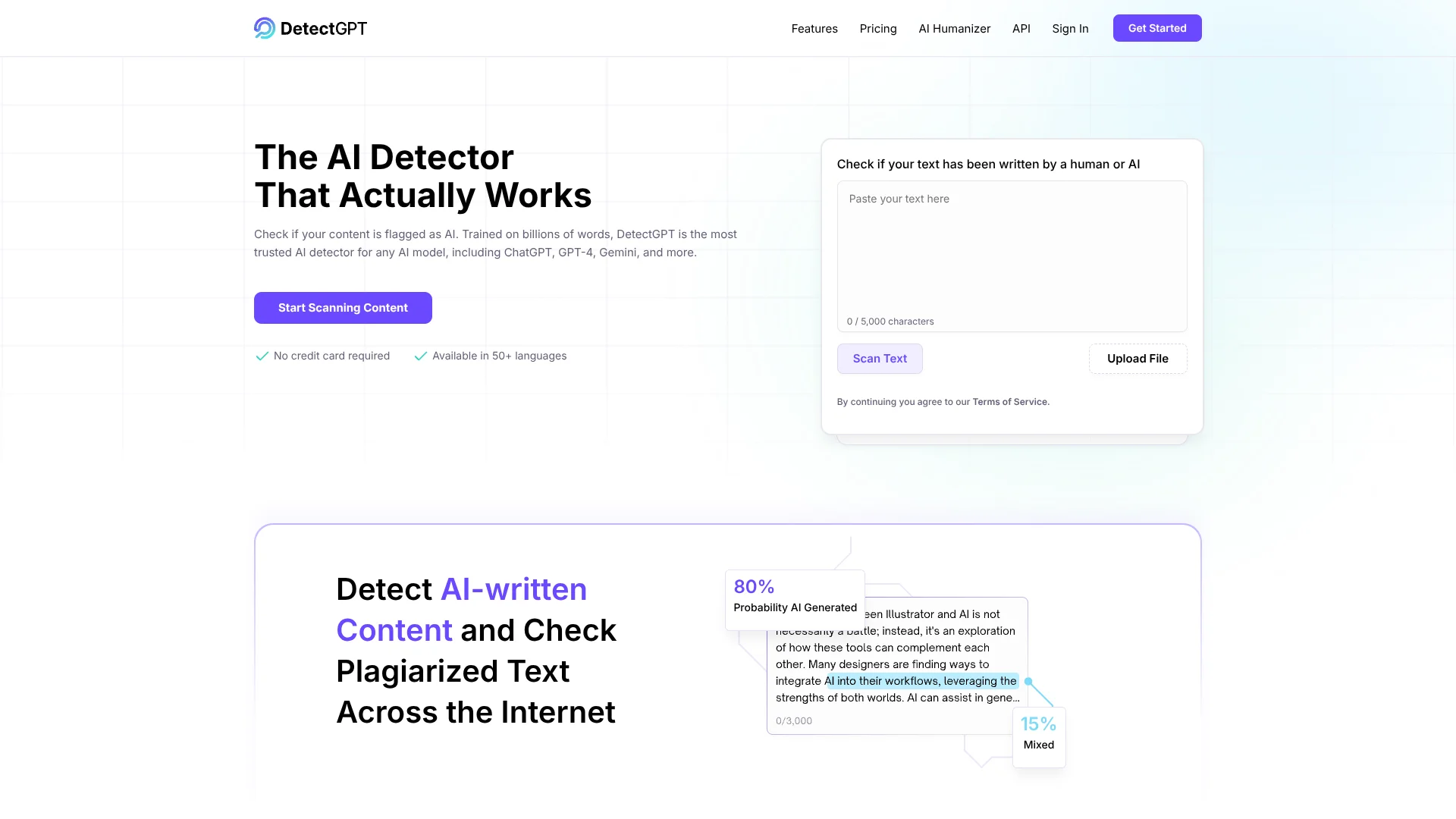
Paste text or upload a file to determine whether content appears human-written or AI-generated.
Outcome: Receive an AI probability assessment.
Plagiarism checking
Check content for plagiarism across internet sources.
Outcome: Assess originality and content integrity.
AI-content humanization
Rewrite AI-generated text while preserving its original meaning.
Outcome: Produce more human-like copy intended to avoid AI-detector flags.
Content certification
Create an Original Content Certification and share an analysis link with clients.
Outcome: Provide evidence of content authenticity.
Batch document analysis
Use paid plans to process multiple files in a batch.
Outcome: Analyze up to 10, 20, or 50 files depending on plan.
Workflow Ideas with DetectGPT
Check and certify content
- 1Paste text or upload a file
- 2Review the AI and originality analysis
- 3Create and share an Original Content Certification link
Humanize flagged content
- 1Enter or upload AI-generated text
- 2Run the AI Humanizer
- 3Review the rewritten text for meaning, readability, facts, and grammar
Process multiple documents
- 1Choose a paid plan with batch file detection
- 2Upload multiple files
- 3Review the resulting detection and PDF reports
How DetectGPT fits into your stack
Browser
DetectGPT is primarily a web-based scanner used in the browser to check text for AI-generated content, plagiarism, facts, and readability.
Knowledge and files
Users can paste text or upload files for analysis. Paid plans add batch file detection, PDF report generation, and plagiarism checking.
Automation and APIs
DetectGPT exposes an AI Detection API intended for organizations that want to integrate detection capabilities into their own tools and workflows.
Pros
- +Strong Detection Pedigree: Built on research about model log‑probability curvature, giving it a more technical foundation than many “black box” detectors.
- +End‑to‑End Content Workflow: Covers detection, plagiarism scanning, readability, and certification in one place instead of stitching together several tools.
- +High Volume Friendly: Generous word limits and batch processing suit agencies, universities, and content teams handling lots of documents.
- +API for Developers: Easy integration into existing workflows, portals, or moderation pipelines.
- +Language Coverage: 50+ languages makes it useful well beyond English‑only environments.
Cons
- −Potential for Misuse: The AI humanizer explicitly aims to bypass detectors, which raises ethical and policy concerns in education and hiring.
- −Detection Is Not Perfect: Vendor claims of 95–99% accuracy should be treated as indicative, not absolute, especially on short or heavily edited text.
- −Limited Transparency on Data Handling: Public materials do not deeply detail how long uploaded content is stored or how it is secured, which larger enterprises may question.
Limitations & when to consider alternatives
Known limitations
- Free access is limited. DetectGPT advertises a 3,000-word free trial rather than a permanent free plan.
- Input length is limited. The web text input displays a 5,000-character limit.
- Detection is not infallible. The Chrome extension states that AI detection is not 100% accurate and may produce false positives.
- Image detection is not available yet. The official site labels AI-image detection as coming soon.
- Subscriptions are non-refundable. The refund policy states that purchases and renewals are non-refundable after the trial.
How to Use DetectGPT
- 1
Open the detector
Go to DetectGPT and paste text into the scanner or choose Upload File to analyze a document.
- 2
Run the analysis
Scan the content to see whether it appears human-written or AI-generated and review the probability result.
- 3
Check originality
Use the plagiarism checker and available fact-checking or readability features to assess content quality.
- 4
Humanize flagged text
Open the AI Humanizer, enter or upload the text, and run the rewrite while preserving its meaning.
- 5
Generate reports
Use a paid plan to generate PDF reports or process files in batches.
- 6
Share certification
Create an Original Content Certification and share the resulting analysis link with clients or reviewers.
Who is DetectGPT For?
Teachers
Educators can identify potentially non-original student work and support academic integrity.
Students
Students can check the originality of their work and avoid unintentional plagiarism.
Writers
Writers can assess AI-generated text and maintain the uniqueness of their content.
Individuals and freelancers
The Essential plan is positioned for individuals and freelancers needing detection, humanization, and plagiarism checking.
Teams and organizations
The Team plan is designed for teams and organizations needing higher monthly word limits and unlimited team members.
Frequently Asked Questions
What does DetectGPT do?
DetectGPT checks whether text was written by a human or generated by AI, and also offers plagiarism checking.
Does DetectGPT support multiple languages?
The site says DetectGPT is available in more than 50 languages.
Can I upload a document?
Yes. The web interface includes an Upload File option, and paid plans include batch file detection.
Does DetectGPT offer an AI humanizer?
Yes. Its AI Humanizer rewrites AI-generated text while keeping the original meaning.
Is there a free trial?
DetectGPT offers a 3,000-word free trial without requiring a credit card.
Does DetectGPT offer an API?
The site advertises an AI Detection API for integrating GPT-content detection into other tools and workflows.
Community reviews
Be the first to share your experience.
Sign in to leave a review for DetectGPT.
DetectGPT Alternatives
Looking for alternatives to DetectGPT? Here are similar tools in the same category:
Learn to Master DetectGPT
With Skill Leap courses
Get in-depth training on DetectGPT and 50+ other AI tools with our expert-led video courses.
Start 7-Day Free Trial