
Free AI Resume Generator
Create professional, ATS-optimized resumes instantly with AI.
Key Takeaways
- What it is
- Create professional, ATS-optimized resumes instantly with AI.
- Best for
- AI-Powered Resume Creation
- Professional Templates
- Step-by-Step Guidance
- Rating
- 4.6/5
What is Free AI Resume Generator?
The Free AI Resume Generator, available on the Remote People website, is a cutting-edge tool designed to streamline the resume creation process for job seekers. It revolutionizes how individuals prepare their job applications by offering an intuitive, AI-powered platform that generates professional resumes in as little as one minute. This tool is tailored for job seekers who wish to create an impactful, ATS-optimized resume that highlights their skills and experiences effectively, enhancing their chances of landing the desired job.
Free AI Resume Generator stands out with its ability to create an ATS-optimized resume in just one minute, a game-changer for those needing quick turnaround times. Its seamless integration of AI technology ensures that resumes are not only professional but also tailored to meet the specific demands of job postings, setting it apart in the competitive landscape of resume-building tools.
The Free AI Resume Generator is an exceptional tool for anyone seeking to create a professional resume quickly and efficiently. Its AI-driven approach ensures that resumes are not only visually appealing but also strategically crafted to pass through applicant tracking systems. For job seekers aiming to make a strong impression, this tool offers an invaluable blend of speed, precision, and convenience, making it a must-try for those entering or navigating the job market.
Who is Using Free AI Resume Generator?
Job Seekers
Individuals actively looking for new employment opportunities and needing a polished resume quickly.
Career Changers
Professionals transitioning into new fields who require a resume that highlights transferable skills.
Students and Recent Graduates
Those entering the workforce for the first time, needing guidance on how to structure their resumes.
Freelancers
Independent contractors looking to present their skills and experiences in a professional manner.
Uncommon Use Cases
Used by career coaches to demonstrate resume creation to clients; adopted by educational institutions for career readiness workshops.
Key Features
Rating Breakdown
Pricing Plans
Free Service
- The Free AI Resume Generator is available at no cost
- Providing users with the ability to create professional resumes without financial barriers
Free AI Resume Generator Use Cases
Create an ATS-optimized resume
Choose a professional template and enter personal, education, experience, and skills information.
Outcome: A polished resume designed for applicant tracking systems.
Tailor a resume to a job description
Upload a job description so the AI can adjust the resume around relevant job requirements.
Outcome: A resume customized for a specific application.
Strengthen professional experience
Add work history and use AI-powered guidance for action-driven accomplishment bullets.
Outcome: More impactful experience descriptions.
Create multiple resume versions
Develop different resume versions for roles such as technology, management, or design.
Outcome: Role-specific resumes for different applications.
Add supporting resume sections
Include accomplishments, volunteering, certifications, languages, references, interests, software, or custom sections.
Outcome: A more complete representation of your qualifications.
Workflow Ideas with Free AI Resume Generator
Build a resume from scratch
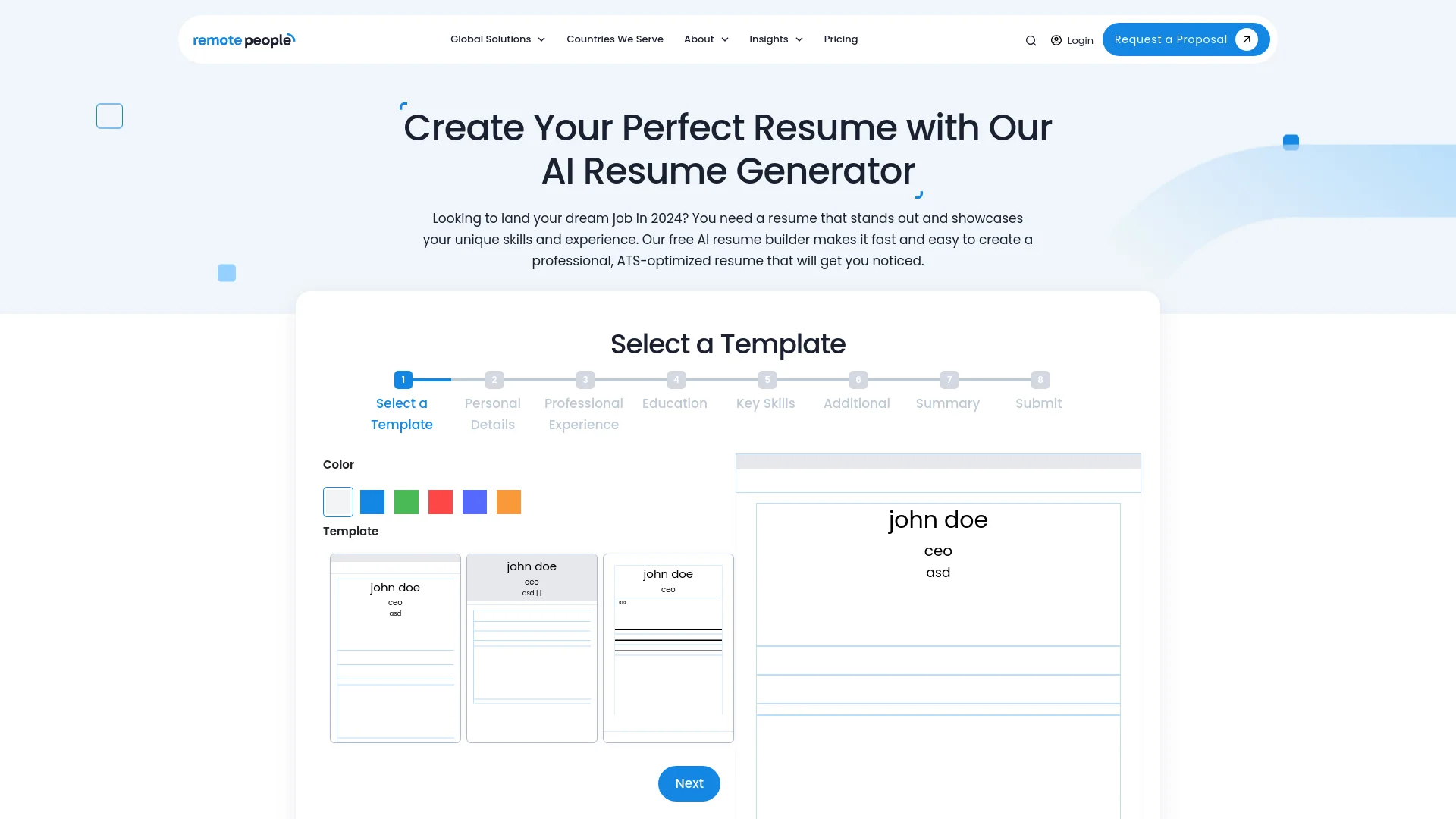
- 1Select a resume template
- 2Enter personal details, experience, education, and skills
- 3Review the summary and download the resume
Tailor a resume for a target role
- 1Upload or provide the target job description
- 2Adjust the resume around the job requirements
- 3Review the ATS-friendly result and download it
Create role-specific resume versions
- 1Build a base resume with your complete background
- 2Create versions for different roles or industries
- 3Download the appropriate version for each application
How Free AI Resume Generator fits into your stack
Browser
A web-based resume-generation tool for creating and saving resume documents through RemotePeople's website.
Pros
- +Time Efficiency: The tool significantly reduces the time required to create a resume, completing the process in just one minute.
- +User-Friendly Interface: Its intuitive design makes it accessible even for those with limited technical skills.
- +Cost-Effective: The service is available for free, providing high value without any financial investment.
- +ATS Optimization: Ensures resumes are formatted to pass applicant tracking systems, increasing the likelihood of reaching hiring managers.
Cons
- −Limited Customization: While offering professional templates, the customization options may be limited compared to a fully manual resume creation process.
- −Generic Output: The AI may produce resumes that lack unique, personalized touches unless manually adjusted by the user.
- −Initial Learning Curve: Users may need time to familiarize themselves with the platform's features and capabilities.
Limitations & when to consider alternatives
Known limitations
- Account needed to save documents. RemotePeople's registration page says users create an account to save their document.
Look elsewhere when
- You need a native mobile app
- You need API-based automation
- You need shared team workspaces
How to Use Free AI Resume Generator
- 1
Select a template
Choose one of the modern professional templates before entering your information.
- 2
Enter personal details
Add your name, contact information, job title, and social links.
- 3
Add professional experience
Enter positions, companies, locations, dates, and work summaries.
- 4
Add education and skills
Include schools, degrees, fields of study, relevant descriptions, and key skills.
- 5
Add supporting sections
Use additional sections for accomplishments, certifications, volunteering, languages, references, interests, software, or custom content.
- 6
Review and download
Check the AI-generated summary and resume content, then download the completed resume.
Who is Free AI Resume Generator For?
Job seekers
The tool is intended to help people create professional resumes for their job search.
Community reviews
Be the first to share your experience.
Sign in to leave a review for Free AI Resume Generator.
Free AI Resume Generator Alternatives
Looking for alternatives to Free AI Resume Generator? Here are similar tools in the same category:
Learn to Master Free AI Resume Generator
With Skill Leap courses
Get in-depth training on Free AI Resume Generator and 50+ other AI tools with our expert-led video courses.
Start 7-Day Free Trial