
Humata AI
AI tool for summarizing, analyzing, and extracting insights from documents.
Key Takeaways
- What it is
- AI tool for summarizing, analyzing, and extracting insights from documents.
- Pricing
- Freemium · $1.99 per month · $49 per user per month
- Best for
- AI-Powered Document Analysis
- Unlimited File Uploads
- Citation Highlights
- Rating
- 4.5/5
What is Humata AI?
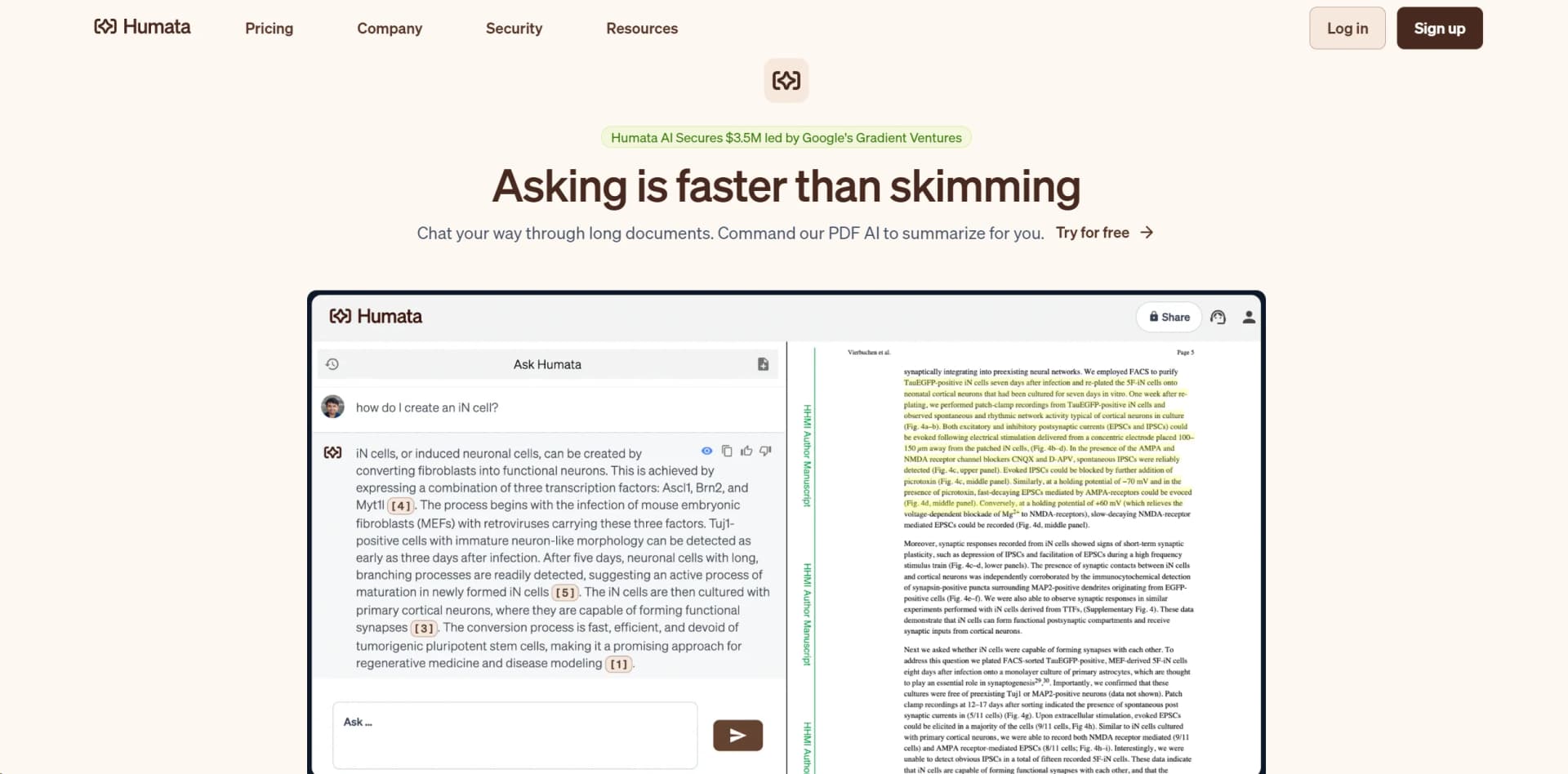
Humata AI is a cutting-edge AI tool designed to revolutionize how we interact with files, particularly PDFs. By offering advanced capabilities for summarizing, comparing, and extracting information, Humata AI simplifies the often daunting task of managing large volumes of documents. Tailored for professionals and individuals who handle extensive documentation, Humata AI transforms the way we access and utilize information, making it a must-have for anyone looking to enhance efficiency and productivity.
Humata AI stands out with its ability to process and analyze documents in a way that feels like having a personal assistant for your files. Unlike generic AI chatbots, Humata AI is specifically designed to handle document-based queries, providing precise answers with citations. This makes it an invaluable tool for anyone who needs to manage and understand complex information efficiently.
Humata AI offers a transformative approach to document management, making it an indispensable tool for professionals across various fields. With its AI-driven capabilities, users can efficiently manage and analyze large volumes of documents, gaining valuable insights quickly. Whether you're in research, education, or a corporate setting, Humata AI provides a seamless and efficient way to handle your files, ensuring you always have access to the information you need when you need it.
Who is Using Humata AI?
Research Institutions
Utilizing Humata AI for efficient document analysis and summarization.
Legal Firms
Employing the tool to quickly extract and organize critical legal information.
Educational Organizations
Leveraging Humata AI to enhance curriculum development and research capabilities.
Corporate Teams
Using the tool to streamline document management and internal communications.
Uncommon Use Cases
Adopted by libraries for digitizing and summarizing archives; Used by healthcare professionals for managing research studies.
Key Features
Rating Breakdown
Pricing Plans
Free Tier
Free
Student Plan
$1.99 per month
- Up to 200 free pages and basic chat support
Expert Plan
- Includes up to 500 free pages and premium chat support for three users
Team Plan
$49 per user per month
- Up to 5,000 free pages and additional features like OCR and personalized responses
Which Humata AI plan should you pick?
Start with Free to test document Q&A, choose Expert for small professional groups, upgrade to Team for permissions and OCR, and contact Humata for Enterprise security and scale.
Free
Good for individuals who need basic document Q&A with up to 60 free pages.
Expert
Good for small professional teams needing up to three users, more included pages, and premium chat support.
Team
Good for teams needing up to 10 users, folder and department permissions, OCR, and response personalization.
Enterprise
Good for larger organizations needing unlimited users, custom usage, enterprise support, SSO, compliance, and uptime commitments.
Humata AI Use Cases
Research paper analysis
Upload technical papers, ask questions, summarize findings, and search across multiple documents.
Outcome: Faster research and easier verification of findings.
Legal case preparation
Create litigation timelines, medical chronologies, asset lists, liability overviews, and witness lists from case documents.
Outcome: More efficient case management and preparation.
Document comparison
Compare and contrast uploaded documents to identify differences, similarities, and relevant precedents.
Data extraction
Extract names, accounts, emails, and other information from multiple files.
Outcome: Streamlined document-based data analysis.
Embedded document support
Upload files and embed a branded Humata chat view into a website so visitors can ask questions about the documents.
Outcome: Customers can access answers directly from a webpage.
Workflow Ideas with Humata AI
Analyze an uploaded document
- 1Upload a file or folder by drag-and-drop or with the upload button.
- 2Choose a chat mode such as Grounded, Balanced, or Creative.
- 3Ask questions and review the cited source references in the answer.
Import and query a website
- 1Open the upload section and select From URL.
- 2Enter the website URL and confirm the import.
- 3Ask Humata questions after the website finishes processing.
Create a shared team knowledge area
- 1Invite members from Account Settings > People.
- 2Assign admin or member roles and organize users into teams.
- 3Restrict access to folders or files according to team permissions.
How Humata AI fits into your stack
Browser
Humata is primarily used as a web application for asking questions across uploaded files, summarizing documents, comparing content, and searching for answers.
Knowledge and files
Users upload files or folders, organize documents into folders, import websites, and chat with documents using cited answers.
Automation and APIs
The documented Humata API provides programmatic access to documents, conversations, answers, API-key authentication, document import, and document-question endpoints.
Pros
- +Time Efficiency: Drastically reduces the time spent on reading and analyzing documents.
- +Trustworthy Insights: Provides answers with citations, enhancing credibility and trust.
- +Scalable Solutions: Offers flexible plans that grow with your needs, making it accessible for both individuals and large teams.
- +User-Friendly Interface: Intuitive design ensures ease of use for all levels of users.
Cons
- −Initial Learning Curve: Some users may find it takes time to fully explore all features.
- −Limited Integration: Although embedding is easy, integration with other platforms might be limited.
- −Resource-Intensive: Large volumes of uploads could require significant computational resources.
Limitations & when to consider alternatives
Known limitations
- Free usage is page-limited. The Free plan includes up to 60 free pages per month.
- Additional pages incur usage charges. Expert and Team plans charge separately for pages beyond the included allowance; listed rates are $0.02 and $0.01 per page respectively.
- Some legal comparison functionality is not yet available. The legal page labels compare-and-contrast document functionality as Coming soon.
- Document data used by the model is retained for up to 30 days. Humata states that document data used for its model is not retained beyond 30 days, while dashboard data remains accessible until requested otherwise.
- Grounded answers may decline unsupported questions. In Grounded mode, Humata may respond that it cannot answer when the information is not found in the uploaded documents.
Look elsewhere when
- You need a native mobile or desktop application.
- You need custom third-party integrations beyond identity providers.
- You need model fine-tuning on your proprietary data.
- You need a coding-focused AI assistant.
How to Use Humata AI
- 1
Upload or import content
Upload files or folders from your device, or import a website from a URL so Humata can process the source material.
- 2
Select the response mode
Use Grounded for answers strictly supported by the document, Balanced for document-first answers with additional context, or Creative for looser responses.
- 3
Ask questions and verify citations
Ask questions about the uploaded content, then follow Humata's cited references to verify the answer against the source.
- 4
Organize and share files
Move files into folders, invite teammates, assign roles, and apply folder-level access restrictions when working collaboratively.
- 5
Embed a document chat
On Enterprise, use Ask > Share > Embed to place a Humata chat view on a website and optionally apply white labeling.
- 6
Use the API for programmatic workflows
Authenticate with a bearer API key, import PDFs by URL, create conversations, ask questions, and download insights data through the documented endpoints.
Who is Humata AI For?
Researchers
Researchers can analyze technical papers, search across PDFs, extract findings, and verify answers through citations.
Students
Students can use Humata to read papers faster, ask questions about course documents, and summarize source material.
Lawyers and law firms
Legal professionals can build timelines and chronologies, review documents, and extract names, accounts, and emails.
Business teams
Teams can share files, manage access by role and folder, and use document-grounded answers for reporting and decisions.
Experts and organizations
Humata positions itself for experts and teams of every size that need to read quickly and uncover information in old documents.
Frequently Asked Questions
Does Humata offer a free plan?
Yes. Humata offers a $0 Free plan with up to 60 free pages of use and no credit card required.
What is Humata used for?
Humata answers questions about uploaded documents, summarizes findings, compares documents, searches files, and provides citations to source content.
Can Humata import websites?
Yes. Users can choose From URL in the upload section, enter a website URL, and then ask questions about the imported website.
Does Humata have an API?
Yes. The documented API supports programmatic access to documents, conversations, answers, URL-based PDF import, and data downloads.
Does Humata support single sign-on?
Yes. Humata supports SAML 2.0 single sign-on with providers including Okta, Microsoft Azure Active Directory, Google Workspace, and OneLogin.
Will Humata train AI models on my data?
No. Humata states that user-provided data is not used to train its AI models.
Community reviews
8 reviews from people who use Humata AI.
Sign in to leave a review for Humata AI.
Awais Nazar
Xuelai W (Robin)
Thomas R.
Joe
Yalçın Aksu
abdel nor
Алина Цой
Kate Bakhmutova
Humata AI Alternatives
Looking for alternatives to Humata AI? Here are similar tools in the same category:
Learn to Master Humata AI
With Skill Leap courses
Get in-depth training on Humata AI and 50+ other AI tools with our expert-led video courses.
Start 7-Day Free Trial