Machined
Builds interconnected SEO content clusters for growing organic search coverage.
Watch Machined in Action
Key Takeaways
- What it is
- Builds interconnected SEO content clusters for growing organic search coverage.
- Pricing
- $19 per month · $49 per month · $99 per month · $249 per month
- Best for
- Content Cluster Automation
- Deep AI Research
- Automated Internal Linking
- Rating
- 4.2/5
What is Machined?
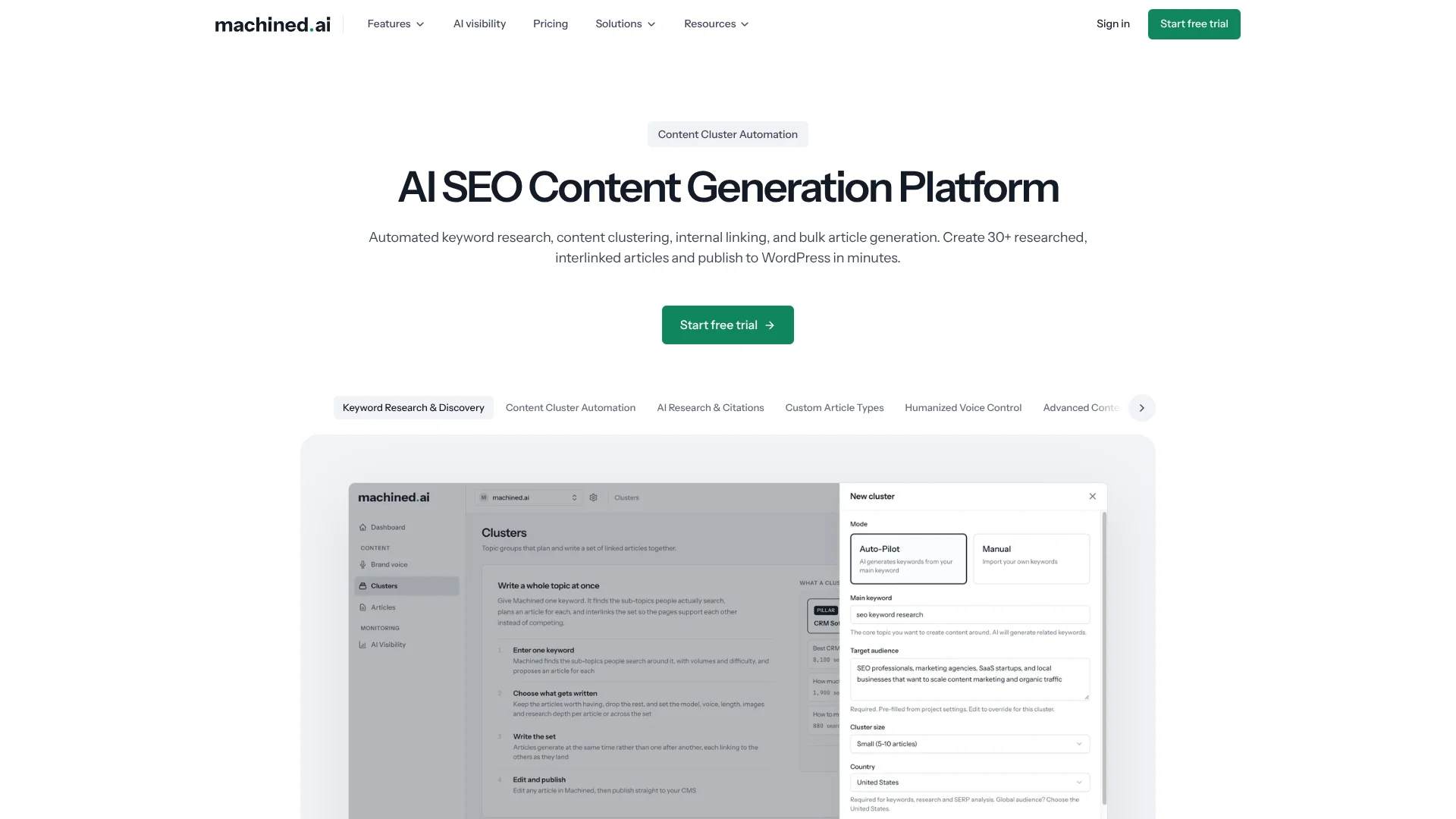
Machined helps SEO teams turn a topic into a connected content plan, researched articles, internal links, images, and published pages. Its core workflow groups keywords by search intent, creates pillar and supporting articles, and sends the finished content to a CMS. This removes the spreadsheet work that usually slows large content projects.
Machined's defining capability is automated cluster production: it creates a group of interlinked articles designed to cover a topic without making multiple pages compete for the same keyword.
The tool fits agencies, publishers, businesses, startups, freelancers, and solopreneurs who need recurring SEO content at volume. It is less suitable for teams seeking content scoring against live search results or a general writing tool for emails, ads, and social posts. Machined is strongest when the goal is topical authority across connected website pages.
Who is Using Machined?
SEO Strategists
Topic coverage and search intent analysis help them plan clusters that support a site's organic growth.
Content Managers
The article quotas, editorial controls, and CMS connections support recurring production calendars.
Agency Account Managers
Unlimited projects and CMS connections make it easier to separate client websites inside one workspace.
Website Publishers
Bulk publishing sends finished articles, images, categories, tags, and metadata to connected sites.
Content Editors
The in-app editor and draft publishing options provide a review point before content goes live.
Uncommon Use Cases
A niche site builder can map an entire new topic before writing begins; a high-volume publisher can control AI provider costs through BYOK.
Key Features
Rating Breakdown
Pricing Plans
Launch
$19 per month
- 30 articles per month
- Unlimited projects
- 2 team members
- Unlimited CMS connections and webhooks
- Annual billing saves 25%
Growth
$49 per month
- 100 articles per month
- Unlimited projects
- 3 team members
- Unlimited CMS connections and webhooks
- Annual billing saves 25%
Pro
$99 per month
- 250 articles per month
- Unlimited projects
- 5 team members
- Unlimited CMS connections and webhooks
- Annual billing saves 25%
Scale
$249 per month
- 750 articles per month
- Unlimited projects
- 10 team members
- Unlimited CMS connections and webhooks
- Annual billing saves 25%
BYOK
$99 per month
- Bring your own AI provider keys
- 2,000 articles per month
- Anthropic, OpenAI, Google, or OpenRouter supported
- Unlimited projects and CMS connections
- AI provider charges are billed separately and vary by usage
Which Machined plan should you pick?
Start with Launch to test cluster production, move to Growth or Pro as monthly volume rises, and choose BYOK when provider control matters more than included AI usage.
Launch
Good for a small website or early SEO program needing up to 30 articles per month.
Growth
Good for regular content operations that need up to 100 articles and three team members.
Pro
Good for agencies and growing teams producing up to 250 articles per month.
Scale
Good for high-volume publishers needing up to 750 articles and ten team members.
BYOK
Good for high-volume operations that want 2,000 articles per month and direct control over AI provider costs.
Machined Use Cases
Topical Authority Building
A central topic becomes a structured set of supporting pages with planned links between them.
Outcome: Broader, better-connected coverage of a search topic.
Bulk SEO Article Production
Recurring article work moves from keyword discovery through research and writing in a single workflow.
Outcome: More SEO content produced with less manual coordination.
CMS Publishing
Finished articles can move directly into WordPress or Webflow, with webhooks available for other systems.
Outcome: Less copying, formatting, and manual uploading.
Internal Link Building
Semantic relationships across cluster articles guide contextual links and anchor text.
Outcome: More consistent connections between related pages.
Multi-Language Content
The content workflow supports generation in more than 100 languages for sites serving international audiences.
Outcome: SEO content production across multiple language markets.
Workflow Ideas with Machined
Build and Publish a Topic Cluster
- 1Create a project for the website and enter the core topic.
- 2Review the keyword clusters, article briefs, and research settings.
- 3Generate the articles, check the internal links, and publish the cluster as drafts or live pages.
Connect a Publishing Workflow
- 1Connect WordPress or Webflow in the project integrations area.
- 2Set the author, categories, tags, metadata, and publishing status.
- 3Send selected articles or a full cluster to the CMS.
Control High-Volume AI Costs
- 1Choose the BYOK plan for high article volume.
- 2Add an Anthropic, OpenAI, Google, or OpenRouter API key.
- 3Monitor provider credits and rate limits while Machined handles the content workflow.
How Machined fits into your stack
SEO Planning
Machined sits at the topic-planning stage, turning a core subject into keyword groups and connected article briefs.
Research and Writing
Its AI research and writing workflow produces cited articles, long-form content, custom briefs, and brand voice settings.
CMS Publishing
WordPress and Webflow connections handle direct publishing. Other destinations can receive content through webhooks.
Automation Tools
Webhooks can pass articles to Zapier, Make, n8n, or another custom workflow for processing beyond the native CMS connections.
AI Provider Layer
Standard plans include AI generation. The BYOK plan lets you connect Anthropic, OpenAI, Google, or OpenRouter and pay those providers directly.
Pros
- +Cluster-first workflow: Builds connected topic coverage instead of isolated articles.
- +Research with citations: Adds sourced context to generated content.
- +Bulk publishing: Sends full clusters to WordPress or Webflow in one publishing action.
- +High-volume plans: Scale reaches 750 articles per month, while BYOK supports 2,000 articles.
- +Provider choice: BYOK supports Anthropic, OpenAI, Google, and OpenRouter keys.
Cons
- −SEO-specific scope: It is not built for broad marketing copy or everyday writing.
- −Provider setup on BYOK: You must manage an external AI account, API key, credits, and rate limits.
- −No free plan: The free access is a seven-day trial rather than an ongoing $0 tier.
Limitations & when to consider alternatives
Known limitations
- Trial becomes read-only. After the seven-day trial, an account that does not move to a paid plan can view and export existing content but cannot generate or publish new content.
- BYOK has outside costs. BYOK article costs are billed by the selected AI provider, and the exact amount varies with model, article length, research depth, and images.
- Provider rate limits apply. External AI providers can slow or fail generation when their rate limits or services are unavailable.
- CMS access depends on permissions. A connected WordPress account gives Machined the permissions of that WordPress user, so the vendor recommends a separate Editor account.
- No post-charge refunds. Machined states that subscriptions are not refunded after a paid charge because the trial is available before subscribing.
Look elsewhere when
- You need a general writing tool for email, ad, or social content.
- You want live search-result content scoring rather than cluster generation.
- Your CMS is not WordPress or Webflow and cannot receive webhooks.
How to Use Machined
- 1
Start the Trial
Create an account for the seven-day Launch trial, which does not require a credit card.
- 2
Create a Project
Set up a project for each website so content, CMS connections, and publishing settings stay separated.
- 3
Define the Topic
Enter the subject you want to cover and review the suggested keyword groups and search intent.
- 4
Set Content Controls
Choose the voice, research depth, article type, and other brief settings before generation.
- 5
Review the Cluster
Check the research, citations, article structure, images, metadata, and automatically created links.
- 6
Publish or Export
Send approved content to WordPress, Webflow, or a webhook as drafts or published pages.
Who is Machined For?
SEO Agencies
Agencies can produce connected content clusters for multiple client websites from one workspace.
Publishers
Publishers can expand coverage around core topics while automating research, linking, and CMS delivery.
Businesses
Businesses can grow organic content output without adding the same amount of manual research and editing work.
Startups
Startups can build topic coverage around a niche with a repeatable AI content workflow.
Freelancers and Solopreneurs
Independent operators can create researched website content without hiring a separate writing and SEO team.
Frequently Asked Questions
Does Machined have a free plan?
Machined offers a seven-day free trial with full Launch access and no credit card required. It does not list an ongoing $0 plan.
What is the lowest paid Machined plan?
Launch costs $19 per month and includes 30 articles per month, unlimited projects, two team members, unlimited CMS connections, and unlimited webhooks.
What does BYOK mean in Machined?
BYOK means bring your own key. You pay $99 per month for Machined and connect an Anthropic, OpenAI, Google, or OpenRouter API key for your AI usage.
Can Machined publish to WordPress?
Yes. Machined can publish articles and media directly to WordPress, including bulk cluster publishing, images, metadata, categories, and tags.
Can Machined connect to other publishing tools?
Native integrations are available for WordPress and Webflow. Webhooks can connect Machined to Zapier, Make, n8n, custom CMSs, databases, and other workflows.
How many articles can each paid plan generate?
Launch includes 30 articles per month, Growth 100, Pro 250, Scale 750, and BYOK 2,000 articles per month.
Community reviews
6 reviews from people who use Machined.
Sign in to leave a review for Machined.
Simo Mrav
Tin Novakovic
Thibault BM
MUSTAAR AAF
Abdulrahman Alhasso
Yusef
Machined Alternatives
Looking for alternatives to Machined? Here are similar tools in the same category: