
Magnific AI Image Generator
Create high-resolution, detailed images from prompts and photos.
Key Takeaways
- What it is
- Create high-resolution, detailed images from prompts and photos.
- Pricing
- $20 per month · $45 per month · $280 per month · $69 per seat per month
- Best for
- Text to image generation with detail focus
- Integrated upscaling and enhancement
- Creativity and fidelity controls
- Rating
- 4.2/5
What is Magnific AI Image Generator?
Magnific (formerly Freepik) AI Image Generator is a creative image generation and enhancement tool built on the same technology that made Magnific’s AI upscaler popular with photographers, designers, and AI artists. It turns text prompts and existing images into high resolution visuals, inventing plausible detail instead of just stretching pixels. The focus is on professional grade imagery that holds up in large formats, with controls that let users balance realism against artistic reinterpretation rather than leaving everything to chance.
Magnific AI Image Generator sets itself apart by blending generative image creation with the ultra detailed upscaling approach that made Magnific well known. Instead of treating upscaling and prompting as separate steps, it treats the whole process as one continuous enhancement pass, controlled by creativity and fidelity sliders.
Magnific AI Image Generator suits users who care deeply about image quality and control and are prepared to pay for it. Between its fine grained enhancement, relighting, and high resolution output, it behaves less like a generic AI image bot and more like a specialised creative workstation. The subscription is not cheap and the controls reward practice, but for photographers, designers, and AI artists aiming for gallery, print, or campaign ready images, it offers a level of polish that many cheaper tools struggle to match.
Who is Using Magnific AI Image Generator?
Professional photographers
Using it to upscale client work, rescue marginal shots, and generate complementary assets such as backdrops or stylised alternates for campaigns.
AI artists and illustrators
Feeding in base renders from other models and refining them into high detail pieces suited to prints, covers, and galleries.
Design and creative agencies
Producing campaign concepts, key visuals, and presentation ready imagery without always resorting to full photo shoots or 3D pipelines.
E commerce and product teams
Enhancing catalog photos, generating lifestyle scenes, and preparing large, clean images for marketplaces and packaging.
Uncommon Use Cases
Adopted by tabletop RPG creators for bespoke character and location art; explored by academic labs for visualising speculative scenarios in reports and talks.
Key Features
Rating Breakdown
Pricing Plans
Premium
$20 per month
- Billed monthly, includes 20,000 credits per month, 250M+ premium stock assets, image/video/audio models, shared workflow spaces, editing tools, music and sound effects generation, commercial AI license, and 250M+ photos, videos, vectors, and PSDs
Premium+
$45 per month
- Billed monthly, includes 45,000 credits per month, unlimited use on selected models, everything in Premium plus top-up credits anytime, music rights, and early access to AI features
Pro
$280 per month
- Billed monthly, includes 300,000 credits per month, unlimited use plus 20% cheaper credits, everything in Premium+ plus early AI feature access
Business
$69 per seat per month
- Billed monthly, screenshot shows 2 users selected, with 90,000 credits per month total for the team, plus shared team credit pool, 8 parallel generations per user, 3-month credit rollover, basic legal indemnification, SSO and usage reporting, company-wide certifications, and shared team spaces and projects
Which Magnific AI Image Generator plan should you pick?
Start with Free to test basic image generation; upgrade to Premium for commercial work, Premium+ for high-volume generation, Pro for maximum credits and merchandise rights, or Business for teams.
Free
Good for exploring Magnific with limited daily image generation and personal-use licensing.
Premium
Good for designers, marketers, and creators who need commercial licensing, premium stock content, and monthly AI credits.
Premium+
Good for heavy AI users who need unlimited generation on most image models and the ability to buy extra credits.
Pro
Good for professional designers, agencies, and creators who need the highest individual credit tiers, early access, and Merchandise License rights.
Business
Good for teams needing shared credits, centralized billing, roles, team management, collaboration, and unlimited generation on selected models.
Enterprise
Good for larger organizations needing unlimited seats, advanced SSO, dedicated support, and enterprise controls.
Magnific AI Image Generator Use Cases
Text-to-image creation
Write a prompt, choose a model and style, optionally add references, and generate one to four images.
Outcome: Finished visuals for creative projects, campaigns, social content, or presentations.
Reference-guided image generation
Upload inspiration images and combine them with prompts to control visual direction.
Outcome: Images that better follow a desired style, layout, color palette, or subject.
Consistent character creation
Train a custom Character LoRA from uploaded images and reuse it across scenes and styles.
Outcome: Recurring characters with a more consistent visual identity.
Product imagery
Train a Custom Object from product photos and generate the product in different scenes and lighting.
Outcome: Adaptable product visuals for e-commerce and marketing.
Image description and variation
Upload an image for an automatically generated prompt, then use the description to create variations.
Outcome: New interpretations of an existing image without manually writing its description.
Workflow Ideas with Magnific AI Image Generator
Prompt to campaign asset
- 1Write a campaign concept in a Text node
- 2Connect it to an Image Generator with style and reference inputs
- 3Run the workflow and export the generated assets
Product image batch generation
- 1Upload product photos or select them from Media
- 2Connect a List node containing scenes or prompts to a generator
- 3Run the workflow to create one output per list item
Generate, edit, and upscale
- 1Generate an image from a prompt or reference
- 2Send the result to Image Editor for retouching or background changes
- 3Upscale or export the finished image
How Magnific AI Image Generator fits into your stack
Browser
Magnific’s web AI Suite provides image generation, editing, video, audio, design, stock assets, Projects, and Spaces directly in the browser.
Automation and APIs
Teams can build multi-step Spaces workflows, publish reusable Flows, call them through the Magnific API, or run them via MCP with Claude and ChatGPT.
Desktop / IDE
Magnific provides a native macOS and Windows desktop app, plus plugins that bring Magnific tools into applications such as Adobe, Figma, DaVinci, and ComfyUI.
Pros
- +High perceived quality: Outputs tend to look sharp and detailed, often closer to meticulous retouching than to basic AI upscaling, which is why many professionals treat it as a finishing step for important images.
- +Strong control over detail: Creativity and fidelity controls help keep key subjects, logos, or products recognisable while still letting the model enrich textures and backgrounds.
- +Professional friendly toolset: High maximum resolutions, relighting, and restoration style options line up with the needs of photographers, agencies, and print focused designers.
- +API and automation potential: The availability of icon and image generation via API makes it suitable for branded systems, design pipelines, and apps that need consistent visual output.
Cons
- −Premium pricing: Subscription tiers are positioned above many general AI art tools, which can be a stretch for hobbyists or very cost sensitive creators.
- −Detail “hallucination” risk: Because the model invents extra structure, it is a poor fit for forensic, scientific, or documentary uses where strict factual accuracy matters more than aesthetics.
- −Learning curve for fine control: While basic prompting is simple, mastering sliders and parameters to get consistent, predictable results takes some practice.
Limitations & when to consider alternatives
Known limitations
- Free-plan generation limits. The Free plan allows up to 20 AI image generations per day using the in-house model and does not provide unlimited generation.
- Credits do not roll over. Unused plan credits reset at the end of each billing cycle.
- Some tools require paid access. Video generation, audio, and advanced editing tools are unavailable or significantly restricted on the Free plan.
- Unlimited generation has exceptions. Premium+, Pro, and Business include unlimited access to selected models, while some premium models and video, audio, and editing actions still consume credits.
- Desktop app requires an internet connection for generation. Magnific runs as a desktop workspace, but generation requires an active internet connection.
How to Use Magnific AI Image Generator
- 1
Open the Image Generator
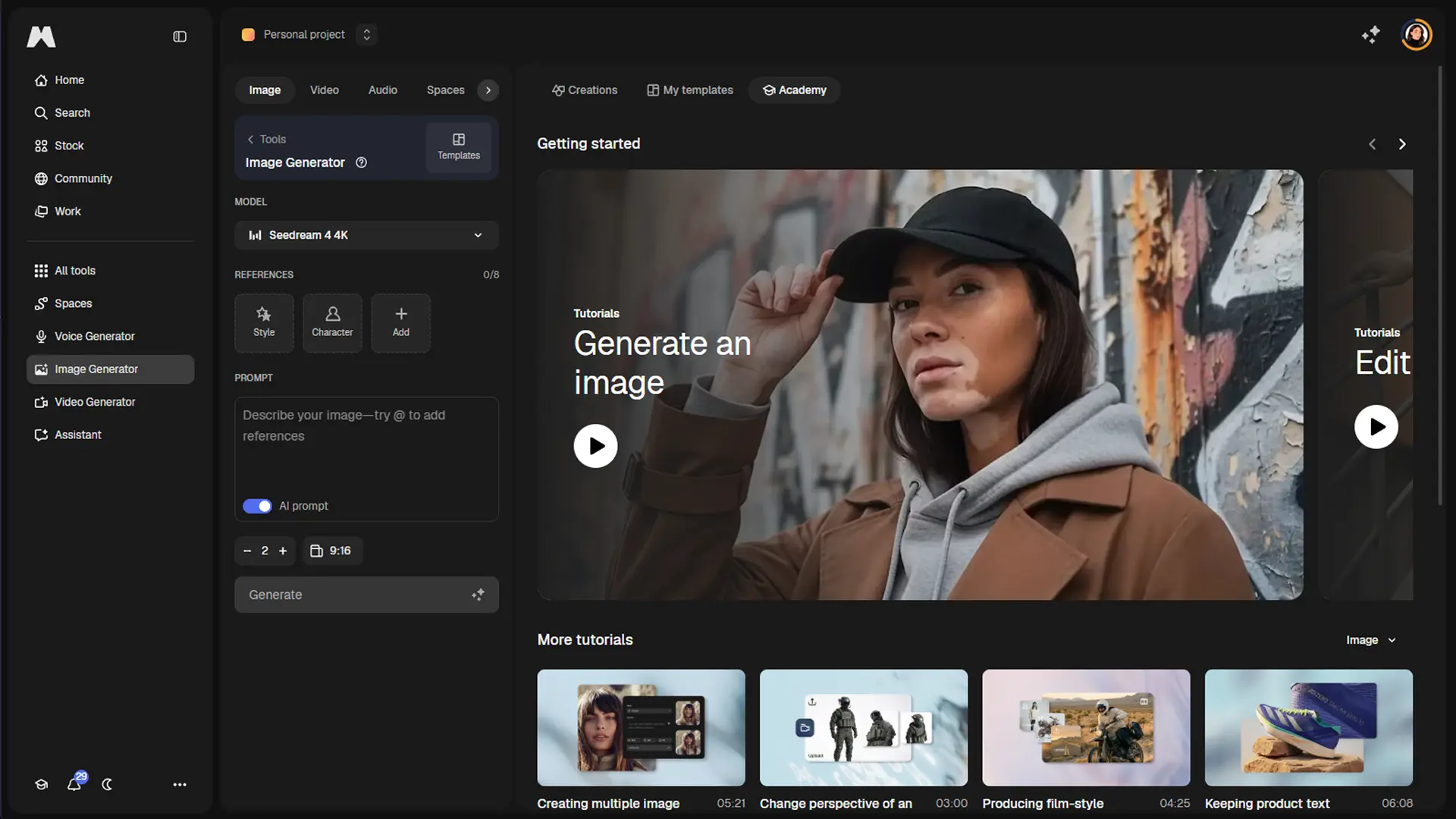
Open Magnific's Image Generator from the AI Suite or its direct app page.
- 2
Write a prompt
Describe the subject, style, lighting, composition, and mood you want the model to create.
- 3
Add references
Upload inspiration images or select Style, Character, Object, Color, Camera, and Effects references for more control.
- 4
Choose generation settings
Select a model, aspect ratio, number of images, and imagination level before generating.
- 5
Generate and refine
Generate the images, then download, edit, publish, create variations, or turn the result into a video or mockup.
- 6
Use custom training when consistency matters
Create a custom Character, Object, or Style by uploading a dataset and training a LoRA for reuse in future generations.
Who is Magnific AI Image Generator For?
Designers
Premium plans provide AI tools, stock content, commercial licensing, and higher generation capacity for professional design work.
Marketers
Magnific supports campaign visuals, product imagery, mockups, brand styles, and reusable creative workflows.
Content creators
Creators can generate images and videos, edit visuals, apply styles, and continue projects across web, desktop, and mobile.
Creative teams
Business and Enterprise plans provide shared credits, team management, roles, collaboration, and SSO.
E-commerce brands
Custom Objects and product-image workflows help create consistent product visuals without repeated photo shoots.
Frequently Asked Questions
Is Magnific AI Image Generator free?
Magnific offers a Free plan with limited daily access, including up to 20 AI image generations per day with its in-house model.
Can I generate images from reference images?
Yes. Upload one or more reference images and combine them with a text prompt to guide style, composition, subject, or mood.
Can Magnific create consistent characters or objects?
Yes. Custom Characters, Objects, and Styles use LoRA training to preserve visual identity across generations.
Does Magnific offer an API?
Yes. The Magnific API provides API-key authentication, REST endpoints, webhooks, and programmatic image, video, editing, and stock workflows.
Does Magnific have mobile and desktop apps?
Yes. Magnific has native iOS and Android apps plus a dedicated desktop application for macOS and Windows.
Does Magnific use uploaded content to train its models?
Magnific states that uploaded and generated content is not used to train or fine-tune its general models.
Community reviews
Be the first to share your experience.
Sign in to leave a review for Magnific AI Image Generator.
Magnific AI Image Generator Alternatives
Looking for alternatives to Magnific AI Image Generator? Here are similar tools in the same category:
Learn to Master Magnific AI Image Generator
With Skill Leap courses
Get in-depth training on Magnific AI Image Generator and 50+ other AI tools with our expert-led video courses.
Start 7-Day Free Trial