
Magnific AI Video Generator
Create punchy 4K clips from text or images.
Key Takeaways
- What it is
- Create punchy 4K clips from text or images.
- Pricing
- $20 per month · $45 per month · $280 per month · $69 per seat per month
- Best for
- Multi-model video generation
- Unified async workflow and API
- AI video upscaling to 4K
- Rating
- 4.3/5
What is Magnific AI Video Generator?
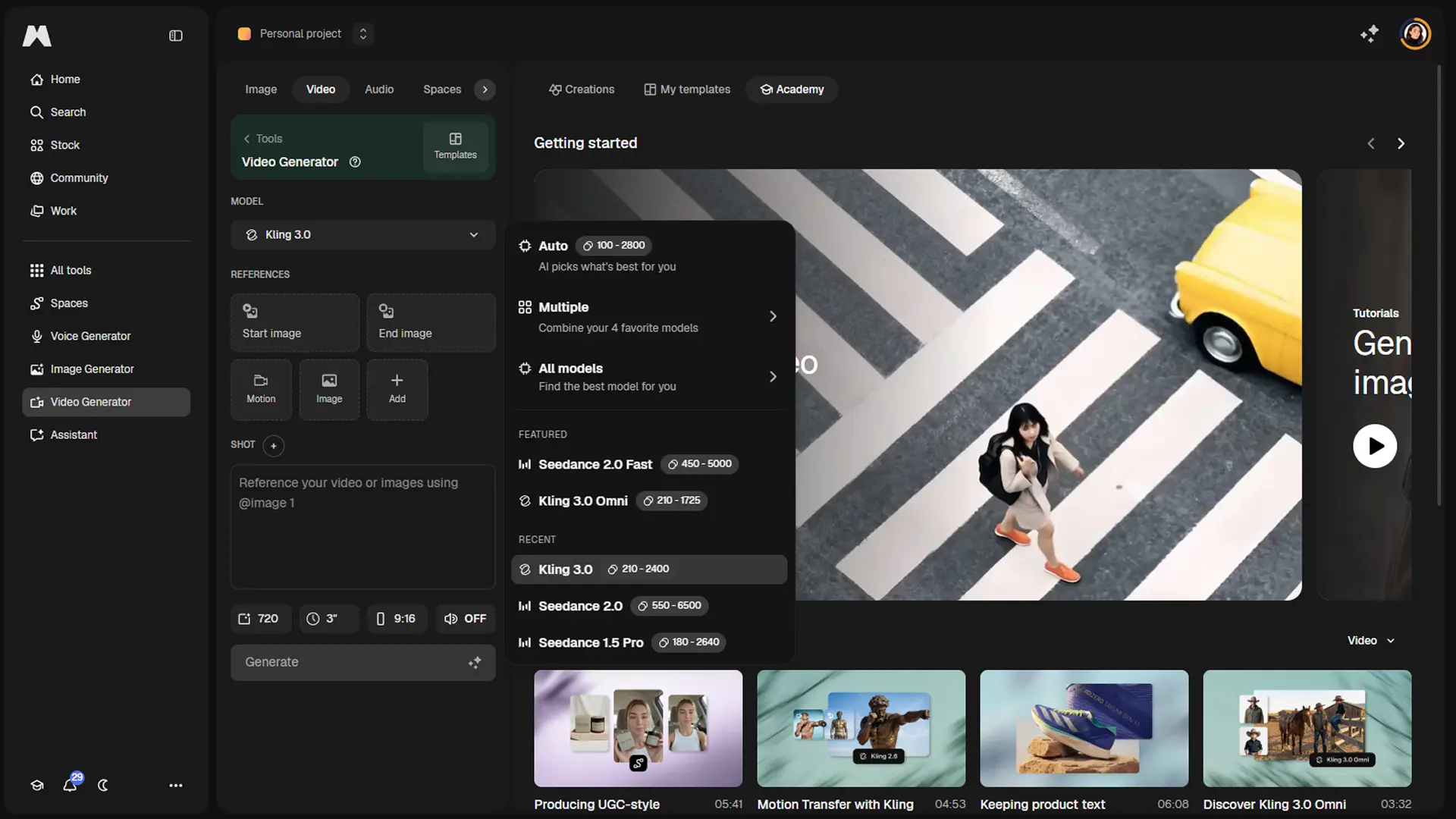
Magnific (formerly Freepik) AI Video Generator is part of the broader Magnific creative platform that combines image, video, and audio creation in one environment. It focuses on AI text to video and image to video generation, backed by several state-of-the-art models, plus an AI video upscaler that pushes footage up to 4K while adding or refining detail intelligently.
Magnific AI Video Generator stands out by pairing strong generative video models with its signature detail-oriented upscaling in a single creative stack. Users can generate clips from text or images, then refine them with precise control over resolution, frame rate, grain, and sharpness, instead of treating upscaling as a separate afterthought.
Magnific AI Video Generator offers a powerful mix of short-form generative video, 4K upscaling, and deep creative control, wrapped inside a broader platform that already serves demanding visual professionals. It is not the cheapest or simplest option, but for teams that care a lot about image quality and owning a single environment for images, video, and audio, it earns serious consideration.
Who is Using Magnific AI Video Generator?
Creative Studios and Production Agencies
Using it to prototype shots, motion tests, and high-detail shots for commercials and social campaigns.
Marketing and Brand Teams
Creating snappy product clips and social assets while keeping everything inside one creative platform.
Photographers, Illustrators, and 3D Artists
Turning stills into animated sequences and then refining them with familiar Magnific upscaling controls.
Developers and SaaS Builders
Embedding text to video and image to video creation directly into apps via the Magnific API.
Uncommon Use Cases
Adopted in design and media schools to teach motion promptcraft; explored by small game studios for rapid storyboard-style cutscene explorations.
Key Features
Rating Breakdown
Pricing Plans
Premium
$20 per month
- Billed monthly, includes 20,000 credits per month, 250M+ premium stock assets, image/video/audio models, shared workflow spaces, editing tools, music and sound effects generation, commercial AI license, and 250M+ photos, videos, vectors, and PSDs
Premium+
$45 per month
- Billed monthly, includes 45,000 credits per month, unlimited use on selected models, everything in Premium plus top-up credits anytime, music rights, and early access to AI features
Pro
$280 per month
- Billed monthly, includes 300,000 credits per month, unlimited use plus 20% cheaper credits, everything in Premium+ plus early AI feature access
Business
$69 per seat per month
- Billed monthly, screenshot shows 2 users selected, with 90,000 credits per month total for the team, plus shared team credit pool, 8 parallel generations per user, 3-month credit rollover, basic legal indemnification, SSO and usage reporting, company-wide certifications, and shared team spaces and projects
Which Magnific AI Video Generator plan should you pick?
Start with Free to explore, choose Premium for regular individual use, upgrade to Premium+ or Pro for heavier generation, and use Business or Enterprise for teams.
Free
Good for exploring Magnific with limited daily AI access and personal-use licensing.
Premium
Good for regular creators who need more credits, commercial licensing, and access to the broader AI suite.
Premium+
Good for power users who need higher credit allocation and unlimited generation on selected models.
Pro
Good for professionals scaling production who need maximum credits and the Merchandise License.
Business
Good for teams needing shared credits, collaborative Spaces and Projects, administration, and SSO.
Enterprise
Good for large organizations needing unlimited seats, advanced SSO, dedicated support, and custom terms.
Magnific AI Video Generator Use Cases
Text-to-video
Write a scene description, select a model, and generate a video clip.
Outcome: A generated AI video based on the prompt.
Image-to-video
Connect or upload a still image as a start frame and animate it.
Outcome: An animated video derived from the source image.
Keyframe interpolation
Provide start and end frames to generate the transition between them.
Outcome: A video connecting the two visual keyframes.
Storyboard to video
Generate multiple clips from scene descriptions and assemble them with Video Combiner.
Outcome: A longer sequence built from multiple AI-generated clips.
Speaking-character videos
Upload an image or video, provide a script or audio, and generate synchronized lip movement.
Outcome: A lip-synced speaking clip.
Workflow Ideas with Magnific AI Video Generator
Prompt to finished video
- 1Create a Text node with the scene description
- 2Connect it to a Video Generator node and choose a model
- 3Send the generated clip to the Video Project Editor for assembly and export
Still image to animated clip
- 1Upload an image or generate one with Image Generator
- 2Connect it to the Video Generator Start Frame input
- 3Generate and download the resulting animation
Storyboard with audio
- 1Generate multiple video clips from scene prompts
- 2Combine the clips with Video Combiner
- 3Add a Voiceover or music track using Video Audio Mix
How Magnific AI Video Generator fits into your stack
Browser
Magnific works as a browser-based creative suite for generating videos from text or images, editing media, and organizing projects.
Automation and APIs
The REST API supports programmatic image, video, audio, editing, and stock-content operations. Spaces provides node-based workflows, while MCP connects Magnific to AI assistants.
Desktop / IDE
Magnific offers native macOS and Windows desktop apps plus plugins for tools including After Effects, Premiere Pro, Photoshop, Figma, ComfyUI, and Affinity.
Team chat and tickets
Magnific's MCP documentation describes using connected AI assistants to retrieve Magnific assets and share them through Slack or place them into Gmail drafts.
Pros
- +High-end visual quality: Access to modern video models and an advanced upscaler yields crisp, detailed clips suitable for professional outputs.(docs.magnific.com)
- +Short-form flexibility: Multiple models and durations give creators options for teasers, ads, loops, and motion studies without switching tools.(docs.magnific.com)
- +Deep control over look and feel: Parameters for resolution, frame rate, sharpness, and detail help avoid the generic “AI look” that plagues some rivals.(docs.magnific.com)
- +Team-friendly ecosystem: Shared Spaces, real-time collaboration, and 250M+ assets make it attractive for studios and enterprise teams already living in Magnific.(producthunt.com)
Cons
- −Can feel complex at first: Multiple models, modes, and quality controls create a learning curve, especially for casual users.(docs.magnific.com)
- −Short clip focus: Official model durations top out around 10 to 15 seconds, so it is not a full long-form editor replacement.(docs.magnific.com)
- −Premium positioning: External reviews consistently describe Magnific as a higher-priced option, which may deter budget-sensitive creators.(tooldirectory.ai)
Limitations & when to consider alternatives
Known limitations
- Credit-based generation. Video generations consume credits, and costs vary by model, duration, resolution, and settings.
- Model-dependent controls. Available durations, aspect ratios, resolutions, audio options, and reference inputs vary by video model.
- Limited free access. The Free plan provides limited daily AI access, personal-use licensing, and required attribution.
- Unlimited access is selective. Unlimited generation applies only to selected models and configurations on eligible plans.
- Viewer role unavailable. The Projects documentation says the Viewer role is coming soon and is not yet available.
Look elsewhere when
- You need a standalone desktop application.
- You need programming-code generation.
- You need a dedicated browser extension.
How to Use Magnific AI Video Generator
- 1
Create or sign in to an account
Visit Magnific, sign in with email, Google, or Apple, and begin with the Free plan or select a paid plan.
- 2
Open Video Generator
Choose Video Generator from the AI Suite to create a clip from a text prompt or visual input.
- 3
Add a prompt or image
Describe the scene or upload a reference, start frame, end frame, or other supported input.
- 4
Choose a video model
Select a model and review its available duration, resolution, aspect ratio, audio, and credit requirements.
- 5
Generate and review
Run the generation, compare returned clips, and iterate with adjusted prompts or references.
- 6
Edit, combine, and export
Use the Video Project Editor to arrange clips, add audio, adjust timing, and export the finished project.
Who is Magnific AI Video Generator For?
Individual creators
Useful for exploring AI image, video, audio, editing, and stock-content tools from one platform.
Marketing teams
Supports campaign visuals, social-media content, advertisements, presentations, and shared team workflows.
Creative teams
Shared Projects and Spaces provide centralized assets, comments, permissions, and real-time collaboration.
Design agencies
Agencies can produce client deliverables across image, video, audio, and design workflows.
Large organizations
Enterprise plans provide unlimited seats, usage-based credits, SSO, dedicated support, and advanced administration.
Frequently Asked Questions
How does the AI Video Generator work?
Enter a text prompt or upload an image, choose a video model, then generate and download the result.
How many credits does video generation use?
Each video generation consumes credits, with the amount varying by the selected model.
Can Magnific generate videos from images?
Yes. Users can animate still images and use start-frame, end-frame, reference-image, or video-reference inputs depending on the model.
Does Magnific offer unlimited video generation?
Premium+, Business, and Pro plans include unlimited generation on selected models and resolutions; other generations consume credits.
Can teams collaborate on video projects?
Business and Enterprise users can share Projects or Spaces, collaborate in real time, and leave comments on video assets.
Is there an API for AI video generation?
Yes. Magnific provides documented REST API access with API keys, video-generation endpoints, parameters, and response schemas.
Community reviews
Be the first to share your experience.
Sign in to leave a review for Magnific AI Video Generator.
Magnific AI Video Generator Alternatives
Looking for alternatives to Magnific AI Video Generator? Here are similar tools in the same category:
Learn to Master Magnific AI Video Generator
With Skill Leap courses
Get in-depth training on Magnific AI Video Generator and 50+ other AI tools with our expert-led video courses.
Start 7-Day Free Trial