
Midjourney Prompt Helper
Unleash AI artistry with intuitive prompt crafting and optimization.
Key Takeaways
- What it is
- Unleash AI artistry with intuitive prompt crafting and optimization.
- Best for
- Prompt Customization
- User-Friendly Interface
- Save and Organize Prompts
- Rating
- 4.6/5
What is Midjourney Prompt Helper?
Midjourney Prompt Helper is a tool designed to complement the Midjourney AI-powered image generation bot, serving as an indispensable aid in prompt creation. It simplifies the often complex process of crafting prompts by providing an intuitive interface where users can select parameters, apply style presets, and manage prompt weightings effortlessly. Tailored for artists, designers, and enthusiasts, MidJourney Prompt Helper enhances creativity while streamlining the prompt creation process.
Midjourney Prompt Helper simplifies Midjourney's prompt system, making AI-powered image generation more accessible. Its AI optimization feature refines prompts for compelling visuals, setting it apart in the AI creative tools space.
Midjourney Prompt Helper is a user-friendly tool enhancing the Midjourney AI image generation bot experience. Its customization and AI optimization features unlock creative potential, making it essential for anyone seeking simplicity and power in prompt creation.
Who is Using Midjourney Prompt Helper?
Digital Artists
Exploring new artistic styles and effects.
Social Media Content Creators
Crafting unique visuals for posts and campaigns.
Graphic Designers
Enhancing design processes with AI-generated imagery.
Educators and Students
Using the tool for teaching AI and creative design.
Uncommon Use Cases
Game developers for concept art generation; Writers for visualizing scenes and characters.
Key Features
Rating Breakdown
Pricing Plans
Free Access
- Available for free
Subscription Options
- Additional features may be available for premium users
Which Midjourney Prompt Helper plan should you pick?
Start with the free account for basic prompt building; upgrade to PromptFolder Pro when you need paid features such as unlimited private prompts, optimization, image uploads, or bulk import/export.
PromptFolder Pro
Good for users who need unlimited private prompts, AI prompt optimization, advanced privacy settings, Midjourney image uploads, and bulk import/export.
Midjourney Prompt Helper Use Cases
Build a Midjourney image prompt
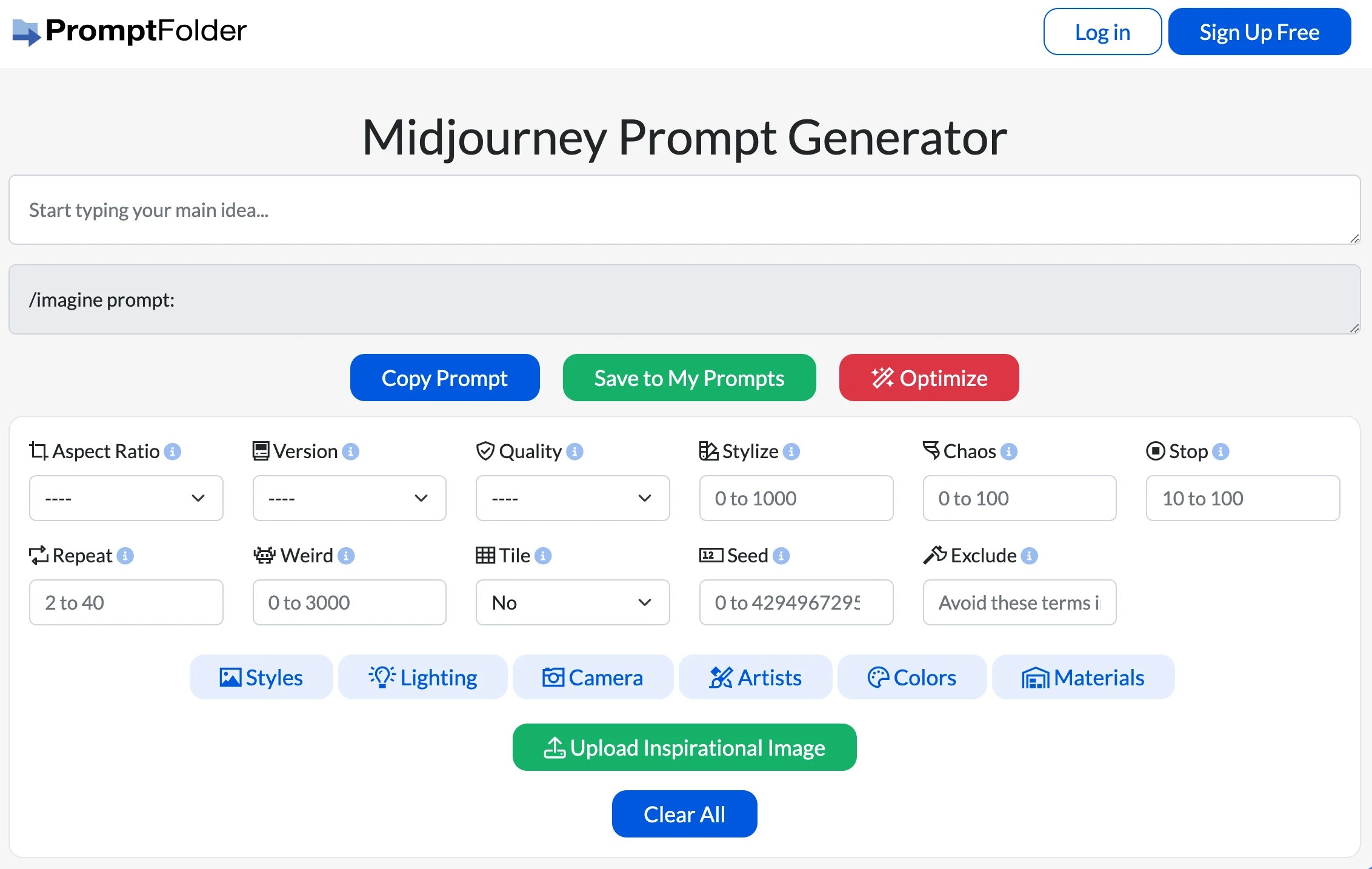
Enter a main image concept and combine it with style, lighting, camera, artist, color, and material choices.
Outcome: A formatted Midjourney prompt ready to copy.
Control image-generation parameters
Set aspect ratio, version, quality, stylize, chaos, stop, repeat, weird, tile, seed, and excluded terms.
Outcome: More precise control over the resulting Midjourney request.
Reuse saved prompts
Save completed prompts to a PromptFolder account for later access and reuse.
Outcome: A reusable personal prompt library.
Workflow Ideas with Midjourney Prompt Helper
Create and run a prompt
- 1Enter the main concept for the image
- 2Choose parameters and style presets
- 3Copy the prompt and run it in Midjourney
Save a reusable prompt
- 1Build the prompt with styles and parameters
- 2Copy or save the completed prompt
- 3Return to the PromptFolder account when needed
Refine a prompt with an image reference
- 1Enter the main image concept
- 2Upload an inspirational image
- 3Adjust the prompt and copy it into Midjourney
How Midjourney Prompt Helper fits into your stack
Midjourney Integration
Works seamlessly with the Midjourney bot.
Web-Based Platform
Accessible from any modern web browser.
Account Syncing
Users can save and manage prompts across devices.
Image Upload
Allows for inspirational image uploads to influence prompt styles.
Pros
- +Enhanced Creativity: Empowers users to experiment with various styles and settings without memorizing commands.
- +Time-Saving: Reduces the time spent on crafting complex prompts.
- +Convenient Organization: Helps users track and reuse prompts efficiently.
- +Accessibility: Streamlines the MidJourney experience for users of all skill levels.
Cons
- −Learning Curve: New users may need time to fully grasp and utilize all features effectively.
- −Dependency on MidJourney Bot: Its usefulness is tied directly to the MidJourney platform.
- −Online Requirement: Requires an internet connection to access and use features.
Limitations & when to consider alternatives
Known limitations
- It does not generate the final image. The helper creates prompt text; users copy it and run it in Midjourney.
- Saving prompts requires an account. The site instructs users to save prompts to a PromptFolder account for later access.
- The tool depends on Midjourney. The generated output is formatted for use in Midjourney rather than serving as a standalone image generator.
Look elsewhere when
- You need a dedicated image-generation application
- You need native mobile or desktop software
- You need shared team workspaces or enterprise identity controls
How to Use Midjourney Prompt Helper
- 1
Comprehensive tutorials are available on the tool’s website, guiding users through prompt creation.
Who is Midjourney Prompt Helper For?
AI art creators
The tool helps creators build Midjourney image prompts using style presets, parameters, and weighting controls.
Midjourney users
It is designed for people who need help remembering Midjourney’s parameters and styling options.
Frequently Asked Questions
How do I use the Midjourney Prompt Generator?
Enter your main image concept, choose parameters and style presets, then copy the generated prompt into Midjourney.
Can I save prompts for later?
Yes. Save prompts to your PromptFolder account so you can return to them later.
Can I upload an image?
Yes. The helper includes an Upload Inspirational Image control for adding an image reference.
What parameters can I configure?
You can configure aspect ratio, version, quality, stylize, chaos, stop, repeat, weird, tile, seed, and exclusions.
Community reviews
1 review from people who use Midjourney Prompt Helper.
Sign in to leave a review for Midjourney Prompt Helper.
Vex Watson
Midjourney Prompt Helper Alternatives
Looking for alternatives to Midjourney Prompt Helper? Here are similar tools in the same category:
Learn to Master Midjourney Prompt Helper
With Skill Leap courses
Get in-depth training on Midjourney Prompt Helper and 50+ other AI tools with our expert-led video courses.
Start 7-Day Free Trial