
MurmurCast
Condense YouTube, podcasts, newsletters into fast email briefs
Key Takeaways
- What it is
- Condense YouTube, podcasts, newsletters into fast email briefs
- Pricing
- Freemium · $8 per month, or $6 per month billed annually · $15 per month, or $12 per month billed annually · $49 per month, or $39 per month billed annually
- Best for
- Multi‑Source Aggregation
- Auto‑Transcription Engine
- AI Summaries
- Rating
- 4.3/5
What is MurmurCast?
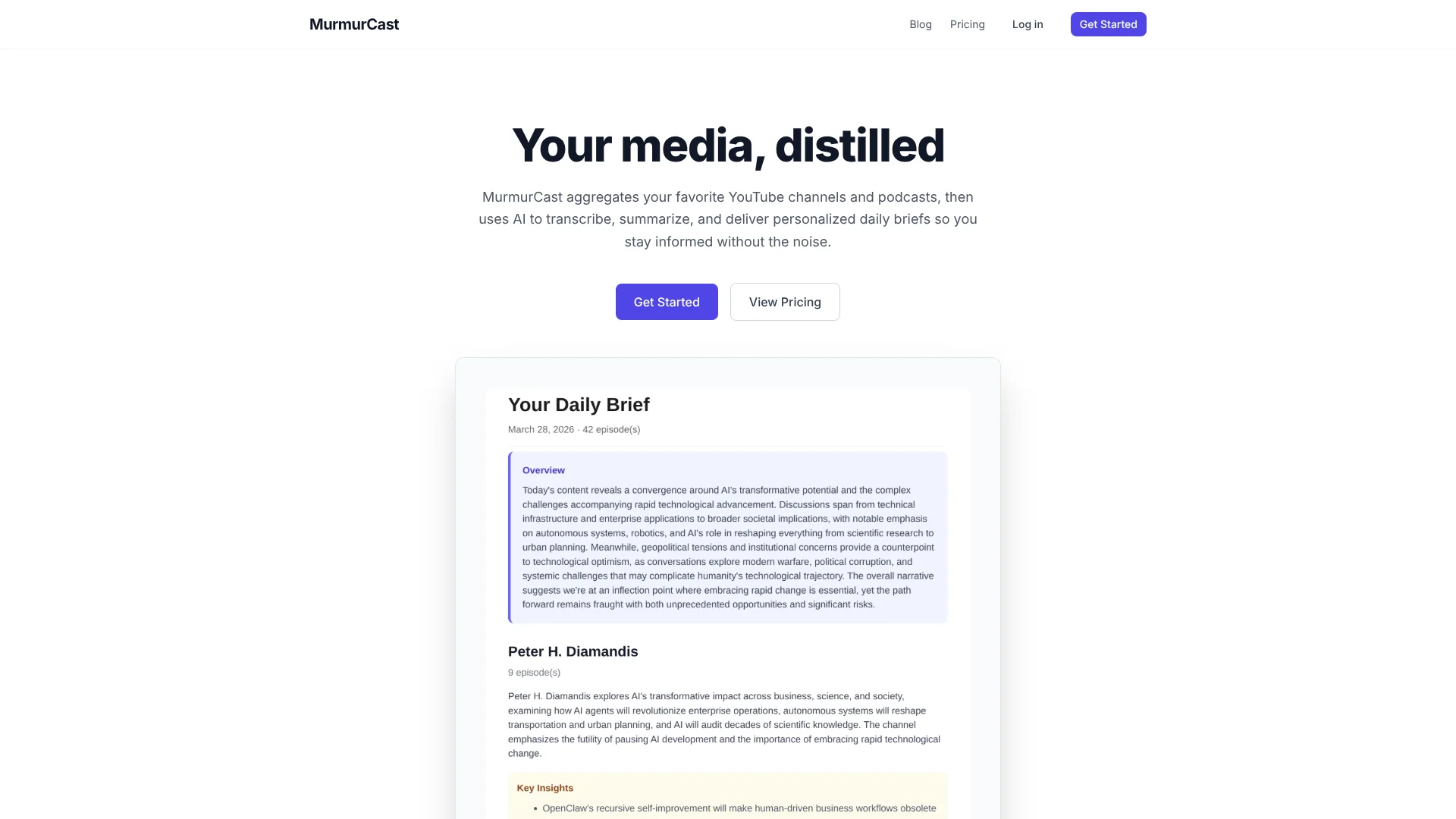
MurmurCast turns long-form YouTube channels, podcasts, and newsletters into concise, AI-generated daily briefs. It automatically pulls new episodes and issues from chosen sources, transcribes the audio, summarizes each item with large language models, and emails a tailored digest so users can decide what deserves full attention without sitting through every minute of content.
MurmurCast focuses on a very specific pain: personal media overload from channels users already follow. Instead of just summarizing one video at a time, it acts like a private briefing assistant that watches those sources, transcribes everything, ranks it by usefulness, and then sends a tight, human‑readable brief. The combination of AI transcription, summarization, search, and channel scoring wrapped into a daily email gives it a distinctive “stop watching, start knowing” flavor that feels especially appealing to heavy YouTube and podcast consumers.
Who is Using MurmurCast?
Knowledge Workers and Consultants
Using it to track industry podcasts and explainer channels without burning mornings on playback.
Founders and Investors
Following startup interviews, tech news channels, and niche shows to spot trends and signals quickly.
Researchers and Students
Turning long lectures, interviews, and deep‑dive episodes into searchable study material and quick refreshers.
Content Creators and Marketers
Monitoring competitor channels, thought leaders, and audience‑favorite shows for ideas and messaging cues.
Uncommon Use Cases
Used by conference organizers to keep tabs on invited speakers’ recent appearances; adopted by language learners who pair transcripts with original content to boost listening skills.
Key Features
Rating Breakdown
Pricing Plans
Free
Free
- Includes 5 sources, 30 episodes per month, 30 Whisper transcriptions per month, AI summaries and transcripts, full-text search, daily brief email, manual URL transcription, and podcast support
Starter
$8 per month, or $6 per month billed annually
- Includes 10 sources, 60 episodes per month, 50 Whisper transcriptions per month, and everything in Free
Pro
$15 per month, or $12 per month billed annually
- Includes 30 sources, 150 episodes per month, 150 Whisper transcriptions per month, and everything in Starter
Power
$49 per month, or $39 per month billed annually
- Includes 100 sources, 500 episodes per month, 500 Whisper transcriptions per month, and everything in Pro
Which MurmurCast plan should you pick?
Start with Free to test the workflow; upgrade to Starter, Pro, or Power when source, episode, transcription, video-length, or search-answer limits become restrictive.
Free
Good for trying MurmurCast with up to 5 sources, 20 episodes per month, 20 podcast transcriptions, and videos up to 3 hours.
Starter
Good for casual listeners who need 10 sources, 60 episodes per month, and videos up to 6 hours.
Pro
Good for knowledge workers following many creators who need 30 sources, 150 episodes per month, and videos up to 9 hours.
Power
Good for heavy consumers, researchers, and content professionals who need 100 sources, 500 episodes per month, and videos up to 24 hours.
MurmurCast Use Cases
Daily media monitoring
Subscribe to YouTube channels, podcasts, newsletters, research papers, or filings and let MurmurCast process new material automatically.
Outcome: A consolidated daily brief delivered by email.
YouTube video summarization
Paste a YouTube URL to obtain a full transcript and AI-generated summary.
Outcome: Quick understanding without watching the entire video.
Podcast catch-up
Process new podcast episodes and review their transcripts and summaries.
Outcome: Faster review of long-form audio.
Research discovery
Search across stored transcripts and summaries to locate earlier discussions, ideas, or source material.
Outcome: Relevant insights found without manually revisiting every episode.
Channel prioritization
Use Smart Channel Ranking, which scores YouTube channels by transcription value.
Outcome: A clearer indication of which channels may be worth following.
Workflow Ideas with MurmurCast
Automated daily briefing
- 1Connect or select recurring YouTube, podcast, and newsletter sources
- 2Let MurmurCast monitor and process newly published content
- 3Read the personalized daily email brief
One-off YouTube research
- 1Paste a YouTube URL into MurmurCast
- 2Receive the full transcript and generated summary
- 3Use the transcript or summary to decide whether deeper viewing is needed
Searchable knowledge review
- 1Accumulate transcripts and summaries from subscribed sources
- 2Search the full-text index for a remembered topic or insight
- 3Open the relevant summary or source for further review
How MurmurCast fits into your stack
Browser
MurmurCast is accessed through an account-based web experience for managing sources, viewing summaries, searching transcripts, and requesting on-demand YouTube transcription.
Its primary delivery surface is the inbox: personalized daily briefs summarize newly processed videos, podcasts, articles, papers, filings, and newsletters.
Pros
- +Serious Time Saver: Condenses hours of video and audio into a short daily briefing, ideal for people drowning in subscriptions.
- +Inbox‑First Experience: Delivers value through email, so users do not need to remember another dashboard or app.
- +High Information Density: AI summaries and channel ranking both push signal over noise, making it easier to focus on impactful sources.
- +Great for Note‑Takers: Full transcripts plus search give power users an ongoing reference library for research, content creation, or learning.
- +Low Friction Entry: On‑demand YouTube transcription works even for single videos, which suits one‑off research and quick checks.
Cons
- −Source Scope Still Limited: Currently centers on YouTube, podcasts, and newsletters, so users who rely heavily on social feeds or blogs may need extra tools.
- −Email‑Only Delivery: No separate mobile app or podcast‑style audio brief advertised yet, which some users might prefer.
- −Few Customization Knobs: Public messaging focuses on summaries and ranking, not on fine‑grained control of tone, length, or level of technical depth.
Limitations & when to consider alternatives
Known limitations
- Source limits vary by plan. The plans allow 5 sources on Free, 10 on Starter, 30 on Pro, and 100 on Power.
- Monthly episode quotas. Monthly episode limits range from 20 on Free to 500 on Power.
- Podcast transcription quotas. Podcast transcription limits range from 20 per month on Free to 500 per month on Power.
- Video-duration limits. Maximum video length ranges from 3 hours on Free to 24 hours on Power.
- Current ingestion is structured-source focused. The current pipeline processes RSS feeds, YouTube channels, and newsletter inboxes; broader unstructured-source ingestion is described as being built toward.
How to Use MurmurCast
- 1
Choose a starting plan
Begin with the Free plan to test daily briefs, summaries, transcripts, search, and podcast support before upgrading.
- 2
Add your information sources
Select the YouTube channels, podcasts, newsletters, papers, or filings you want MurmurCast to monitor.
- 3
Let content process automatically
MurmurCast monitors new content, retrieves it, transcribes audio or video, and generates summaries.
- 4
Read the daily brief
Review the personalized email digest to identify which new episodes, articles, or filings deserve attention.
- 5
Use on-demand transcription
Paste a YouTube URL when you need a transcript and summary for content outside your subscribed channels.
- 6
Search accumulated knowledge
Use full-text search across transcripts and summaries to retrieve earlier insights and source material.
Who is MurmurCast For?
Casual listeners
The Starter plan is positioned for casual listeners who want more capacity than the free tier.
Knowledge workers
The Pro plan is aimed at knowledge workers who follow many creators and need higher source and episode limits.
Heavy consumers
The Power plan is designed for heavy consumers who process large volumes of media.
Researchers
MurmurCast supports research-oriented monitoring through summaries, transcripts, full-text search, and source tracking.
Content professionals
The Power plan is also positioned for content professionals who need up to 100 sources and 24-hour videos.
Frequently Asked Questions
What does MurmurCast do?
It monitors selected YouTube channels, podcasts, and newsletters, then transcribes or extracts content, summarizes it, and delivers a daily email brief.
Can I use MurmurCast for one-off content?
Yes. You can paste any YouTube URL to receive a full transcript and summary without subscribing to the channel.
Does MurmurCast support podcasts?
Yes. Podcast support and podcast transcription quotas are included in every listed plan.
Can I search my processed content?
Yes. MurmurCast provides full-text search across transcripts and summaries, with daily limits for AI-generated search answers.
How long can videos be?
The limit depends on the plan: up to 3 hours on Free, 6 hours on Starter, 9 hours on Pro, and 24 hours on Power.
What happens to stored transcripts and summaries?
They are retained according to subscription-plan limits and permanently removed when the account is deleted.
Community reviews
Be the first to share your experience.
Sign in to leave a review for MurmurCast.
MurmurCast Alternatives
Looking for alternatives to MurmurCast? Here are similar tools in the same category:
Learn to Master MurmurCast
With Skill Leap courses
Get in-depth training on MurmurCast and 50+ other AI tools with our expert-led video courses.
Start 7-Day Free Trial