
Nimbalyst
Edit code, docs, diagrams with inspectable AI changes.
Key Takeaways
- What it is
- Edit code, docs, diagrams with inspectable AI changes.
- Pricing
- Freemium
- Best for
- Agent powered visual editors
- Inline AI diff review
- Parallel session and task management
- Rating
- 4.5/5
What is Nimbalyst?
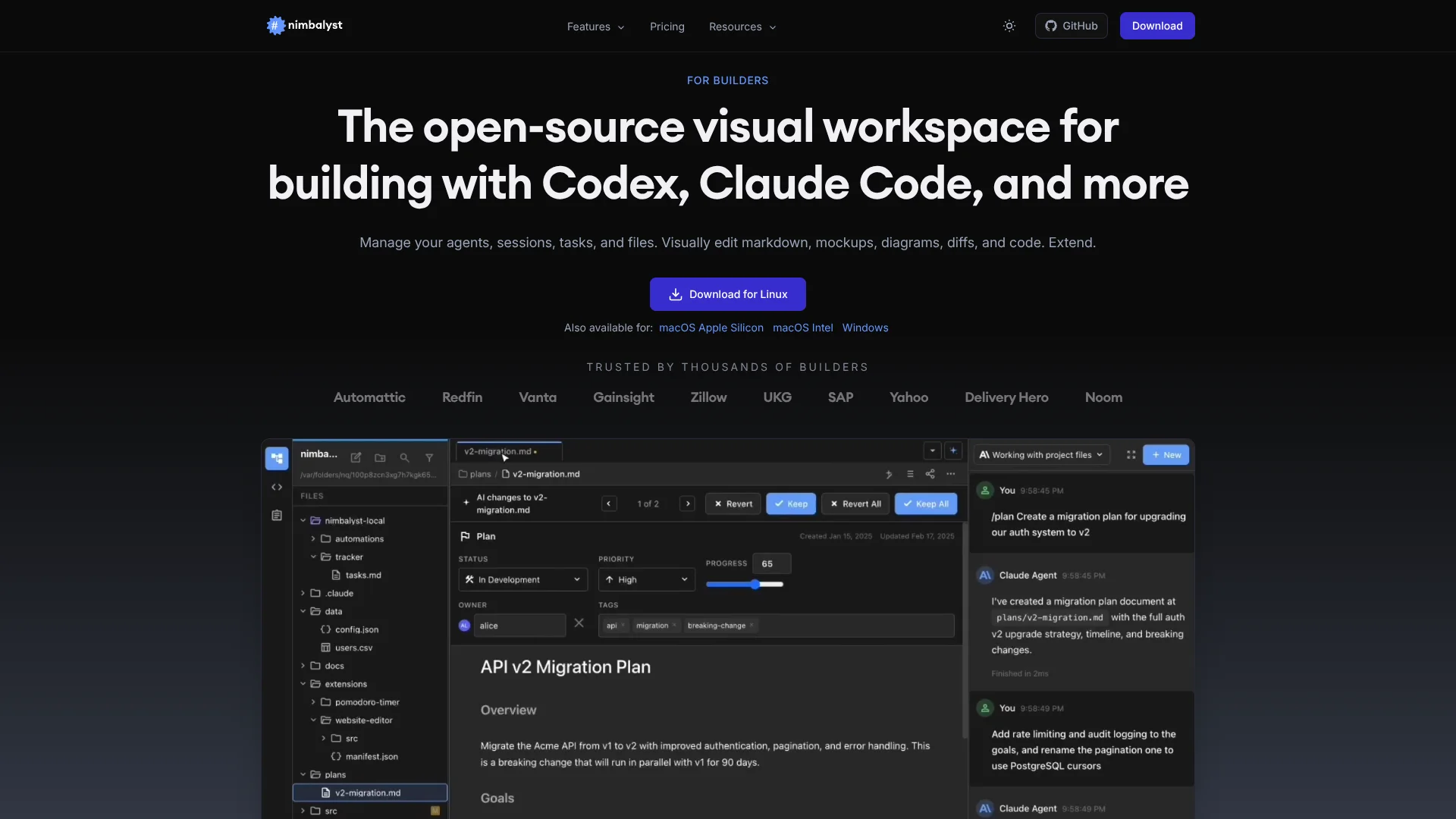
Nimbalyst at https://nimbalyst.com is an open source visual workspace for AI coding agents such as Claude Code and OpenAI Codex. It brings together a Monaco based code editor, rich visual file editors, and an AI session manager so developers can run agentic development workflows with clear visibility and control instead of opaque terminal runs.
Nimbalyst treats Claude Code and Codex as long running collaborators that work inside a shared, visual project hub. The blend of inline diffs, kanban style session management, integrated task tracking, and multi format visual editors gives AI coding a control surface that feels closer to an IDE built around agents rather than a code editor with an AI plugin bolted on. Its open source model and extension marketplace add a strong customization story for teams that want to shape their own agentic tooling.
Nimbalyst delivers a focused environment for anyone serious about working with Claude Code and Codex as day to day coding partners. By putting visual editors, agent sessions, tasks, and Git aware diffs into one open source desktop app, it cuts down on tool sprawl while keeping humans firmly in the loop on every AI change. For solo developers and small teams exploring agentic development, especially those already paying for Claude or Codex, it is a compelling way to turn raw AI coding agents into a controlled, repeatable workflow.
Who is Using Nimbalyst?
Software Developers and Engineers
Running Claude Code or Codex sessions for features, refactors, and debugging with guarded diffs and Git integration.
Product Managers and Designers
Drafting PRDs, mockups, and diagrams while asking agents to refine copy and generate matching UI code.
Data and Analytics Practitioners
Cleaning and reshaping CSVs, enriching datasets, and documenting pipelines inside one AI aware project space.
Engineering Managers and Tech Leads
Coordinating multi track work, supervising agent sessions on a kanban board, and reviewing proposed changes before merging.
Uncommon Use Cases
Used by early stage founders as a $0 AI assisted office suite for docs and planning; adopted by educators demonstrating modern agentic development workflows in class.
Key Features
Rating Breakdown
Pricing Plans
Individual
Free
- Includes the open-source visual workspace for Codex, Claude Code, OpenCode, and Copilot agents
- WYSIWYG markdown editor
- Mockups and diagram tools
- Session manager
- Agent-powered task management
- Code editor and terminal
- Extensions
- Mobile app
- MCP server support
- File sharing
Team
- Includes everything in Individual, plus team collaboration on tracked items and tasks, and multiplayer collaboration features.Disclaimer: Please note that pricing information may not be up to date. For the most accurate and current pricing details, refer to the official Nimbalyst website
Which Nimbalyst plan should you pick?
Start with Individual for personal work and upgrade to Teams when you need real-time shared documents, trackers, diagrams, and team chat.
Individual
Good for individuals who need the full local workspace, visual editors, coding-agent sessions, task tracking, code tools, extensions, and mobile session management.
Teams
Good for teams who need real-time collaboration on shared documents, mockups, diagrams, trackers, and team chat. Listed at $20 per user per month or $200 per user per year, and free during beta.
Enterprise
Good for organizations that need a collaboration server in their own cloud, data residency controls, restricted source availability, governed model and spend controls, and deployment support.
Nimbalyst Use Cases
Debug and fix software
Paste stack traces, investigate the codebase, run tests, and iterate with Claude Code or Codex.
Outcome: Identify root causes and work toward a green test suite.
Plan and implement features
Create plans and specifications, build mockups or diagrams, and direct agents against the related files.
Outcome: Keep planning context beside implementation work.
Review and refactor code
Ask agents to review branches or refactor code, then inspect file-by-file diffs before committing.
Outcome: Make incremental changes with human review.
Create data models
Use the data-model editor and AI to design schemas from code and markdown documentation.
Outcome: Export schemas as Prisma, SQL DDL, JSON Schema, DBML, or JSON.
Manage parallel agent sessions
Run multiple Claude Code and Codex sessions, organize them on a board, and resume or branch prior sessions.
Outcome: Coordinate parallel coding work with session history and status visibility.
Workflow Ideas with Nimbalyst
Feature delivery
- 1Write a feature plan or specification in the markdown editor
- 2Ask Claude Code or Codex to implement the feature and update related files
- 3Review inline diffs, run tests in the terminal, and commit the approved changes
Bug investigation
- 1Paste the stack trace or bug description into a session
- 2Have the agent inspect the codebase and propose or implement a fix
- 3Run tests, review the resulting diffs, and commit the fix
Design-to-code workflow
- 1Create a mockup or diagram with the visual editors
- 2Ask an agent to implement the design in the codebase
- 3Preview the result in the Chromium pane and iterate on the files
How Nimbalyst fits into your stack
Desktop / IDE
Nimbalyst is primarily a local desktop workspace for macOS, Windows, and Linux. It combines coding-agent sessions, code editing, terminals, Git workflows, diffs, and isolated worktrees in one application.
Browser
The product includes shared documents that open in a browser and a Chromium browser pane for previewing live pages. Its Chrome Web Clipper can send selected web pages to the local Nimbalyst desktop app as Markdown.
Docs and writing
Nimbalyst provides WYSIWYG Markdown editing with AI-assisted drafting, document changes shown as reviewable diffs, and linked plans, trackers, diagrams, mockups, and code.
Knowledge and files
Projects remain in the local file system using ordinary formats such as Markdown, code, CSV, PDFs, diagrams, mockups, and data models. Git, GitHub, GitLab, Bitbucket, and MCP-connected services can extend access to project knowledge and files.
Team chat and tickets
Nimbalyst Teams adds shared documents, collaborative trackers and kanban boards, team chat, and agents working against the same shared workspace. MCP templates connect agents with services including Slack, Linear, GitHub, Notion, Asana, and Jira.
Pros
- +High control over agent output: Diff first workflow and file sidebar make AI activity auditable instead of mysterious.
- +Strong fit for multi file work: Full project context and worktree isolation suit refactors, migrations, and parallel experiments.
- +Replaces several productivity tools: Markdown, diagrams, mockups, CSV editing, and task tracking live in one AI aware environment.
- +Very attractive for solo users: Individual plan at $0 per month keeps costs focused on API usage rather than tooling.
Cons
- −Bring your own AI costs: Users must pay separately for Claude Code, Codex, or other model access, which can be significant at scale.
- −Agent focus is opinionated: Best experience is with Claude Code and Codex; other agents are early or experimental.
- −Learning curve for newcomers: Concepts like worktrees, session kanban, and multiple visual editors may feel heavy at first.
Limitations & when to consider alternatives
Known limitations
- AI provider access is separate. Nimbalyst provides the workspace, but users must supply or authenticate an existing Claude Code, Codex, Anthropic, OpenAI, or local-model setup.
- AI features require internet except LM Studio. The documentation says full markdown editing works offline, while AI features require internet unless using LM Studio.
- Mobile is for monitoring and review. The iOS app is positioned for session monitoring, diff review, chat, and steering rather than as a full desktop editor.
- Some providers are alpha. OpenCode and GitHub Copilot are available as alpha providers, so their integrations may be less mature.
- Diff review is editor-dependent. Inline diffs are supported in markdown, code, and mockup editors; editors such as Excalidraw and data models do not render diffs.
Look elsewhere when
- You need a browser-based workspace instead of a desktop application.
- You need built-in AI model access rather than bringing your own provider subscription or API key.
- You need a multilingual interface beyond English.
How to Use Nimbalyst
- 1
Install the desktop app
Download the macOS, Windows, or Linux installer, then open or create a project folder.
- 2
Connect an agent
Configure Claude Code or Codex through an existing subscription, CLI authentication, or an API key.
- 3
Open or create an artifact
Work in markdown, code, diagrams, mockups, data models, spreadsheets, CSV files, or other supported editors.
- 4
Run an agent session
Ask Claude Code or Codex to research, plan, edit files, implement features, or update tasks from the workspace.
- 5
Review the result
Inspect the files touched by the session and review red/green diffs in supported editors before accepting changes.
- 6
Track and continue work
Use the session manager, tracker, Git integration, worktrees, mobile app, or team workspace to resume and coordinate ongoing work.
Who is Nimbalyst For?
Developers
Run several coding agents on isolated branches, review changes as diffs, and manage code, tasks, and sessions in one workspace.
Product managers
Write specifications, sketch screens, direct agents, and track engineering progress without living in a terminal.
Designers
Create mockups, prototypes, design systems, and user-flow diagrams with coding agents.
Marketing teams
Manage briefs, research, calendars, mockups, and website work on shared files with agents.
Research and science teams
Keep methods, analysis code, data, calculations, and diagrams together in a local-first workspace.
Frequently Asked Questions
Is Nimbalyst free?
The Individual plan is free with no feature limits or trial period. Teams is a paid collaboration plan and is free while in beta.
Which coding agents does Nimbalyst support?
Claude Code and OpenAI Codex are first-class providers. OpenCode and GitHub Copilot are available as alpha providers.
What platforms does Nimbalyst run on?
Nimbalyst runs as a desktop app on macOS, Windows, and Linux, with an iOS app for monitoring sessions and reviewing work.
Do I need an API key to use Nimbalyst?
No. You can authenticate with an existing Claude or ChatGPT subscription; API keys are supported as an alternative.
Can I run several agents at once?
Yes. Nimbalyst supports parallel sessions, searchable session history, branching, archiving, and optional Git worktree isolation.
How does Nimbalyst handle agent changes?
Agent edits appear as red and green inline diffs in supported editors so you can keep, revert, or edit changes before committing.
Community reviews
Be the first to share your experience.
Sign in to leave a review for Nimbalyst.
Nimbalyst Alternatives
Looking for alternatives to Nimbalyst? Here are similar tools in the same category:
Learn to Master Nimbalyst
With Skill Leap courses
Get in-depth training on Nimbalyst and 50+ other AI tools with our expert-led video courses.
Start 7-Day Free Trial