
OSS Insight
Unleash GitHub data insights with AI-powered SQL and real-time analytics.
Key Takeaways
- What it is
- Unleash GitHub data insights with AI-powered SQL and real-time analytics.
- Best for
- AI-Powered Query Generation
- Real-Time Data Updates
- Interactive Visualizations
- Rating
- 4.5/5
What is OSS Insight?
OSS Insight is a cutting-edge platform that transforms the way we understand and interact with GitHub event data. It's a powerful tool that leverages AI-generated SQL to unearth insights from massive datasets, making it invaluable for developers, project managers, and data analysts who rely on GitHub for their software development projects. Its core purpose is to provide a user-friendly interface that allows both SQL experts and novices to explore GitHub data with ease, offering insights that can inform strategic decisions and improve efficiency.
OSS Insight stands out with its AI-powered SQL generation, democratizing data analysis by enabling users without SQL knowledge to conduct complex queries. Its integration with TiDB Cloud, which supports massive datasets and complex analytical queries, sets it apart in the realm of GitHub data exploration tools.
OSS Insight excels in bridging the gap between complex data analysis and user accessibility, establishing itself as an essential tool for anyone looking to delve into GitHub's treasure trove of data. Its innovative AI-powered query generation and real-time data updates facilitate a seamless and insightful exploration of GitHub events. Whether you're a seasoned data analyst or a developer eager to gain insights from GitHub data, OSS Insight provides a unique and powerful platform to meet your needs.
Who is Using OSS Insight?
Software Developers
Analyzing contribution trends and repository activity.
Data Scientists
Mining GitHub for research and data-driven insights.
Project Managers
Monitoring project health and contributor engagement.
Open Source Contributors
Identifying popular projects and potential collaboration opportunities.
Uncommon Use Cases
Academic researchers tracking software development trends; HR professionals scouting for talent based on GitHub contributions.
Key Features
Rating Breakdown
Pricing Plans
Free Access
- OSS Insight offers its services free of charge
- Providing valuable data without financial barriers
OSS Insight Use Cases
Explore GitHub trends
Ask natural-language questions about millions or billions of GitHub events.
Outcome: Receive generated SQL and visualized results.
Analyze a repository
Review stars, forks, issues, commits, pull requests, contributors, code changes, and historical trends.
Outcome: Understand repository popularity and development activity.
Analyze developer contributions
Inspect contribution behavior, work cadence, code reviews, issues, and activity across public repositories.
Outcome: Gain insight into developer productivity and collaboration.
Compare projects
Compare two GitHub projects using repository analytics metrics.
Outcome: Identify relative differences in popularity and development activity.
Embed analytics in README files
Create real-time repository or developer widgets for GitHub README.md files.
Outcome: Publish live contribution and repository insights within a README.
Workflow Ideas with OSS Insight
Investigate repository health
- 1Enter a repository or select a repository analytics page
- 2Review stars, issues, pull requests, commits, contributors, and historical trends
- 3Use geography and company distributions to understand the surrounding community
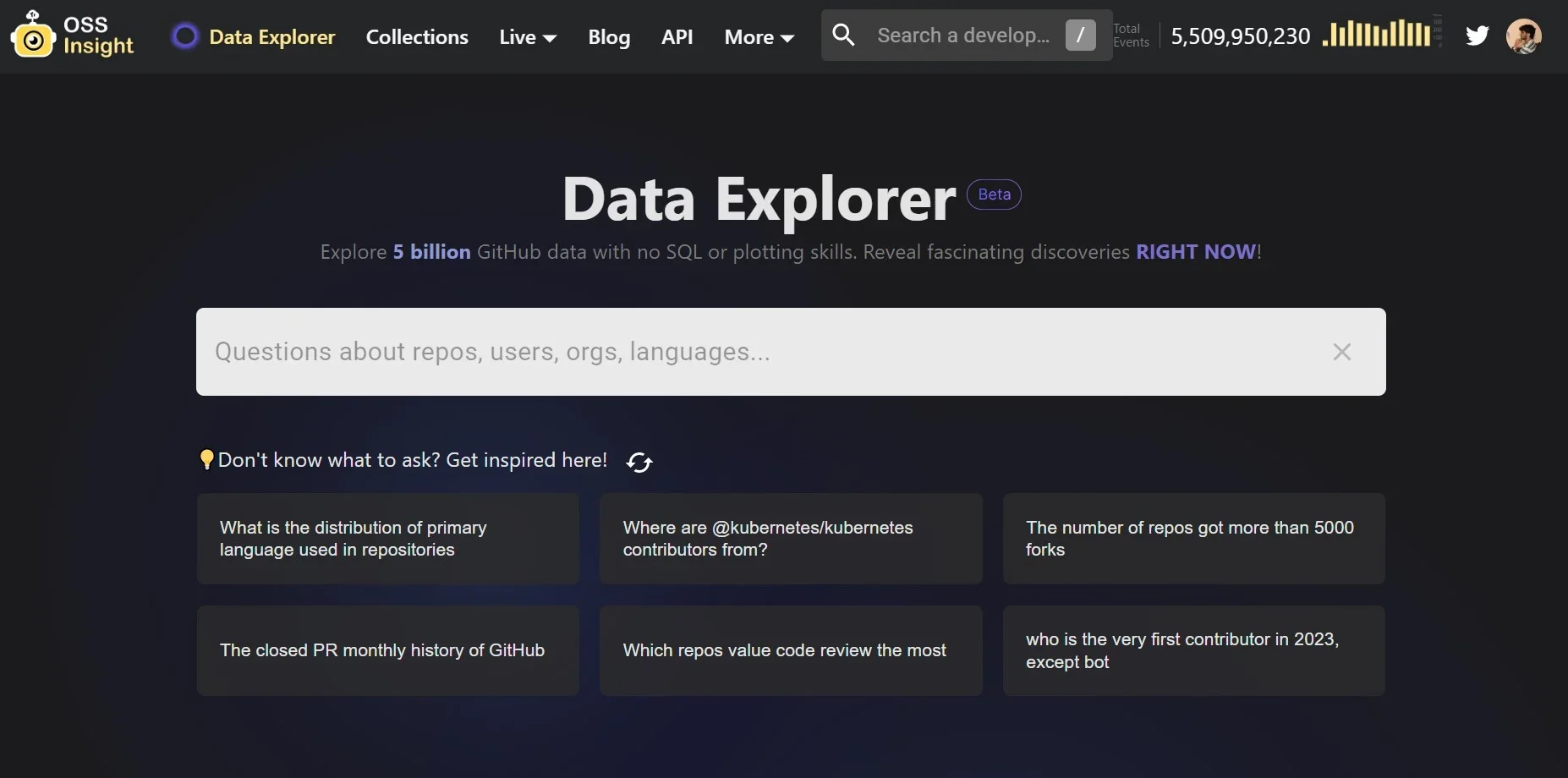
Explore a GitHub question with AI
- 1Enter a clear natural-language question using GitHub terms
- 2Let Data Explorer translate the question into SQL
- 3Review the generated query and visualized result
Publish a project insight widget
- 1Enter a repository or developer name in the widget builder
- 2Select an available analytics widget
- 3Copy the generated code into a GitHub README.md file
How OSS Insight fits into your stack
GH Archive Data Integration
Utilizes comprehensive GitHub event data since 2011 for in-depth analysis.
GitHub Event API
Offers real-time data updates for up-to-the-minute insights.
Data Visualization Tools
Employs tools like Apache ECharts for interactive data representation.
User Customization
Provides options for users to create and share custom widgets tailored to their data interests.
Pros
- +Innovative Data Exploration: Simplifies the discovery of trends and patterns in GitHub data.
- +Time-Saving: Reduces the time needed to craft complex SQL queries manually.
- +Educational Resource: Acts as a learning platform for understanding GitHub's database structure.
- +Community Engagement: Encourages sharing insights and collaborating through user-friendly widgets.
Cons
- −Learning Curve for Advanced Features: New users may need time to fully leverage the tool's capabilities.
- −Limited to Public GitHub Data: Relies solely on public event data, which may not cover all use cases.
- −AI Limitations: The AI may sometimes struggle with context or producing the most efficient queries.
Limitations & when to consider alternatives
Known limitations
- Public GitHub data only. The Data Explorer relies on GH Archive and GitHub public-event data, so questions outside that dataset may not produce satisfactory answers.
- AI context limitations. The AI may lack knowledge of database structure or domain context and may generate inefficient SQL for large or complex queries.
- Occasional service instability. The official FAQ identifies service instability as a limitation of the AI-powered Data Explorer.
- Question-rate limit. The Data Explorer documents a limit of up to 15 questions per hour.
- Metrics may differ from GitHub. Differences can result from missing events, repository visibility changes, GitHub data issues, or renamed users and repositories.
How to Use OSS Insight
- 1
Access a range of tutorials, from a 10-minute overview to a 25-minute workshop, designed to help users quickly get started and make the most out of OSS Insight.
Who is OSS Insight For?
Open-source developers
They can analyze developer productivity, contribution behavior, work cadence, code reviews, issues, and collaboration.
Repository maintainers
They can monitor repository popularity, activity, historical trends, issue and pull-request timing, and contributor geography.
Open-source organizations
They can examine participation, productivity, issue management, company affiliations, and organization-level repository activity.
Technology researchers
They can explore technical collections, historical rankings, trends, and open-source landscapes.
Users without SQL skills
The AI Data Explorer converts natural-language GitHub questions into SQL and visualizes the results.
Frequently Asked Questions
What is OSSInsight?
OSSInsight is a free analytics platform for analyzing GitHub repositories, developers, organizations, trends, and community activity.
How does OSSInsight analyze repositories?
It analyzes GitHub event data, including stars, forks, issues, commits, pull requests, contributors, reviews, geography, and company affiliations.
What data does OSSInsight use?
Historical data comes from GH Archive, while realtime data comes from GitHub’s public events API.
Can I use the AI-powered feature with my own dataset?
The Data Explorer FAQ directs users to Chat2Query in TiDB Cloud for exploring other datasets.
What are the Data Explorer limitations?
The AI may lack database or domain context, produce inefficient SQL for complex queries, experience instability, or be limited by the public GitHub dataset.
Why did an SQL query fail?
Possible causes include misunderstood questions, network issues, excessive requests, incorrect SQL, or unavailable data; the documented limit is 15 questions per hour.
Community reviews
Be the first to share your experience.
Sign in to leave a review for OSS Insight.
OSS Insight Alternatives
Looking for alternatives to OSS Insight? Here are similar tools in the same category:
Learn to Master OSS Insight
With Skill Leap courses
Get in-depth training on OSS Insight and 50+ other AI tools with our expert-led video courses.
Start 7-Day Free Trial