
Overchat AI
Chat, write, design images, craft short videos together
Key Takeaways
- What it is
- Chat, write, design images, craft short videos together
- Pricing
- Freemium · $59.99 per year
- Best for
- Multi‑model hub
- Text, image, and video generation
- Task‑specific AI tools
- Rating
- 4.4/5
What is Overchat AI?
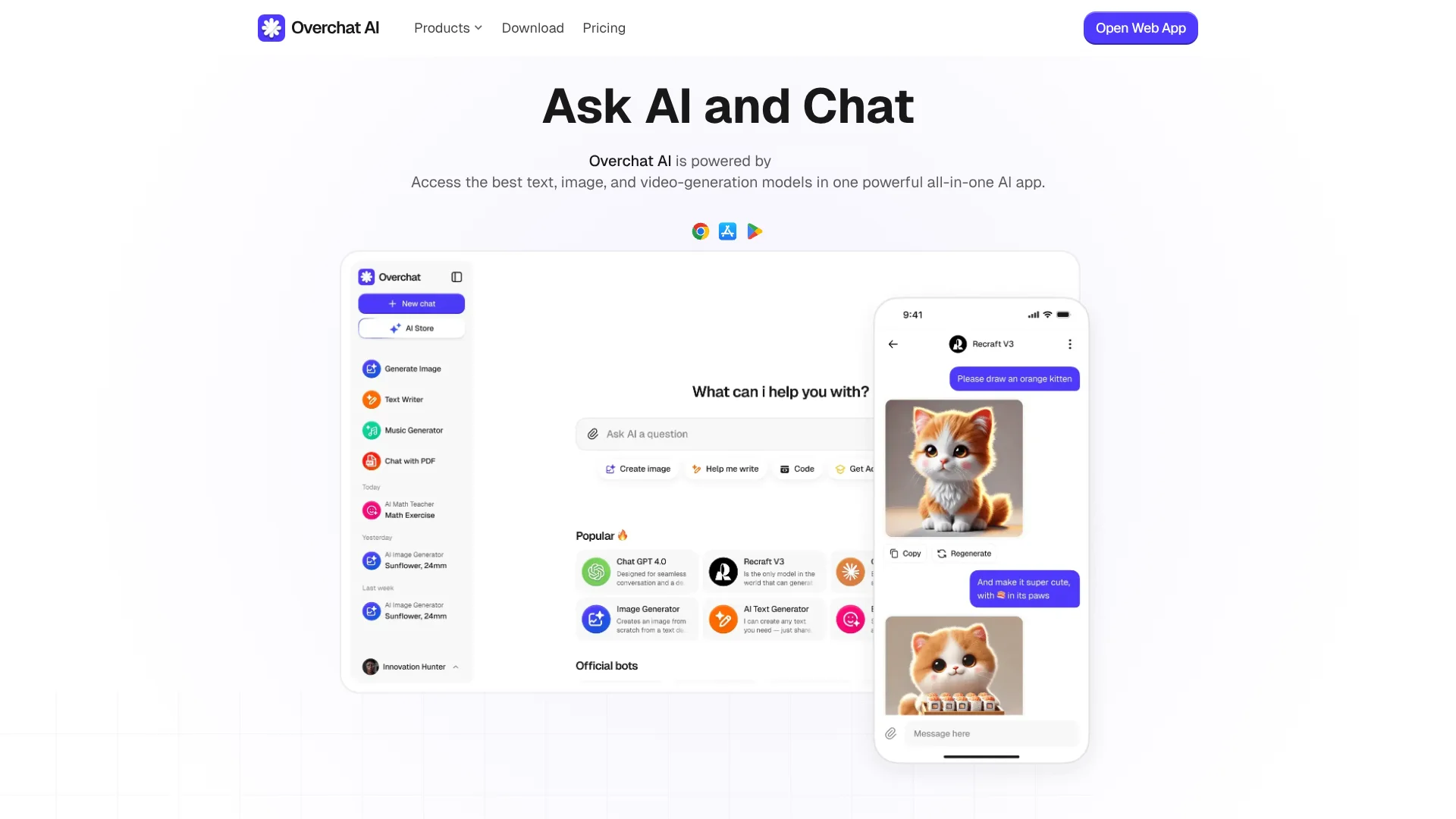
Overchat AI is an all‑in‑one “AI super app” that brings many leading text, image, and video models into a single interface. Instead of juggling separate subscriptions for ChatGPT, Claude, Gemini, DeepSeek, Grok, and others, users can chat, write, generate images, and create short videos inside one environment. It targets people who want powerful models, but prefer one login, one billing setup, and a privacy‑conscious wrapper around the underlying AI providers.
Overchat AI stands out by acting as a true “meta client” across many proprietary and open models, not just a wrapper around one vendor. It combines everyday productivity tools, creative image and video workflows, playful filters, and niche bots (from brainrot translators to attractiveness raters) in the same place. That mix of serious work features and fun utilities, paired with a strong privacy posture, gives it a distinct flavor among AI chat hubs.
Overchat AI offers a compelling proposition for anyone tired of chasing separate subscriptions for each new “hot” model. Its multi‑model hub, broad creative stack, and task‑specific bots give individual users and small teams serious capability while keeping onboarding friction low. The interface can feel busy, and long‑term value depends on how much a user taps into the higher‑end models and creative tools, but for many, the mix of cost savings, convenience, and privacy‑minded design will be hard to ignore.
Who is Using Overchat AI?
Content Creators and Solo Entrepreneurs
Using it to draft scripts, social captions, ad copy, thumbnails, and quick video concepts from one place.
Marketing Teams and Agencies
Relying on multi‑model copywriting, image generation, and short‑form video tools to speed up campaign production.
Students and Educators
Applying the homework solvers, PDF chat, and summarizers for studying, lesson prep, and quick explanations.
Software Developers and Tech Professionals
Tapping into coding‑aware models plus documentation summarization and AI detectors for faster experimentation.
Uncommon Use Cases
Adopted by librarians building in‑house research helpers; used by HR teams to prototype internal policy chatbots and training content.
Key Features
Rating Breakdown
Pricing Plans
Free
Free
- Includes 20 credits per day, 20 daily accesses to basic models, GPT-4o, ChatGPT 4.1 Nano, limited trial image generation, and basic model-driven smart writing, translation, and summary
Pro Access
$59.99 per year
- Includes unlimited AI chat, access to basic models (GPT-4o mini and DeepSeek V3), access to advanced models (GPT-5.1, Claude 4.5 Sonnet, Gemini 3 Pro, Llama 4, Mistral, and Grok-41), image generation (GPT-Image-1, Nano Banana Pro, Flux 2, and Seedream 4), and advanced custom chatbots for writing, translation, summary, search, and ChatPDF
Which Overchat AI plan should you pick?
Start with Free to test the core chat and generation features, then upgrade to Pro Access when you need broader model access and higher usage.
Free
Good for users who need basic model access and limited daily messages for testing and occasional tasks.
Pro Access
Good for regular users who need unlimited AI chat, advanced models, image generation, and higher overall usage.
Overchat AI Use Cases
Chat with documents
Upload PDFs, Word files, presentations, spreadsheets, text files, or images and ask questions about their contents.
Outcome: Faster summaries, explanations, translations, and document research.
Analyze images
Upload photographs, screenshots, diagrams, or document scans and ask the AI to describe or interpret them.
Outcome: Visual explanations and extracted text through OCR.
Generate content
Use text, image, and video models for writing, visual creation, scripts, and other creative tasks.
Outcome: Drafts and generated media from one platform.
Solve homework and math problems
Submit questions or homework images and request explanations or step-by-step solutions.
Outcome: Guided answers and learning support.
Write and debug code
Ask the AI to generate programming code, explain code, or help diagnose bugs.
Outcome: Faster prototyping and troubleshooting.
Workflow Ideas with Overchat AI
Research a long document
- 1Upload a PDF, DOCX, or other supported document.
- 2Ask Overchat for a summary or section-specific explanation.
- 3Ask follow-up questions about findings, terminology, or conclusions.
Extract and explain image text
- 1Upload a screenshot, photograph, or scanned document.
- 2Ask Overchat to recognize and extract the text.
- 3Request a summary, translation, or explanation of the extracted content.
Create and refine content
- 1Choose a suitable text, image, or video model.
- 2Provide a prompt describing the desired content.
- 3Refine the result with follow-up instructions or a different model.
How Overchat AI fits into your stack
Browser
Overchat is available as a web app at overchat.ai, combining chat, image, video, search, and specialized AI tools in one browser workspace.
Knowledge and files
The ChatPDF workspace accepts PDFs, Word, PowerPoint, Excel, text, programming, and image files for summarization, translation, and conversational analysis.
Docs and writing
Writing tools generate or revise articles, emails, landing pages, social posts, research papers, and other content formats.
Desktop
A macOS version is available for Apple Silicon Macs, alongside the browser experience.
Pros
- +One subscription for many frontier models: Very attractive for users who want GPT, Claude, Gemini, and more without separate accounts.
- +Strong creative toolkit: Image‑to‑image, style filters, photo editing, and video generators make it appealing for designers, social creators, and marketers.
- +Good language coverage: Supports 25+ languages, so non‑English users are not treated as an afterthought.
- +Security‑forward messaging: Clear encryption claims, regulatory compliance, and explicit statements about not tracking chats.
Cons
- −Interface density: The sheer number of tools and models can feel overwhelming for beginners.
- −Model availability dependencies: Access depends on upstream providers; some models or features may vary by region or change over time.
- −Usage limits still exist: Even with “unlimited chat,” image and video credits, or specific model caps, can confuse users expecting totally open‑ended use.
Limitations & when to consider alternatives
Known limitations
- Limited free usage. The Free plan provides only a limited number of daily messages or credits.
- Windows support is not available yet. The FAQ says the Windows version is still in development.
- Browser extension support is not available yet. The FAQ says browser-extension versions are still in development.
- Scanned PDFs work best with readable text. Image-only scanned PDFs may require OCR and work best when the scan is clear.
- Generated content requires fact-checking. Overchat warns that generated content may contain false information and may not be suitable for every commercial use.
Look elsewhere when
- You need a public developer API with API keys and endpoints.
- You need a browser extension today.
- Your team needs shared workspaces, roles, or user invitations.
- You need SSO or SAML administration.
How to Use Overchat AI
- 1
Create an account or open the web app
Use the web app or install the official iOS, Android, or supported macOS app to begin.
- 2
Choose a model or specialized tool
Select among text, image, video, document, homework, coding, and other purpose-built tools.
- 3
Enter a prompt or attach a file
Type a request or upload a supported document or image when the task requires analysis.
- 4
Review and refine the result
Ask follow-up questions, request revisions, or switch models while continuing the conversation.
- 5
Upgrade when free usage is insufficient
Move from Free to Pro Access when you need advanced models, image generation, or more capacity.
Who is Overchat AI For?
Students and academics
They can use homework help, essay writing, PDF summaries, translations, and document analysis.
Content creators and marketers
They can create articles, images, videos, scripts, and other marketing content.
Professionals
They can draft emails and presentations, analyze documents, and use specialized productivity tools.
Developers
They can generate and debug code while switching among multiple AI models.
General AI users
They can access multiple text, image, and video models through one subscription instead of managing separate services.
Frequently Asked Questions
Is Overchat AI free?
Yes. The free tier provides daily credits for trying text and image generation models.
Which platforms support Overchat AI?
Overchat is available on the web, iOS, Android, and macOS for Apple Silicon. Windows and browser-extension versions are in development.
What can users do with Overchat AI?
Users can chat with AI models, generate and edit images, create videos, analyze documents, translate text, solve homework, write code, and use specialized AI tools.
How does Overchat protect user data?
Overchat states that it uses AES-256 encryption for user chats and secure data-transfer protocols.
What is ChatPDF?
ChatPDF lets users upload documents, ask questions, summarize sections, translate content, and chat with the file.
How much does Overchat Pro cost?
The pricing page lists Pro Access at $14.99 per month or $59.99 per year.
Community reviews
Be the first to share your experience.
Sign in to leave a review for Overchat AI.
Overchat AI Alternatives
Looking for alternatives to Overchat AI? Here are similar tools in the same category:
Learn to Master Overchat AI
With Skill Leap courses
Get in-depth training on Overchat AI and 50+ other AI tools with our expert-led video courses.
Start 7-Day Free Trial