PDNob PDF Editor
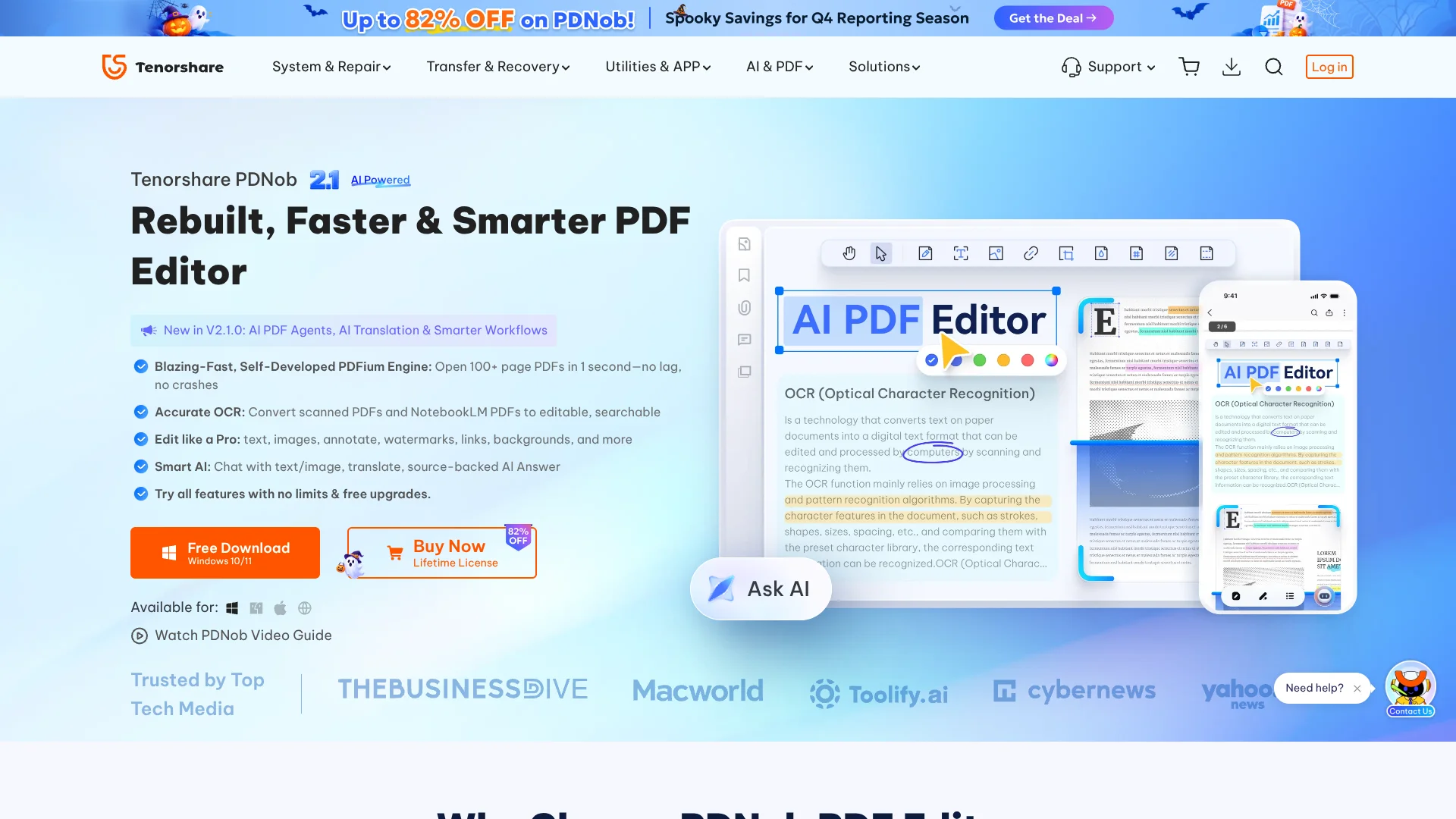
Make scanned PDFs editable and searchable with source-linked AI answers.
Watch PDNob PDF Editor in Action
Key Takeaways
- What it is
- Make scanned PDFs editable and searchable with source-linked AI answers.
- Pricing
- $49.99 per year · $64.99 one time · $39.99 per year · $104.99 one time
- Best for
- AI PDF Chat
- AI OCR
- PDF Conversion
- Rating
- 4.2/5
What is PDNob PDF Editor?
PDNob PDF Editor brings PDF editing, OCR, conversion, annotation, forms, signing, and AI document tools into a desktop app for Windows and Mac, with an iPhone app for mobile work. It helps students, professionals, and teams turn scanned pages into editable documents, revise existing PDFs, organize pages, and understand long files without rebuilding them from scratch.
Its AI answers can link back to the source text with clickable page references, giving you a way to check where an explanation or summary came from. The AI Agent can also select PDF actions such as OCR, conversion, and compression from a natural-language request.
PDNob fits people who need recurring PDF work rather than occasional annotations, especially when scanned files and document conversion are part of the job. The desktop app handles core editing locally, but AI features and cloud sync need an internet connection, and complex visual conversions may still need manual layout adjustments.
Who is Using PDNob PDF Editor?
Lawyers
Evidence files and agreements become easier to search, summarize, annotate, merge, and redact before sharing.
Teachers
Grading notes, highlights, comments, signatures, and OCR help turn student work into organized review files.
Doctors and Nurses
Scanned clinical documents can be converted into searchable text and combined into structured PDF records.
Accountants and Auditors
Invoice amounts, dates, report changes, and audit comments can be extracted or marked without recreating the source document.
Editors, Authors, and Designers
Manuscripts and layouts can be revised, annotated, watermarked, and exported to formats such as EPUB or Word.
Uncommon Use Cases
NotebookLM slide PDFs can be converted into editable PowerPoint or Word files; screen recording can create narrated PDF tutorials and walkthroughs.
Key Features
Rating Breakdown
Pricing Plans
1 Year License
$49.99 per year
- 1 year of access to all features
- Free upgrade to PDNob 2.1
- No watermark
- 20 GB cloud storage
- Use on two computers at the same time
- Includes free iOS access
Lifetime License
$64.99 one time
- Lifetime access to all features
- Free upgrades
- No watermark
- 20 GB cloud storage
- Use on two computers at the same time
- Includes free iOS access
PDNob AI
$39.99 per year
- Unlimited AI usage after the trial
- 7-day free trial
- AI chat with PDFs
- PDF summaries and translation
- AI rewriting and explanations
- Use across web, iOS, and desktop
PDNob Team Plan
$104.99 one time
- Displayed price is for the selected team configuration
- Lifetime access to all features
- Flexible license management dashboard
- Unlimited cloud storage
- License assignment and member management
- Simultaneous use on Windows, Mac, and iOS
Which PDNob PDF Editor plan should you pick?
Start with the free version to test PDF editing and OCR, choose the Lifetime License for regular desktop work, and add PDNob AI when you need frequent summaries, translation, rewriting, or PDF chat.
Free Trial
Good for testing the editor, OCR, conversion, and AI tools before accepting the free version's usage limits.
1 Year License
Good for people who need full PDF editing features for a defined year and want a lower upfront commitment than lifetime access.
Lifetime License
Good for frequent PDF users who want lifetime access to the desktop editing features and free product updates.
PDNob AI
Good for readers who need unlimited AI summaries, PDF chat, translation, rewriting, and explanations across supported platforms.
PDNob Team Plan
Good for organizations that need license assignment, member management, centralized administration, and team-level cloud storage.
PDNob PDF Editor Use Cases
Make scanned PDFs editable
OCR recognizes text in scans and converts it into searchable, editable PDF content while retaining the document layout.
Outcome: Paper-based or image-only documents become easier to search, revise, and archive.
Review long documents with AI
AI summaries, explanations, and source-linked answers help readers find key information without manually scanning every page.
Outcome: Faster understanding with references back to the original PDF.
Convert PDFs for office work
Office files, images, and PDFs can move between Word, Excel, PowerPoint, EPUB, RTF, TXT, and image formats.
Outcome: Content becomes usable in the application or format needed next.
Prepare documents for sharing
Redaction, passwords, permission restrictions, encryption, and watermarks help protect sensitive or branded PDFs.
Outcome: Safer documents for clients, colleagues, public release, or archiving.
Process recurring PDF batches
Batch tools handle repeated conversion, OCR, merging, compression, watermarking, and encryption tasks across multiple files.
Outcome: Less manual repetition when working through document backlogs.
Workflow Ideas with PDNob PDF Editor
Turn a scan into a searchable report
- 1Open the scanned PDF in PDNob.
- 2Run OCR and review the recognized text.
- 3Export the searchable file to Word or PDF/A.
Review a contract with AI
- 1Open the contract and select AI PDF Chat.
- 2Ask for key obligations, dates, or unclear clauses.
- 3Check each answer through its linked page reference and annotate the document.
Prepare a protected client file
- 1Edit or merge the required pages.
- 2Redact sensitive information and add a watermark.
- 3Apply password protection or encryption before sharing.
How PDNob PDF Editor fits into your stack
Desktop document work
PDNob sits alongside Word, Excel, PowerPoint, and other office tools when PDFs need editing, conversion, OCR, or page management.
Research and knowledge work
AI summaries, source-linked answers, explanations, and translation help readers work through dense PDFs while checking the original pages.
Scanned archives
OCR turns image-only documents into searchable files that can be edited, converted, organized, and stored digitally.
Cloud storage and sharing
PDNob includes cloud storage on its plans and can create shareable links for uploaded PDF files with configurable permissions.
Mobile PDF access
The iPhone app supports editing, conversion, OCR, annotation, compression, cloud backup, and document viewing away from the desktop.
Pros
- +Source-backed AI answers: Page references make it easier to verify summaries and explanations.
- +Strong scanned-document support: OCR can preserve layout while making scanned PDFs editable and searchable.
- +Broad PDF toolkit: Editing, conversion, forms, annotations, signing, compression, and protection are available in one desktop app.
- +Cross-device access: Paid plans support Windows, Mac, and iOS access, with up to two computers signed in at once.
- +Local desktop editing: Core editing works offline, which helps when documents should stay on the computer.
Cons
- −AI requires an add-on or included credits: Unlimited AI usage is sold separately or included under specific plan terms.
- −Limited tablet support: The iOS listing is for iPhone and does not provide a native iPad app.
- −Conversion cleanup may be needed: Complex PDFs can require manual adjustments to fonts or text-box alignment after export.
Limitations & when to consider alternatives
Known limitations
- AI is not available on every platform. The technical specifications list AI chat, summarization, and translation for Windows, while Mac AI support is not yet listed there.
- AI translation has a weekly page limit. AI PDF translation is limited to 600 pages per week for fair-use and service-stability reasons.
- Free usage has feature limits. The free version limits AI usage, cloud storage, file size, conversion and OCR frequency, batch size, and watermark-free exports.
- Offline use has a licensing check. Core desktop editing works offline, but the license needs an online check every 30 days.
- Complex conversions may need cleanup. NotebookLM slide PDFs and other visually complex files may need manual font or text-box alignment adjustments after conversion.
Look elsewhere when
- You need a documented developer API for automated PDF processing.
- You need a browser extension for editing PDFs while browsing.
- Your team needs a shared workspace where members directly view and edit the same cloud files.
- You need a native iPad app rather than an iPhone app.
How to Use PDNob PDF Editor
- 1
Install the desktop app
Download PDNob for Windows 10 or later, or macOS 10.15 or later, then sign in to activate the account.
- 2
Open or create a PDF
Import an existing document or create a PDF from supported office files and images.
- 3
Edit the document
Change text and images, adjust pages, add links or watermarks, and apply annotations from the editing tools.
- 4
Run OCR when needed
Apply OCR to scanned pages so the text can be searched, copied, edited, or converted.
- 5
Apply AI tools
Summarize, translate, rewrite, explain, or chat with the document; AI features require online access.
- 6
Export or protect the result
Convert the finished PDF, compress it, add a signature, redact information, or apply password and encryption settings.
Who is PDNob PDF Editor For?
Teachers, Students, and Academic Researchers
Research papers, textbooks, and scanned course materials can be summarized, OCR-converted, annotated, and combined into organized PDFs.
Legal Professionals
Case files and contracts can be merged, searched, redacted, annotated, and reviewed with AI summaries.
Healthcare Teams
Scanned reports and paper records can become searchable PDFs for easier review and digital archiving.
Accountants and Auditors
Invoices and financial reports can be converted, edited, annotated, and exported into usable office formats.
IT Services and Tech Teams
Batch OCR, conversion, compression, encryption, and permission controls support recurring document operations.
Frequently Asked Questions
Does PDNob PDF Editor have a free version?
Yes. The free version can be used without a time limit, but it restricts features such as AI usage, cloud storage, batch processing, OCR and conversion frequency, and watermark-free exports.
How much does PDNob PDF Editor cost?
The official pricing page lists a 1 Year License at $49.99 per year, a Lifetime License at $64.99 one time, and a PDNob AI add-on at $39.99 per year. A Team Plan is also listed at $109.00 one time for the displayed configuration.
Can PDNob edit scanned PDFs?
Yes. Its OCR tools recognize scanned documents and convert them into searchable and editable PDFs, with support for 16 or more recognition languages.
Does PDNob work offline?
Core desktop editing works offline. Cloud sync and AI features require an internet connection, and the license needs an online check every 30 days.
How many devices can use one individual account?
An individual account can be used on up to two computers at the same time: two Windows devices, two Macs, or one Windows device and one Mac. The plan also includes iOS access.
Is there an iPhone app?
Yes. PDNob has an iPhone app for iOS 15 or later with PDF editing, conversion, OCR, annotations, compression, cloud backup, and viewing features.
Community reviews
Be the first to share your experience.
Sign in to leave a review for PDNob PDF Editor.
PDNob PDF Editor Alternatives
Looking for alternatives to PDNob PDF Editor? Here are similar tools in the same category: