Picker AI
Pick the photo that fits your goal, from dating profile to LinkedIn.
Key Takeaways
- What it is
- Pick the photo that fits your goal, from dating profile to LinkedIn.
- Pricing
- Freemium · $7.99 per month · $12.99 per month
- Best for
- Goal-based rankings
- Scores and top picks
- Picker AI Insights
- Rating
- 4.1/5
What is Picker AI?
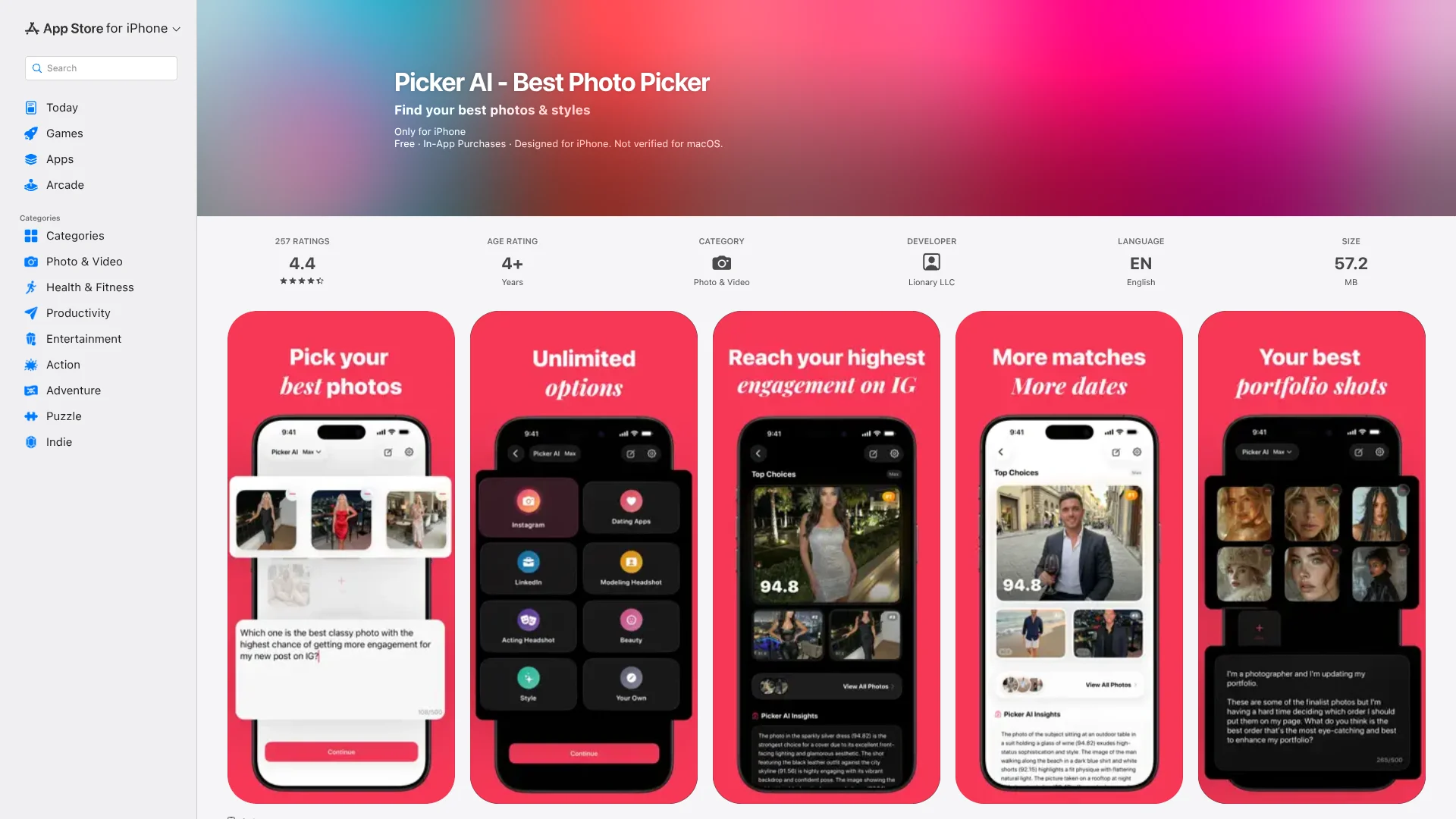
Picker AI compares photos for a specific purpose, then scores each image and explains its picks. It is for people choosing what to post, which dating or professional headshot to use, or which outfit looks best. You can select a built-in goal, such as Instagram or LinkedIn, or describe your own. The free Basic mode ranks up to four photos at a time.
Instead of giving only a favorite, Picker AI shows scores out of 100 and highlights a winner plus two runners-up. Its ranking is tied to your stated goal, so a photo picked for a dating profile may rank differently for LinkedIn. Max handles up to 200 photos in one ranking.
Social media creators, people updating dating profiles, and anyone sorting a large photo shoot are likely to get the most value. It is a focused photo-selection tool, not a photo editor, and its suggestions are AI judgments rather than guaranteed results. Reach for Picker AI when you want help choosing among photos, not changing them.
Who is Using Picker AI?
Social media creators
A clear top pick helps them decide which image to post for a specific platform or post.
Dating profile users
Goal-based rankings help them choose photos for dating apps such as Hinge.
Job seekers
LinkedIn photo comparisons help them select a headshot for their profile.
Actors and models
Ranking portfolio images helps narrow down headshots for auditions or modeling profiles.
Uncommon Use Cases
Sellers choosing a cover photo for an item; people comparing outfit or interior design options.
Key Features
Rating Breakdown
Pricing Plans
Basic
Free
- Rank up to 4 photos per ranking
- Includes a starter set of use cases, scores, a top pick, and insights
Pro
$7.99 per month
- The US App Store also lists Pro Annual for $69.99 per year
- Rank up to 50 photos per ranking
- Includes every use case and Your Own
Picker Max
$12.99 per month
- Rank up to 200 photos per ranking
- Includes Your Own custom instructions
Which Picker AI plan should you pick?
Try Basic for occasional four-photo comparisons, choose Pro for batches up to 50, and consider Max when you need up to 200 photos per ranking.
Basic
Good for trying the core photo-ranking workflow with up to four photos per ranking.
Pro
Good for regular photo comparisons of up to 50 images and access to every listed use case.
Max
Good for larger batches of up to 200 photos and custom instructions on every ranking.
Picker AI Use Cases
Choose a social post
A goal-specific ranking helps creators pick a photo from a shoot for Instagram or another social app.
Outcome: A scored top choice with two runners-up and written reasoning.
Select a dating profile photo
Dating-app rankings compare photos for the profile context rather than treating every image as interchangeable.
Outcome: A ranked set of photos for the chosen dating use.
Pick a professional headshot
LinkedIn, modeling, and acting headshot options can be compared against the intended use.
Outcome: Scores and explanations for the leading photos.
Compare outfits or décor
A custom question lets the AI judge outfit or interior design images against a personal preference.
Outcome: A goal-specific ranking with a written explanation.
Sort a large photo batch
Max ranks a camera-roll batch when reviewing every near-duplicate by hand would take too long.
Outcome: Up to 200 photos ranked in one run.
Workflow Ideas with Picker AI
Choose a dating profile photo
- 1Select the photos you are considering.
- 2Choose Dating Apps as the use case.
- 3Review the scores and explanation, then save the preferred photo to Photos.
Pick a photo from a shoot
- 1Select the shoot images you want compared.
- 2Choose Instagram or describe the post goal in Your Own.
- 3Compare the top choice and runners-up before posting.
Narrow down headshots
- 1Add your professional or audition headshot options.
- 2Choose LinkedIn, Modeling Headshot, or Acting Headshot.
- 3Review the scores and save the photo that best fits the use.
How Picker AI fits into your stack
Phone photo library
Picker AI starts with photos selected from your device. It can save a chosen image straight to Photos.
Social and dating decisions
The app helps choose an image for a destination such as Instagram, LinkedIn, or a dating profile, but does not publish it there.
Personal photo review
Ranking history is kept in your account, and account or history deletion is available from Settings.
Pros
- +Purpose-specific picks: The same photo set can be judged for a dating profile, a LinkedIn headshot, or another goal.
- +Clear comparisons: Scores and explanations make it easier to understand why one photo ranked above another.
- +Large batches: Max can compare up to 200 photos in a single ranking.
- +Free entry point: Basic includes rankings for up to four photos.
Cons
- −Narrow focus: It helps choose photos but is not a photo-editing or publishing tool.
- −Phone-first experience: The main workflow is built around the iPhone and Android apps.
- −AI judgment: A high score is a suggestion, not a promise of more likes, matches, or job opportunities.
Limitations & when to consider alternatives
Known limitations
- Plan-based batch sizes. Basic ranks up to 4 photos, Pro up to 50, and Max up to 200 per ranking.
- Photo processing. Picker sends a smaller copy of each selected photo to its AI model for scoring and says it does not save the photo files.
- Ranking history requires an account. Ranking history is stored in your account and can be deleted from Settings.
Look elsewhere when
- You need to edit or retouch photos inside the same tool.
- You need Picker AI to publish directly to social or dating apps.
- Your workflow requires comparing more than 200 photos in one ranking.
How to Use Picker AI
- 1
Pick a photo batch
Select the images you want compared; the number allowed depends on Basic, Pro, or Max.
- 2
Set the goal
Choose a listed use case, or enter your own instructions if your plan includes Your Own.
- 3
Review the ranking
Check the scores, top choices, and Picker AI Insights before deciding.
- 4
Keep the useful result
Save the selected photo to Photos and revisit ranking history from your account.
Who is Picker AI For?
Social media creators
Instagram and other social posters can compare images for a particular post.
Dating app users
People choosing profile pictures can rank them for dating apps.
Professionals
LinkedIn users can compare profile photos for a professional first impression.
Models and actors
People selecting modeling or acting headshots can compare portfolio images.
Style and home decision-makers
People can compare outfit photos or décor options using a custom question.
Frequently Asked Questions
Is Picker AI free?
Yes. Basic is free and ranks up to four photos at a time. Paid Pro and Max modes support larger batches.
How many photos can it rank?
Basic ranks up to 4 photos, Pro up to 50, and Max up to 200 in one ranking.
How does Picker AI choose a photo?
It scores photos out of 100 for the selected use case, considering factors such as expression, eye contact, lighting, focus, and framing.
Does Picker AI work on Android?
Yes. The developer lists an Android app as well as an iPhone app.
What happens to the photos I select?
The app sends a smaller copy of each photo to its AI model for scoring and says it does not save the photo files.
Community reviews
Be the first to share your experience.
Sign in to leave a review for Picker AI.
Picker AI Alternatives
Looking for alternatives to Picker AI? Here are similar tools in the same category: