remio
Your personal ChatGPT with all your context.
Key Takeaways
- What it is
- Your personal ChatGPT with all your context.
- Pricing
- Freemium · $8.25 per month (billed annually) or $19.90 monthly · $6.20 per month (billed annually)
- Best for
- Info Capture
- Ask remio
- Powerful Copilot
- Rating
- 4.2/5
What is remio?
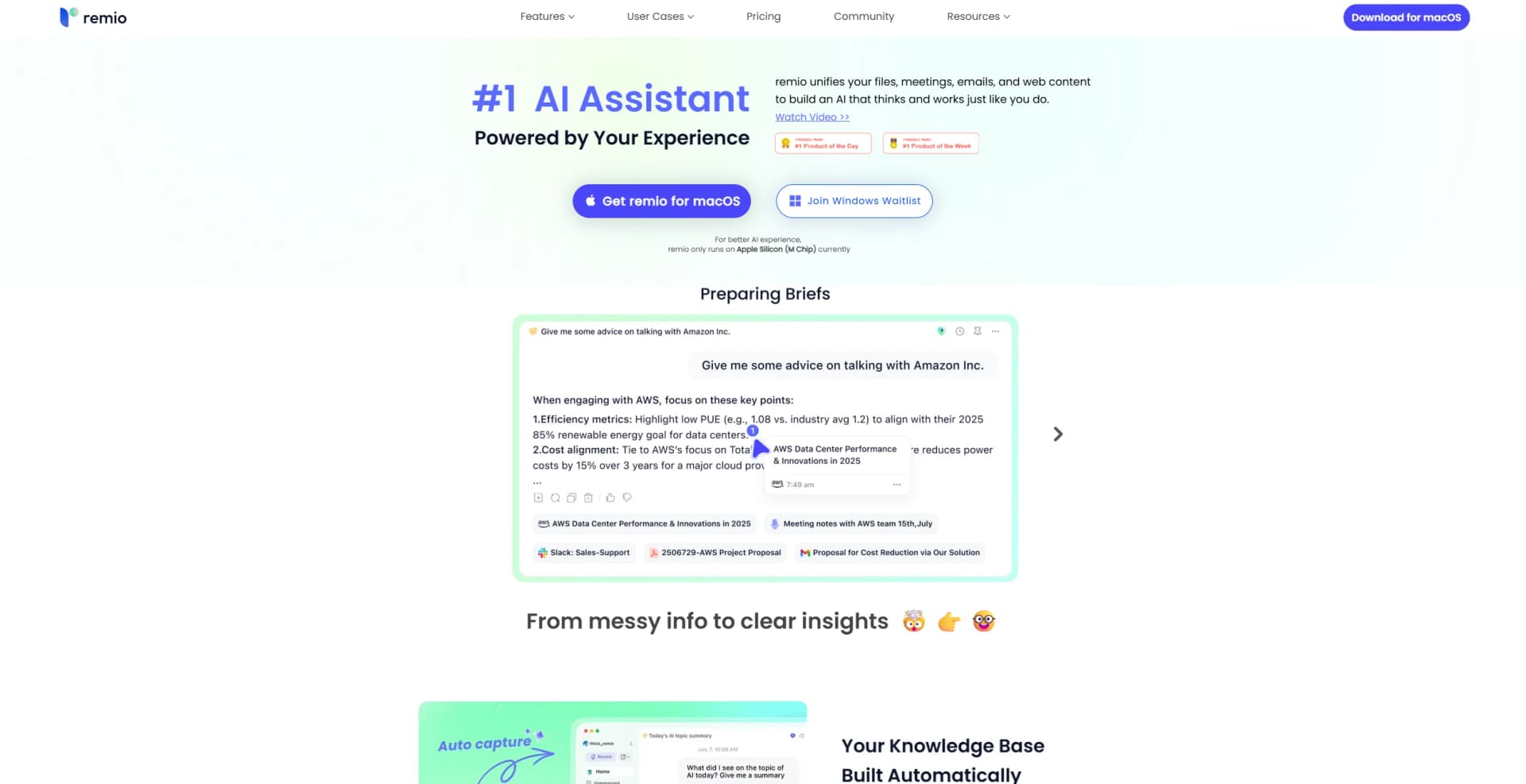
Remio is a personal AI assistant that transforms how individuals and professionals manage and utilize information. By unifying files, meetings, emails, and web content, Remio creates a comprehensive knowledge base that mirrors your personal style and logic. Designed for knowledge workers like managers, professionals, engineers, researchers, and students, it simplifies the task of organizing and accessing vast amounts of data.
Remio stands out by creating a personalized AI that functions as a "Second Brain." Unlike traditional note-taking apps, it automatically captures and organizes information, making it searchable and actionable in an instant. Its ability to blend new knowledge into existing data sets it apart, offering insights that feel intuitive and aligned with personal goals.
Remio offers a unique approach to personal knowledge management by capturing and organizing information automatically. Its ability to learn from your past interactions and provide tailored insights makes it a valuable tool for anyone dealing with large volumes of information. Whether you're a product manager, engineer, or student, Remio's intuitive design and powerful features can transform the way you work, making it an indispensable part of your digital toolkit.
Who is Using remio?
Product Managers
Streamlining project management and data organization.
Engineers
Leveraging for efficient data handling and project documentation.
Sales Teams
Using it to manage client information and communication.
Marketing Professionals
Employing it to organize campaign data and insights.
Uncommon Use Cases
Academic researchers using it for literature reviews; Consultants employing it for comprehensive client research.
Key Features
Rating Breakdown
Pricing Plans
Free Plan
Free
- Includes auto-capture, highlights, app connections (Slack, Email), meeting recording, AI Search, and Smart Write trial. Offers 100% data privacy and upcoming mobile app access
Pro Plan
$8.25 per month (billed annually) or $19.90 monthly
- Includes everything in Free plus AI Ask, real-time webpage overview, meeting summaries, Smart Write, and multiple device sync (upcoming). Ideal for professionals organizing and managing extensive knowledge
BYOK Plan
$6.20 per month (billed annually)
- Or $14.90 monthly. Lets users bring their own LLM key (OpenAI, Google, Anthropic, xAI). Provides full Pro access with added privacy
- Security
- Direct LLM provider communication—built for users managing sensitive data
Which remio plan should you pick?
Start with Free to test capture and knowledge management, then upgrade to Pro when you need more credits and premium AI features.
Free
Good for users testing local knowledge management, webpage capture, file parsing, integrations, and basic AI usage.
Pro
Good for regular AI users who need 10,000 monthly credits, premium models, meeting assistance, BYOK, and cross-device sync.
Plus
Good for heavier agent usage requiring 40,000 monthly AI credits and the Pro feature set.
Max
Good for power users requiring the highest listed allowance of 150,000 monthly AI credits.
BYOK
Good for privacy-conscious users who want to connect their own AI API keys while using remio features.
remio Use Cases
Create PowerPoint presentations
Use the presentation workflow to create or update editable PowerPoint decks from instructions and source material.
Outcome: A review-ready, editable PowerPoint draft.
Analyze spreadsheets
Use the /xlsx workflow to inspect spreadsheets and request analysis, summaries, and trend highlights.
Outcome: Structured spreadsheet insights.
Capture and search meetings
Record meetings or import audio and use transcription, overviews, minutes, and cross-meeting questions.
Outcome: Searchable recordings with summaries and action-item context.
Research across files and web content
Combine webpages, PDFs, local files, email, Slack, and other sources, then ask questions with source references.
Outcome: Grounded answers based on personal and work materials.
Automate recurring briefings
Create scheduled or content-triggered automations, such as daily briefings, using connected knowledge sources.
Outcome: Recurring agent-generated updates.
Workflow Ideas with remio
Daily briefing automation
- 1Open Automations and start from a daily briefing template
- 2Choose a schedule or content trigger
- 3Review the generated briefing in run history
Meeting-to-action-items workflow
- 1Record a meeting or import an audio file
- 2Let remio transcribe and generate an overview
- 3Ask Chat for decisions, owners, and action items
Research-to-presentation workflow
- 1Capture webpages and sync relevant files
- 2Use Chat or /deep-research to synthesize the sources
- 3Use /pptx to create an editable presentation
How remio fits into your stack
Browser
The Chrome extension automatically captures webpages, PDFs, highlights, and summaries, then makes that material searchable in remio.
Knowledge and files
The desktop app indexes local folders and files such as PDFs, DOCX, PPTX, Markdown, TXT, images, audio, and video for search and AI analysis.
Automation and APIs
Automations run scheduled or content-triggered agent workflows, while MCP connects remio with external tool ecosystems through OAuth, stdio, or streamable HTTP.
Desktop / IDE
The desktop application is the core workspace for local file indexing, meeting recording, AI processing, and access to context through the CLI.
Pros
- +Time Efficiency: Significantly cuts down on the time spent manually gathering and organizing information.
- +User-Friendly: Its integration into existing workflows is intuitive, making it easy to adopt.
- +Customizable: Users can connect their own LLM API key for enhanced data privacy.
- +Insightful Assistance: Provides tailored AI responses based on personal data and past interactions.
Cons
- −Platform Limitation: Currently only available on Apple Silicon (M Chip) devices.
- −Initial Setup: Requires some time to connect all data sources effectively.
Limitations & when to consider alternatives
Known limitations
- Desktop dependency. The desktop application is the core remio experience, and mobile content is processed or synchronized through the desktop client.
- Supported desktop platforms. The current download page lists Windows 10+ x64 and Apple-silicon Macs; Linux is not listed as supported.
- One-way local file sync. Changes made in Finder are reflected in remio, but files cannot yet be renamed, moved, or deleted from within remio.
- Automations need the desktop app available. Scheduled automations require remio to remain available for local processing.
- Slack sync history limitation. The Slack guide says the current version supports only the last three months of conversation history.
How to Use remio
- 1
Install the desktop app
Download remio for Windows or Apple-silicon Mac because the desktop app is the core application.
- 2
Connect local files
Choose folders such as Desktop, Downloads, or Documents so remio can index and search supported files locally.
- 3
Install the Chrome extension
Add the extension to capture webpages, highlight content, and summarize pages or YouTube videos from the browser.
- 4
Add external sources
Connect supported sources such as Slack, email, calendars, or MCP tools to broaden the knowledge base.
- 5
Ask Chat questions
Use natural-language questions, file attachments, @ mentions, or commands such as /pptx, /xlsx, /image, and /deep-research.
- 6
Create automations
Open Automations, choose a template or blank workflow, then configure a schedule or content-based trigger.
Who is remio For?
Product managers
The site names product managers as a target audience for organizing research, decisions, files, and project context.
Engineers
Engineers can connect files, notes, external tools, and agent skills into a searchable work context.
Sales professionals
Sales users can record meetings, capture client information, and retrieve action items and commitments.
Marketing professionals
Marketing users can collect web research, analyze documents, and turn context into presentations and other deliverables.
Students
Students can capture lectures, photos, documents, and notes, then search and question the resulting knowledge base.
Frequently Asked Questions
What operating systems does remio support?
The desktop app supports Windows 10+ x64 and Macs with Apple silicon. Mobile apps are available for iPhone and Android.
Does remio have a free plan?
Yes. The Free plan costs $0 per month and includes 500 AI credits monthly, webpage capture, local file parsing, integrations, and mobile access.
What does the BYOK plan do?
BYOK lets users connect their own AI API keys for privacy, control, and direct billing through their chosen AI provider.
Can remio analyze uploaded files and images?
Yes. Chat supports PDF, DOCX, PPTX, image, and text attachments. Images can be analyzed for content such as screenshots and whiteboards.
How do remio automations work?
Automations can run on schedules or when connected sources such as email, Slack, or meetings change. They maintain run history and require confirmation for certain external actions.
Does remio require the desktop app?
The desktop app is the core application. The mobile app and Chrome extension provide capture and companion functionality, with desktop processing used for the full knowledge-base experience.
Community reviews
Be the first to share your experience.
Sign in to leave a review for remio.
remio Alternatives
Looking for alternatives to remio? Here are similar tools in the same category:
Learn to Master remio
With Skill Leap courses
Get in-depth training on remio and 50+ other AI tools with our expert-led video courses.
Start 7-Day Free Trial