
Renamer.ai
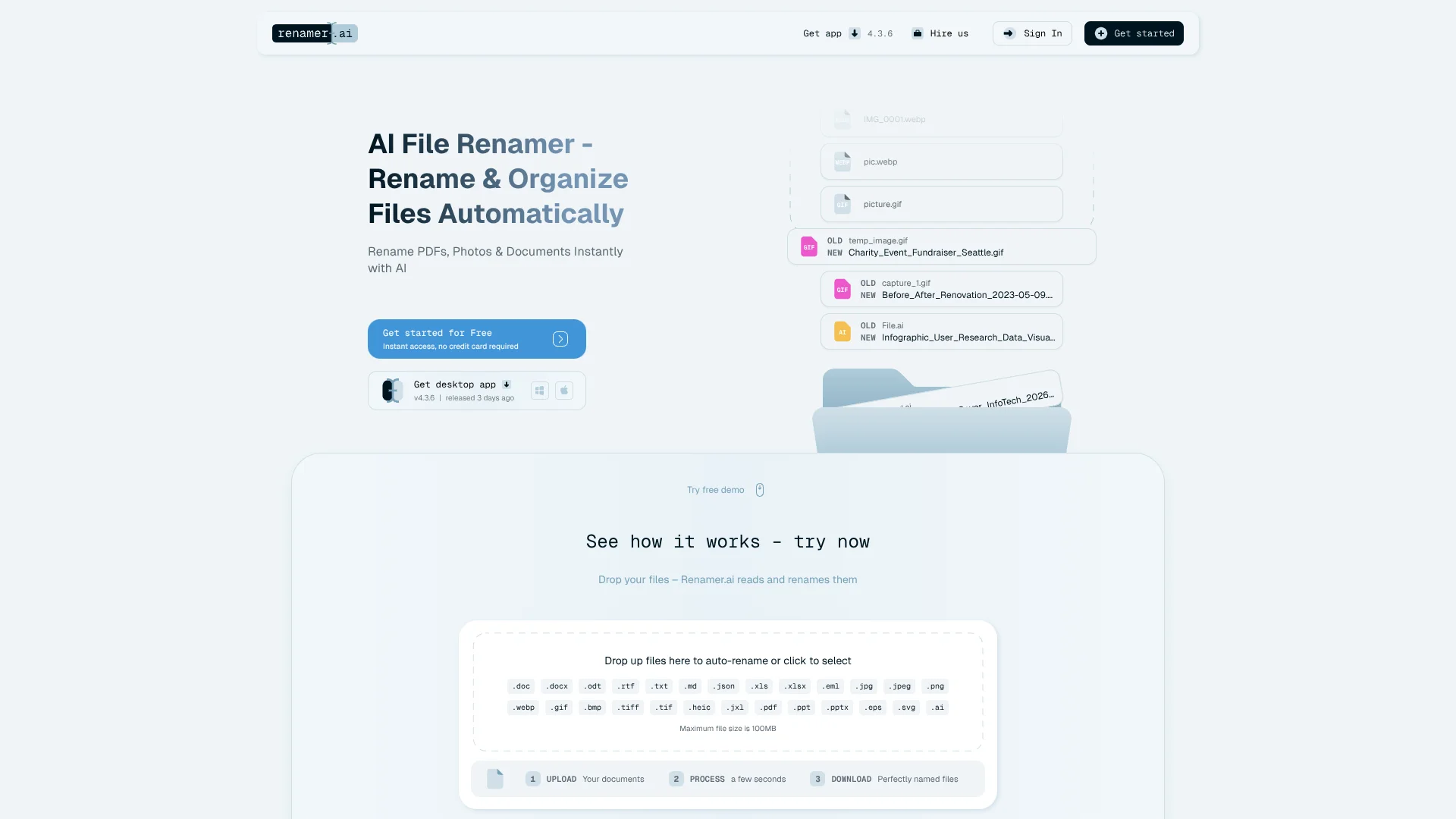
Auto-renames messy files using content into clear labels.
Key Takeaways
- What it is
- Auto-renames messy files using content into clear labels.
- Pricing
- Freemium · $9.95 per month · $29.95 per month · $99.95 per month
- Best for
- AI content-aware renaming
- Magic Folders automation
- Custom naming templates
- Rating
- 4.5/5
What is Renamer.ai?
Renamer.ai focuses on turning chaotic file names into clear, searchable labels using AI. It reads the actual content of PDFs, images, office documents, and emails, then generates meaningful names based on dates, entities, document types, and visual content. With desktop apps for Windows and Mac plus a web interface, it helps individuals and teams keep downloads, shared drives, and long-neglected archives consistently organized with minimal manual work.
Renamer.ai differentiates itself from traditional rule-based renamers by actually reading file content and images rather than just applying filename patterns. Its mix of OCR, language detection, and image understanding lets it infer document type, counterparties, and key dates with minimal configuration. Magic Folders bring this intelligence into day-to-day work, quietly cleaning live folders, while the company’s consulting offering and API give larger organizations a path from “one-time cleanup” to fully automated, integrated document workflows.
Renamer.ai gives a practical, content-aware approach to file naming that fits how modern teams already work. For users drowning in poorly labeled invoices, project files, and research PDFs, it can quickly restore order and keep new clutter from building up again. Organizations with strict offline rules or extremely messy handwritten archives will still have edge cases to manage, but for most digital document scenarios, the combination of AI renaming, automation, and flexible templates makes this a highly effective tool for reclaiming time and reducing file chaos.
Who is Using Renamer.ai?
Accounting and Finance Teams
Auto rename invoices, receipts, and statements for easier reconciliation, audits, and tax preparation.
Marketing and Creative Agencies
Keep thousands of client assets, variations, and exports consistently named for faster retrieval and collaboration.
Professional Services and Legal Firms
Standardize client files, contracts, and historical case documents across departments and legacy archives.
Researchers and Educators
Organize academic papers, datasets, and multilingual collaboration files into predictable, searchable structures.
Uncommon Use Cases
Used by photography studios to rename shoots for SEO and client galleries; adopted by solo freelancers to clean messy client folders on shared cloud drives.
Key Features
Rating Breakdown
Pricing Plans
Starter
Free
- 15 files per month
Pro
$9.95 per month
- 200 files per month
Power User
$29.95 per month
- 1,000 files per month
Ultimate
$99.95 per month
- 5,000 files per month
Which Renamer.ai plan should you pick?
Start with Starter for occasional use and upgrade to Pro, Power User, or Ultimate as monthly file volume increases.
Starter
Good for trying AI file renaming or processing up to 25 files per month.
Pro
Good for regular individual use requiring up to 200 files per month.
Power User
Good for heavy file-management workflows requiring up to 1,000 files per month.
Ultimate
Good for high-volume workflows requiring up to 5,000 files per month.
Renamer.ai Use Cases
Rename invoices
Upload or monitor invoice files and extract vendor names, invoice numbers, dates, and totals into filenames.
Outcome: Invoices become searchable and easier to reconcile.
Organize legal documents
Process contracts, leases, discovery documents, and scanned case files using content-based templates.
Outcome: Legal files receive consistent names before entering a document-management system.
Rename photos by content
Analyze photos for people, objects, scenes, activities, and visible text.
Outcome: Generic filenames such as IMG_3847.jpg become descriptive names.
Clean up downloads
Point a Magic Folder at a Downloads folder and automatically rename new files as they arrive.
Outcome: Downloaded documents stay consistently named without manual processing.
Prepare files for DMS migration
Batch-process legacy files before uploading them to systems such as Clio, iManage, or NetDocuments.
Outcome: The migrated collection is easier to search and identify.
Workflow Ideas with Renamer.ai
Automated invoice intake
- 1Point a Magic Folder at the invoice folder or email-attachment sync location.
- 2Choose a naming template containing fields such as vendor, invoice number, date, and total.
- 3Let Renamer.ai read and rename each new invoice automatically.
Legal document cleanup
- 1Drop scanned contracts or case files into Renamer.ai.
- 2Review the proposed names and adjust the naming template if needed.
- 3Apply the names before uploading the files into the firm's document-management system.
Photo library organization
- 1Select a folder of photos from a camera or phone import.
- 2Use computer vision to generate names based on visible content.
- 3Preview and confirm the proposed names before renaming the batch.
Pros
- +Huge time saver: Dramatically cuts manual renaming for invoices, statements, contracts, and project files.
- +Strong for ongoing workflows: Magic Folders keep Downloads and shared folders tidy without constant user attention.
- +Privacy conscious: Enterprise-grade encryption, short file retention, and clear “not a storage service” positioning appeal to compliance-focused teams.
- +Scalable setup: Works for solo freelancers, small businesses, and enterprises through templates, higher-volume plans, and consulting services.
Cons
- −Monthly file limits: Heavy users may hit plan caps quickly and need higher tiers or custom solutions.
- −Cloud-based processing: Not ideal for organizations that require fully offline document handling.
- −Variable accuracy on messy input: Handwritten notes or very poor scans can reduce naming quality and require manual checks.
Limitations & when to consider alternatives
Known limitations
- Free-plan volume limit. The Starter plan includes 25 renames per month; higher volumes require a paid plan.
- Per-file size limit. The web photo-renaming workflow supports files up to 100MB each.
- RAW photo formats are unsupported. Standard RAW formats such as CR2 and NEF are not supported and must be exported to a supported format.
- No EXIF-based naming. Renamer.ai names photos from visible image content and does not extract GPS, camera, or date-taken EXIF data.
- Not a document-management system. It does not provide storage, permissions, retention policies, version history, or audit trails.
Look elsewhere when
- You need a public developer API with endpoints, SDKs, and structured responses.
- Your workflow requires native QuickBooks, Xero, SAP, or NetSuite integrations.
- You need a full contract-lifecycle-management system.
- You need structured invoice data exported to spreadsheets or accounting systems.
How to Use Renamer.ai
- 1
Choose web or desktop
Use the web interface for quick browser-based renaming, or download the Windows/macOS desktop app for on-device processing and Magic Folders.
- 2
Add files or select a folder
Drop individual files or batches into the app, or point Magic Folders at a directory that receives new files.
- 3
Select a naming template
Use a built-in template or create a custom pattern controlling fields, separators, date format, case, and language.
- 4
Review proposed names
Inspect the AI-generated filenames and edit or exclude individual results before applying changes.
- 5
Apply or automate
Confirm the batch rename, or leave Magic Folders enabled so new files are processed automatically in the background.
Who is Renamer.ai For?
Accountants
Renamer.ai can identify invoice vendors, numbers, dates, and amounts to create searchable filenames.
Law firms
It can rename scanned contracts, case files, and legal documents using content-based naming templates.
HR teams
HR teams can batch-rename employee documents and scans consistently.
Photographers
Photographers can use computer vision to name photos by their visible subjects, scenes, and activities.
Real estate agents
Real estate professionals can organize property photos by spaces such as kitchens, bathrooms, exteriors, and garages.
Frequently Asked Questions
What is Renamer.ai?
Renamer.ai is an AI-powered file renaming tool that analyzes document and image content, then generates descriptive filenames.
What file types does Renamer.ai support?
It supports more than 25 document and image formats, including PDFs, DOCX, XLSX, PPTX, EML, JPG, PNG, HEIC, and TIFF.
How do Magic Folders work?
You select a folder, enable Magic Folders, choose a naming template, and Renamer.ai automatically processes new files in the background.
Does Renamer.ai modify file contents?
No. Renaming changes only the filename; the underlying document or image remains unchanged.
Is there a free plan?
Yes. The Starter plan is free and includes 25 renames per month without requiring payment.
How are files protected?
The privacy policy states that data is encrypted in transit with TLS 1.2+ and at rest with AES-256. Web uploads are deleted after up to 24 hours.
Community reviews
Be the first to share your experience.
Sign in to leave a review for Renamer.ai.
Renamer.ai Alternatives
Looking for alternatives to Renamer.ai? Here are similar tools in the same category:
Learn to Master Renamer.ai
With Skill Leap courses
Get in-depth training on Renamer.ai and 50+ other AI tools with our expert-led video courses.
Start 7-Day Free Trial