SearchCans
Get search results and cleaned pages at scale.
Key Takeaways
- What it is
- Get search results and cleaned pages at scale.
- Pricing
- $18 per plan · $99 per plan · $597 per plan · $1
- Best for
- Multi‑Engine Search APIs
- Reader API (Web to Text)
- Parallel Lanes & Lane Stacking
- Rating
- 4.4/5
What is SearchCans?
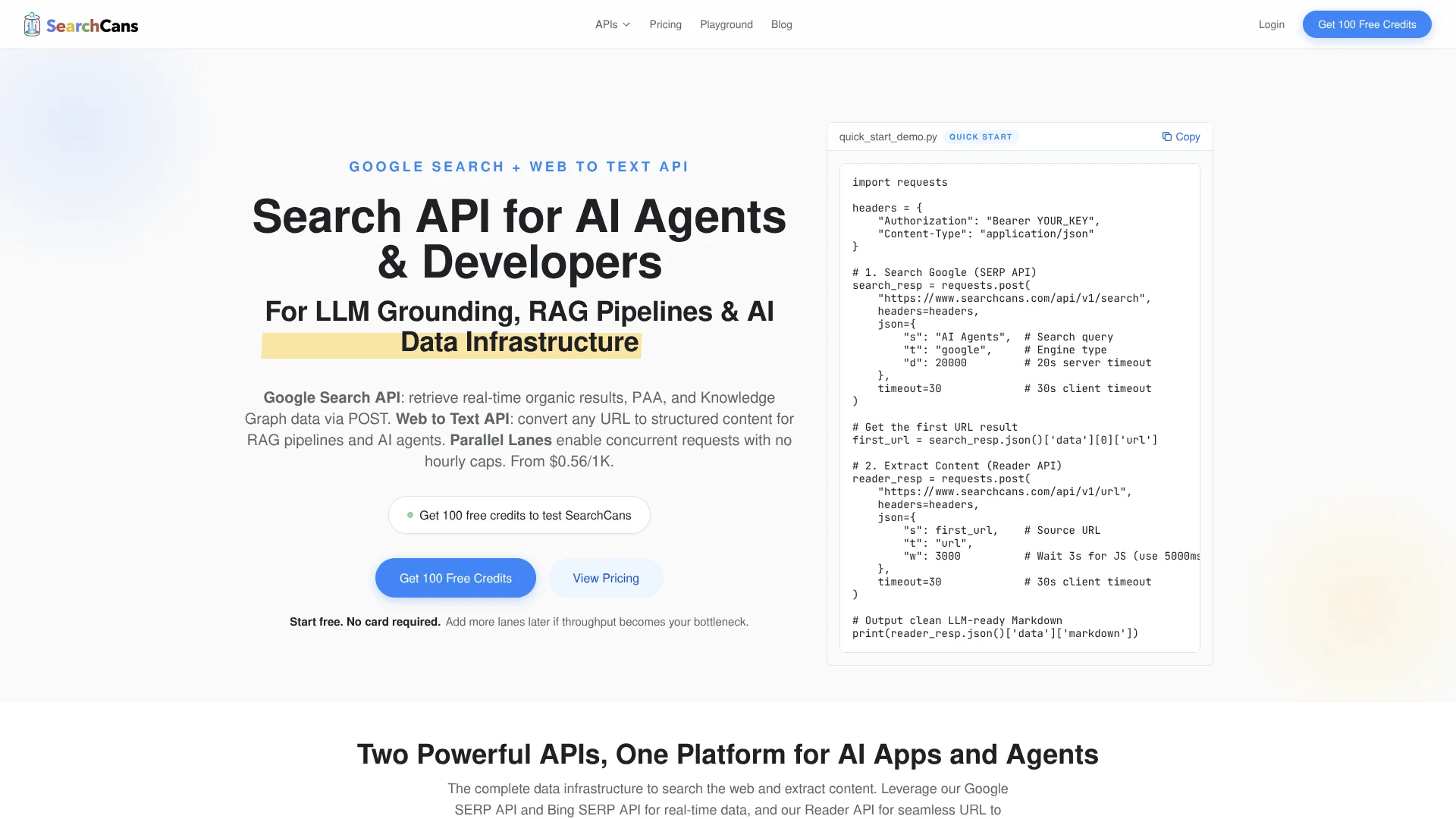
SearchCans is an API-first data layer for AI applications that need fresh web search results and clean page content. It combines Google and Bing SERP APIs with a Web to Text “Reader” API so agents, RAG pipelines, and LLM tools can search, fetch, and turn messy pages into structured, LLM‑ready text in a single workflow. Its architecture focuses on high throughput, real-time search data, and predictable pricing for developers building AI systems.
SearchCans stands out by tightly pairing SERP APIs with a Reader API built for LLM consumption instead of traditional SEO dashboards. The lane model removes hourly rate limits and makes concurrency a first‑class control knob, which suits agents and batch jobs that spike traffic. That mix of AI‑centric outputs, clear throughput scaling, and prepaid credit packs makes it unusually friendly for experimentation that can later ramp into production.
Who is Using SearchCans?
AI Agent Platforms
Using SERP and Reader APIs to give agents reliable web tools without bespoke scrapers.
RAG Pipeline Builders
Feeding fresh search results and cleaned article text into vector databases.
Search‑Augmented SaaS Products
Powering “research” or “web insights” features inside productivity and analytics tools.
Data Engineering Teams
Replacing brittle scraping jobs with a managed search and extraction layer.
Uncommon Use Cases
Used by SEO research teams to programmatically pull PAA and Knowledge Graph hints; adopted by academic labs prototyping search‑grounded LLM experiments.
Key Features
Rating Breakdown
Pricing Plans
Standard
$18 per plan
- 20,000 credits ($0.90 per 1K credits), 2 parallel search lanes, ~2,400 throughput per hour, real-time results, fast response time, email technical support, and credits valid for 6 months
Starter
$99 per plan
- 132,000 credits ($0.75 per 1K credits), 3 parallel search lanes, ~3,600 throughput per hour, real-time results, faster response priority, email technical support, lane stacking eligibility, and credits valid for 6 months
Pro
$597 per plan
- ~1,000,000 credits ($0.60 per 1K credits), 22 parallel search lanes, ~26,400 throughput per hour, real-time results, priority request routing, Tier-1 developer support, lane stacking eligibility, and credits valid for 6 months
Ultimate
$1
- 680 per plan
- 3,000,000 credits ($0.56 per 1K credits), 68 parallel search lanes, ~81,600 throughput per hour, dedicated cluster node, zero queue latency, dedicated account manager, lane stacking eligibility, and credits valid for 6 months
Which SearchCans plan should you pick?
Start with Free for testing, move to Standard or Starter for regular workloads, and upgrade to Pro or Ultimate when concurrency and volume grow.
Free
Good for testing and side projects that need 100 credits and one parallel lane.
Standard
Good for small production workloads needing 20,000 credits and two parallel lanes.
Starter
Good for growing workloads needing 132,000 credits, five lanes, and lane stacking.
Pro
Good for higher-volume applications needing approximately one million credits and 37 lanes.
Ultimate
Good for enterprise-scale workloads needing three million credits, 113 lanes, dedicated capacity, and an account manager.
Enterprise
Good for high-volume or compliance-sensitive workloads requiring custom concurrency, dedicated infrastructure, SLA, and priority support.
SearchCans Use Cases
Live web search
Query Google and Bing through structured SERP APIs.
Outcome: Real-time search results in JSON.
Web content extraction
Submit a URL to Reader API and extract page content, metadata, images, and links.
Outcome: Clean Markdown or HTML for downstream processing.
Document ingestion
Process PDF, DOCX, XLSX, PPTX, EPUB, and related document URLs with File Extraction API.
Outcome: Structured Markdown for LLM ingestion and RAG.
Localized search
Set country and language parameters to target regional indexes and result languages.
Outcome: Market-specific search results.
AI research pipelines
Combine SERP discovery with Reader extraction to provide current context to AI applications.
Outcome: Grounded data for agents, chatbots, and RAG workflows.
Workflow Ideas with SearchCans
High-Throughput SERP and Reader APIs for Modern AI Workflows
- 1SearchCans offers a focused, developer‑centric approach to web search and content extraction for AI systems. Teams that need real‑time results, LLM‑ready text, and predictable scaling can treat it as a plug‑in infrastructure layer rather than building their own scrapers and parsers. With lane‑based concurrency, credit‑based pricing, and AI‑oriented response formats, it suits both early‑stage experiments and serious production agents that live and breathe web data.
How SearchCans fits into your stack
Browser
SearchCans is accessed through its web platform for API keys, documentation, pricing, playground testing, and account management.
Automation and APIs
Its REST APIs provide live Google and Bing search, Reader extraction, screenshots, account checks, and concurrency controls for AI-agent and automation workflows.
Knowledge and files
Reader converts web pages and PDFs to Markdown, while File Extraction parses PDF, DOCX, XLSX, PPTX, EPUB, and similar documents for RAG and LLM ingestion.
Team chat and tickets
Official guides show SearchCans feeding automated workflows with Slack notifications, including scheduled search and alert pipelines.
Pros
- +AI‑Native Design: Search plus Reader combination fits agentic workflows and RAG pipelines without custom scraping infrastructure.
- +Cost‑Focused Pricing: Credits start at roughly $0.56 per 1,000 requests at higher tiers, appealing for heavy workloads.
- +High Concurrency: Parallel lanes and stacking give a clear path from hobby projects to production traffic.
- +Simple Integration: Single search and URL endpoints with example code make it quick to plug into existing LLM stacks.
Cons
- −Narrow Scope: Focuses on search and content extraction rather than end‑to‑end features like ranking, deduplication, or summarization.
- −Concept Overhead: The idea of lanes, stacking, and throughput estimates may feel abstract for smaller teams.
- −Ecosystem Still Growing: Some utility APIs, such as file extraction and YouTube search, are still labeled as coming soon.
Limitations & when to consider alternatives
Known limitations
- Credits expire. Purchased credits are valid for six months from purchase.
- Throughput depends on lanes. Parallel Lanes determine how many requests can run simultaneously; actual throughput varies by endpoint and response time.
- Proxy escalation costs extra credits. Shared, datacenter, and residential proxy tiers add credits to the Reader API base cost.
- Some anti-bot protections may remain inaccessible. The documentation states that even the highest proxy tier cannot guarantee success against every Cloudflare or behavioral challenge.
- File processing requires a direct document URL. File Extraction API expects a URL pointing directly to the document file.
Look elsewhere when
- You need a native mobile application.
- You need shared workspace collaboration.
- You need SSO or SAML.
- You need built-in image understanding or code generation.
How to Use SearchCans
- 1
Create an account
Register for a free account and receive 100 credits without adding a payment method.
- 2
Get an API key
Open the dashboard and copy the API key for authenticated requests.
- 3
Run a SERP request
POST a query to the Search API with the desired engine, such as Google or Bing.
- 4
Extract a result URL
Pass a selected result URL to Reader API to retrieve clean Markdown or HTML.
- 5
Process documents
Set the file parameter when submitting a supported PDF, Office document, or EPUB URL.
- 6
Scale concurrency
Upgrade plans or stack eligible paid plans when requests begin queuing and more parallel lanes are needed.
Who is SearchCans For?
AI agents
SearchCans provides live search results and extracted source content for agents that need current web context.
RAG pipelines
Reader and File Extraction APIs produce structured Markdown suitable for retrieval and vector-store ingestion.
Developers
REST endpoints, API keys, JSON responses, and cURL, Python, and JavaScript examples support application development.
Content workflows
The platform extracts web pages and documents into clean Markdown or HTML for downstream content processing.
High-volume workloads
Parallel Lanes, Lane Stacking, and dedicated cluster capacity support concurrent request workloads.
Frequently Asked Questions
What is SearchCans?
SearchCans is an AI data infrastructure platform providing Google and Bing SERP APIs, Reader API, File Extraction API, and Web Screenshot API.
How do I get started?
Create a free account, obtain an API key from the dashboard, and make your first API call. New users receive 100 free credits without a credit card.
How much does SearchCans cost?
Prepaid plans start at $18 for 20,000 credits. Higher-volume plans reduce the listed rate to $0.56 per 1,000 credits.
What is the Reader API?
Reader API converts URLs into clean, LLM-ready Markdown containing content, metadata, images, and links in structured JSON.
Can SearchCans handle JavaScript websites?
Yes. Reader API can render JavaScript sites through a headless browser, with a static mode available for lightweight pages.
Which languages are supported?
Search results can be localized across 45 languages using the language parameter and BCP 47 language codes.
Community reviews
Be the first to share your experience.
Sign in to leave a review for SearchCans.
SearchCans Alternatives
Looking for alternatives to SearchCans? Here are similar tools in the same category:
Learn to Master SearchCans
With Skill Leap courses
Get in-depth training on SearchCans and 50+ other AI tools with our expert-led video courses.
Start 7-Day Free Trial