
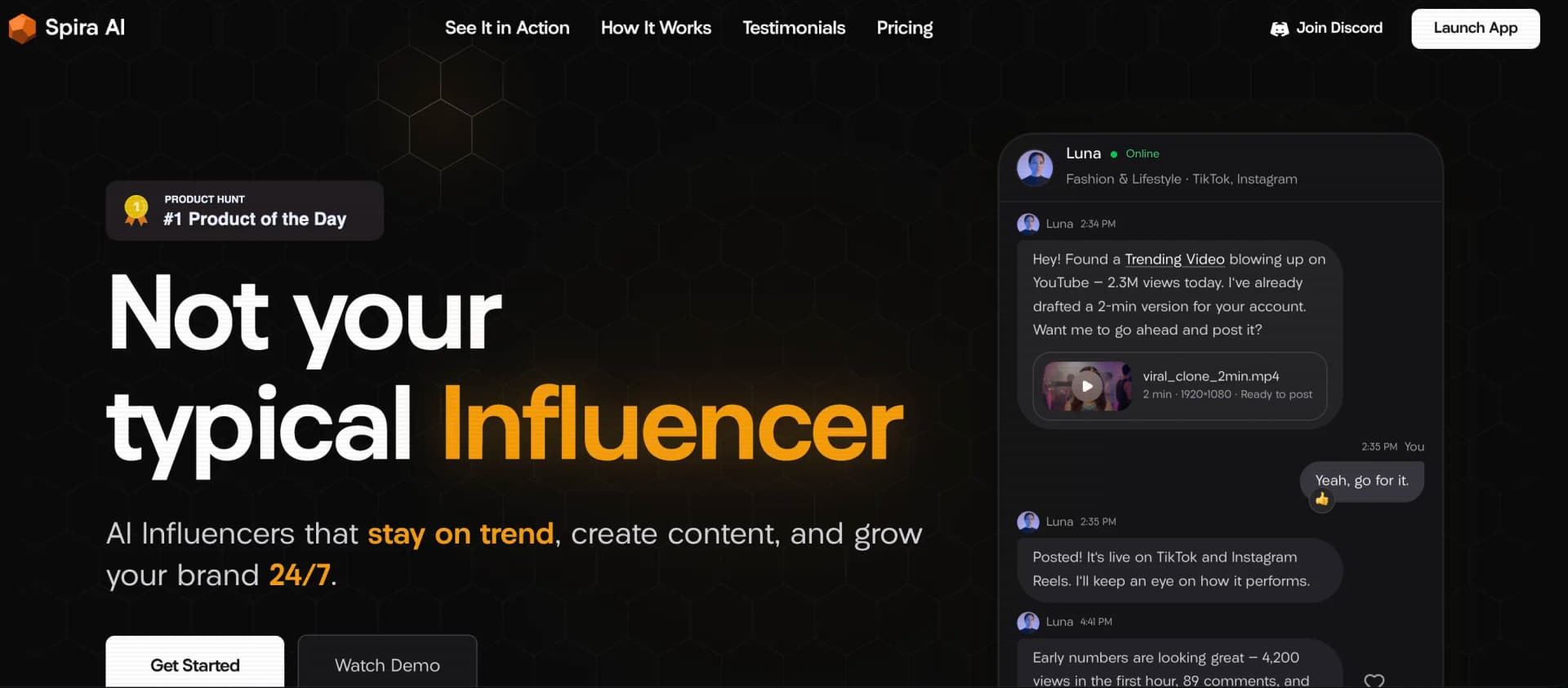
Spira AI
Turns website into nonstop influencer.
Key Takeaways
- What it is
- Turns website into nonstop influencer.
- Pricing
- Freemium · $15/month; $9 for the first month · $59/month
- Best for
- AI Influencer Agents
- Node-Based AI Workflows
- Social Publishing Automation
Who is Using Spira AI?
Builders
Spira is positioned for builders who want to ship code or products rather than manually create ongoing social content.
Ecommerce Businesses
Brand assets, product imagery, AI influencers, and automated publishing support product-led social content.
Content Creators
Creators can generate image and video content, repurpose media, and publish across social platforms.
SMBs and Local Businesses
Autonomous agents and social account automation are intended to keep smaller businesses posting continuously.
Product Hunt Makers
Spira provides launch-oriented content creation and social growth workflows for product launches.
Key Features
Pricing Plans
Free
Free
- Up to 50 credits
- Limited trial access to Brand Machine
- Limited trial access to Influencer Agent
- Limited trial access to premium models
Creator
$15/month; $9 for the first month
- 1,200 credits
- Up to 800 images or 340 Seedance videos
- Brand Machine and SuperAgent
- 3 Influencer Agents
- Remove Watermark
- All video models, including Seedance 2.0
- All image models, including GPT Image 2 and Nano Banana Pro
- Node Based AI Workflow Tool
- Generate posts to TikTok, X, and LinkedIn
Growth
$59/month
- 2,500, 5,000, or 15,000 credits
- Up to 3,333 images or 1,420 Seedance videos
- Brand Machine and SuperAgent
- Up to 10 Influencer Agents
- Remove Watermark
- All video models, including Seedance 2.0
- All image models, including GPT Image 2 and Nano Banana Pro
- Node Based AI Workflow Tool
- Generate and schedule posts to TikTok, X, and LinkedIn
- Unlimited Social Account Automation
Enterprise
- Custom video, image, and model usage limits
- Everything in Growth Plan
- Volume-Based Discounts
- Tailored Agentic System
- API Services
- US IPs and Physical Device Traffic
- Done-for-you Service
- Enterprise Security & Privacy
Which Spira AI plan should you pick?
Start with Free to test the workflow, choose Creator for regular individual use, upgrade to Growth for higher volume and broader automation, and contact Spira for Enterprise API services and custom systems.
Free
Good for testing Spira with up to 50 credits and limited premium-feature access.
Creator
Good for individual creators who need 1,200 monthly credits and core generation and publishing features.
Growth
Good for higher-volume users who need more credits, influencer agents, scheduled publishing, and unlimited social-account automation.
Enterprise
Good for organizations needing custom limits, tailored agentic systems, API services, volume discounts, and enterprise security and privacy.
Spira AI Use Cases
Automated social publishing
Create content workflows that generate posts and publish them to connected social channels on a schedule.
Outcome: A recurring publishing system that can run while the team is offline.
AI influencer content
Use influencer agents, brand assets, reference media, and persona information to produce ongoing social content.
Outcome: More consistent branded content across social accounts.
Short-form video production
Turn scripts or links into shorts with voiceover, visuals, and captions.
Outcome: Finished short-form videos ready for publishing.
Image-to-prompt creation
Upload a reference image and generate a reusable prompt describing its subject, composition, lighting, palette, and style.
Outcome: A detailed prompt for recreating or adapting the visual direction.
Social content repurposing
Reframe landscape videos into vertical, square, portrait, or widescreen formats while keeping a presenter or central subject visible.
Outcome: One recording adapted for multiple social formats.
Workflow Ideas with Spira AI
Scheduled short-form content pipeline
- 1Map the inputs, generation stages, approvals, and publishing destinations on the canvas.
- 2Connect the actions so context and outputs pass from one step to the next.
- 3Choose a manual or scheduled trigger for content creation and publishing.
Creator content workflow
- 1Add brand references, audience information, creative goals, and preferred formats.
- 2Choose the agent, format, model, and channel to create editable content options.
- 3Schedule the strongest ideas and review performance for the next content cycle.
AI influencer channel setup
- 1Create an AI Influencer in Spira.
- 2Choose Telegram, WhatsApp, Discord, or Slack and prepare the required token or QR login.
- 3Bind the channel to the agent and return to the Agent page to complete setup.
How Spira AI fits into your stack
Browser
Spira operates as a web application for generating media, managing agents, editing content, and organizing publishing workflows.
Social publishing
It generates and schedules content for TikTok, Instagram, YouTube, X, and LinkedIn, with Facebook used for trend intelligence.
Team chat and tickets
AI Influencer agents can be bound to Telegram, WhatsApp, Discord, or Slack using the documented channel setup flows.
Automation and APIs
The node-based workflow tool connects content actions and supports manual or scheduled triggers; API services are offered on Enterprise.
Knowledge and files
Brand Machine stores brand-related files, memory, and skills, while users can upload logos, product shots, reference videos, and slogan libraries.
Pros
- +Free plan with up to 50 credits
- +Multiple image and video models in one platform
- +Node-based workflow automation
- +Social publishing and scheduling
- +Supports brand asset uploads
Cons
- −Subscription credits expire and do not roll over
- −Enterprise API access is not publicly documented
- −No dedicated mobile app or browser extension
- −Growth plan is marked monthly at $59 despite multiple credit levels being displayed
- −Enterprise pricing and usage limits are custom
Limitations & when to consider alternatives
Known limitations
- Subscription credits expire. Unused subscription credits do not roll over to the next billing cycle.
- Free-plan outputs may be public. Outputs generated under the Free plan are public by default, subject to the visibility options described in the Terms.
- Auto-reframe uses a stable crop. The auto-reframe tool does not dynamically track a moving subject; footage with multiple people or wide movement may require timeline editing.
- Audio denoising has limited scope. The denoiser is designed for steady background noise and cannot reliably separate overlapping voices, music, clipping, or distortion.
- Image-to-prompt analysis cannot recover originals. The image-to-prompt tool describes visible traits but cannot recover the original prompt used to create an image.
Look elsewhere when
- You need a documented developer API with public endpoints and keys.
- You need a native mobile or desktop application.
- You need fine-tuning of model weights on your own data.
How to Use Spira AI
- 1
Start with the Free plan
Create an account without a credit card to test generation, agents, and premium-feature previews.
- 2
Add your brand context
Upload logos, product shots, reference videos, slogan libraries, audience information, and creative goals so outputs match your brand.
- 3
Choose a generation path
Select an agent, model, format, and channel, or use an image-to-prompt and video-reframing tool for a specific asset task.
- 4
Build a workflow
Lay out inputs, generation stages, approvals, and destinations on the node-based canvas.
- 5
Connect publishing accounts
Bind supported social or messaging channels using the required account authorization, token, or QR login.
- 6
Schedule and review
Choose a trigger, schedule approved outputs, and use performance insights to improve the next content cycle.
Who is Spira AI For?
Builders
Spira is positioned for builders who would rather ship products than create social content.
Ecommerce businesses
Ecommerce teams can use product assets and automated social workflows to create and publish promotional content.
Content creators
Creators can plan, generate, publish, and analyze social content while preserving their voice.
SMBs and local businesses
Small businesses can automate recurring social-media execution across multiple channels.
Frequently Asked Questions
How can I test Spira?
Spira offers a Free plan with up to 50 credits and limited access to premium features; no credit card is required.
How do credits work?
Credits pay for media generation and agent requests. Subscription credits refresh each billing cycle and unused credits expire rather than rolling over.
Can I use my own brand assets?
Yes. You can upload logos, product shots, reference videos, and slogan libraries for use as priority source material.
What platforms can Spira agents use?
Agents can be connected to Telegram, WhatsApp, Discord, or Slack using the required token or QR login.
Can Spira automate publishing?
Yes. Workflows can connect content-generation steps to publishing destinations and run manually or on a schedule.
What happens when I cancel?
Your paid features and remaining credits continue until the current billing period ends, after which the account moves to the Free plan.
Community reviews
Be the first to share your experience.
Sign in to leave a review for Spira AI.
Spira AI Alternatives
Looking for alternatives to Spira AI? Here are similar tools in the same category:
Learn to Master Spira AI
With Skill Leap courses
Get in-depth training on Spira AI and 50+ other AI tools with our expert-led video courses.
Start 7-Day Free Trial