
Typho
AI-driven artistry: Create stunning, personalized portraits from text.
Key Takeaways
- What it is
- AI-driven artistry: Create stunning, personalized portraits from text.
- Pricing
- Freemium · $9.99
- Best for
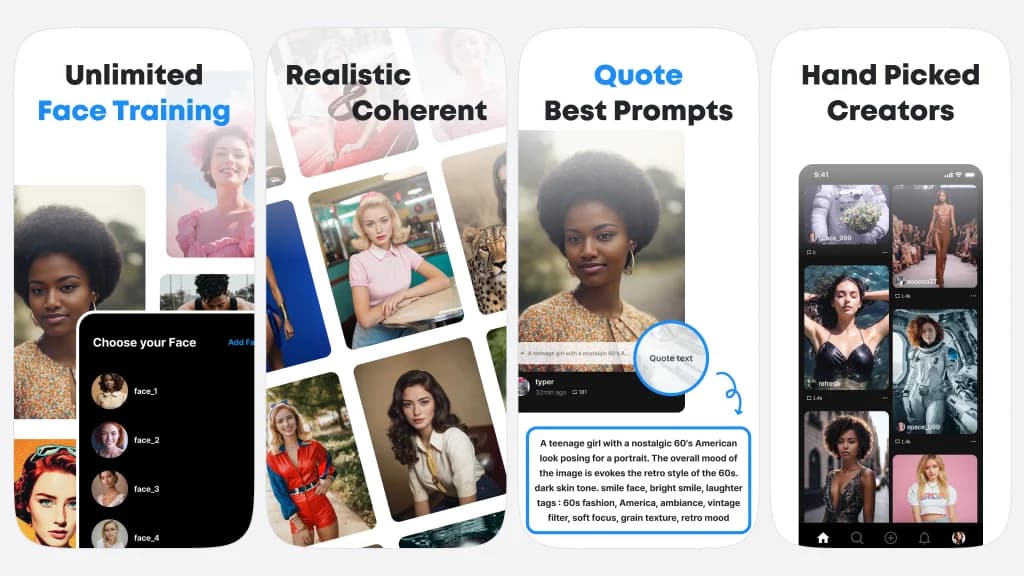
- Unlimited Face Training
- Photographer Quality Pipeline
- Search and Quote Prompts
- Rating
- 3.7/5
What is Typho?
Typho is a groundbreaking mobile application that harnesses artificial intelligence to convert user input text into visually striking self-portraits and high-quality images. This innovative platform enables users to unleash their creativity and express themselves through art in a whole new way. Whether users envision classic, realistic portraits or contemporary, abstract compositions, Typho brings their ideas to life effortlessly. Specifically designed for iPad and iPhone users, Typho provides a creative playground where anyone can explore their imagination without the need for intricate adjustments or coding skills.
Typho stands out for its focus on artistic creation through text input. Unlike other AI tools emphasizing utility or data analysis, Typho empowers users to express themselves through art without technical barriers.
Typho emerges as a versatile platform for creative expression through AI-generated portraits. It empowers users to translate text into intricate visual compositions, catering to innovators, businesses, artists, and enthusiasts alike. Despite room for improvement in performance and stability, Typho's unique ability to democratize art creation offers unparalleled opportunities for users seeking a simple yet powerful creative tool.
Who is Using Typho?
Innovators
Individuals pushing the boundaries of AI-generated human portraits without the need for a camera.
Businesses
Implementing virtual model try-ons in the fashion and retail industry for enhanced customer experiences.
Artists and Designers
Seeking new sources of inspiration for visual creativity and experimentation.
Photographers
Planning and simulating photo shoots before actual execution for precise vision realization.
Uncommon Use Cases
Academics exploring AI's role in future art forms, event planners creating virtual representations of hosts or guests.
Typho caters to a diverse user base seeking to enhance their creative endeavors
Key Features
Rating Breakdown
Pricing Plans
Free Tier
Free
- Typho offers core functionalities at no cost
- Including basic face training and image creation
Basic Plan
$9.99
- This plan unlocks additional features and capabilities
Which Typho plan should you pick?
Start with the free download to evaluate portrait generation, then upgrade to Basic Plan when you need paid access.
Basic Plan
Good for users who want paid access to Typho's face-training and portrait-generation experience.
Typho Use Cases
AI-generated self-portraits
Describe a visual concept with text and create a portrait in an imagined setting.
Outcome: A photographer-quality AI portrait.
Virtual model try-on
Businesses can explore portrait concepts involving virtual models.
Creative inspiration
Artists and designers can browse prompts and inspiration from selected creators.
Outcome: New visual concepts and portrait ideas.
Photo-shoot simulation
Photographers can simulate a planned shoot before using a camera.
Outcome: A preview of possible portrait concepts.
Workflow Ideas with Typho
Create a trained-face portrait
- 1Train Typho on a specific face.
- 2Describe the desired portrait with text.
- 3Generate the photographer-quality portrait.
Use community prompts
- 1Browse hand-picked creator inspiration.
- 2Search for a suitable prompt.
- 3Quote the prompt to create a picture.
How Typho fits into your stack
iOS Compatibility
Typho is designed for iPhone, iPad, and iPod touch devices running iOS 12.0 or later.
Mac Compatibility
For Mac users, Typho requires macOS 11.0 or later with an Apple M1 chip or later.
Apple Vision Support
Enhances capabilities with visionOS 1.0 or later.
Pros
- +Ease of Use: Typho's intuitive interface simplifies the process of creating portraits with minimal effort.
- +Innovative Artistic Expression: Users can explore their artistic side by generating unique portraits in various styles.
- +No Technical Expertise Required: The app eliminates the need for fine-tuning or coding, making it accessible to all users.
- +Regular Updates: Consistent bug fixes and stability improvements ensure a smooth user experience.
Cons
- −Inconsistent Performance: Some users have reported glitches and issues with photo loading, suggesting room for improvement in app stability.
- −Platform Limitation: Currently available only for iOS, limiting access for users with other operating systems.
- −In-App Purchases: While the basic app is free, some features require payment, which may not appeal to all users.
Limitations & when to consider alternatives
Known limitations
- Apple-focused availability. The official listing identifies iPhone and iPad compatibility and says the app is not verified for macOS.
- Invitation-only creator community. Access to the hand-picked creator community is described as invitation-only.
- In-app purchases. The app is free to download but includes in-app purchases, including a Basic Plan.
Look elsewhere when
- You need a documented developer API.
- You need browser-based access or a browser extension.
- You need programming-code generation.
How to Use Typho
- 1
While Typho boasts a user-friendly design, additional guidance and tips can be found on the app store listing and the official website to help users explore its features.
Who is Typho For?
Innovators
They can explore replacing camera-based portrait production with AI-generated human portraits.
Businesses
They can use Typho for virtual model try-on concepts.
Artists and designers
They can find inspiration from visual creatives and generate imaginative portraits.
Photographers
They can simulate the subject or concept of a future photo shoot.
Frequently Asked Questions
What is Typho?
Typho is an artistic platform for creating unique portraits of people in imaginary situations.
How does Typho create portraits?
Users describe a vision with text, and Typho transforms the description into photographer-quality portraits.
Can Typho train a user's face?
Yes. The app advertises unlimited face training and AI training for a specific face.
Does Typho require fine-tuning or coding?
No. The official listing says users do not need fine-tuning or coding.
Does Typho include prompt discovery?
Yes. Users can search and quote prompts for best-picture results.
Is there a creator community?
Typho describes inspiration from hand-picked creators through an invitation-only community.
Community reviews
1 review from people who use Typho.
Sign in to leave a review for Typho.
Eric Maeng
Typho Alternatives
Looking for alternatives to Typho? Here are similar tools in the same category:
Learn to Master Typho
With Skill Leap courses
Get in-depth training on Typho and 50+ other AI tools with our expert-led video courses.
Start 7-Day Free Trial