
Venngage
Create personalized, visually stunning designs effortlessly online.
Key Takeaways
- What it is
- Create personalized, visually stunning designs effortlessly online.
- Pricing
- Freemium
- Best for
- AI-Powered Card Generation
- Customizable Templates
- Accessible Color Palettes
- Rating
- 4.6/5
What is Venngage?
Venngage is an online platform specializing in empowering users to create personalized and visually compelling content. With a strong emphasis on design and user-friendliness, Venngage offers a suite of features tailored for crafting a variety of content, including infographics, reports, and even Valentine's Day cards. Notably, Venngage's Valentine's Day Card Maker feature caught my attention for its ability to generate unique cards with ease.
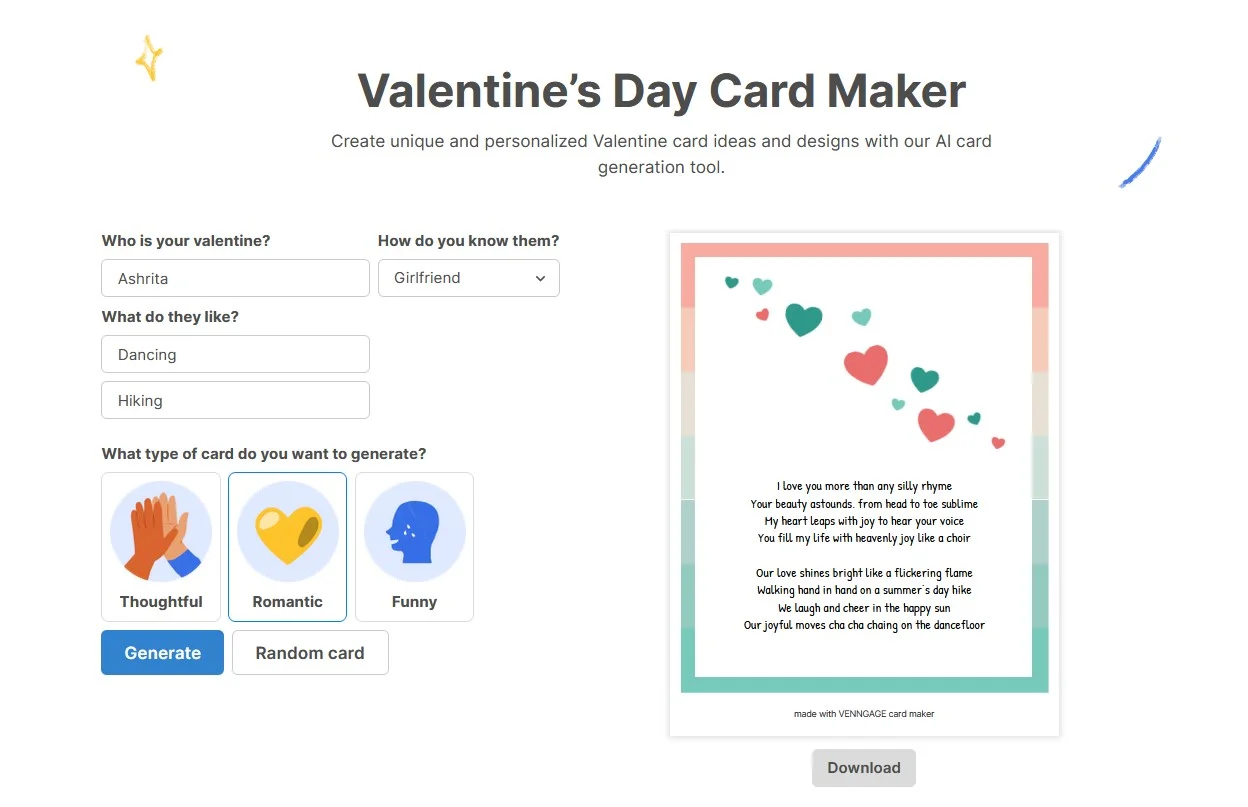
Venngage's Valentine's Day Card Maker stands out with its AI-driven card generation tool, combining automation with customization for a unique card-making experience.
Venngage is a versatile design tool with a user-friendly interface and robust features. The Valentine's Day Card Maker exemplifies Venngage's commitment to accessibility and creativity, offering users an effortless way to convey affection through personalized cards. Whether you're a novice or experienced designer, Venngage provides a platform where ideas can take shape beautifully and effortlessly.
Who is Using Venngage?
Couples
Creating personalized cards to celebrate their relationship.
Friends and Family
Sending heartfelt messages to loved ones.
Educators
Crafting custom cards for classroom activities.
Professionals
Designing corporate Valentine's cards for clients or colleagues.
Uncommon Use Cases
Utilized by event planners for invitations; Adopted by writers for book promotions.
Key Features
Rating Breakdown
Pricing Plans
Free Tier
Free
- Basic features available with a free account
Premium Plans
- Advanced features and unlimited creations with subscription plans
Which Venngage plan should you pick?
Start with Free to test basic designs, choose Premium for individual professional exports, upgrade to Business for collaboration and brand controls, and contact sales for Enterprise security and organization-wide needs.
Free
Good for getting started with a few designs, public sharing and limited AI access.
Premium
Good for individuals who need unlimited designs, private sharing and PNG or high-resolution PNG exports.
Business
Good for professionals and teams who need collaboration, brand kits, PDF or PowerPoint exports and team sharing.
Enterprise
Good for organizations that need advanced security, SSO, groups, custom requirements and dedicated support.
Venngage Use Cases
Create AI-generated infographics
Enter a prompt or upload source content, generate an infographic layout and customize the result.
Outcome: Produce professional visual summaries faster.
Build presentations and reports
Choose a template or generate a document, then edit text, visuals, charts and branding.
Outcome: Create polished business communication materials.
Visualize data
Upload CSV or spreadsheet data into charts, maps or infographic designs and customize the presentation.
Outcome: Make data easier to understand and communicate.
Create accessible visual content
Use accessibility checks for contrast, font readability, alt text and WCAG-oriented design.
Outcome: Improve accessibility and inclusive communication.
Collaborate on team designs
Invite teammates, share designs, assign permissions and edit shared team content.
Outcome: Coordinate visual production across an organization.
Workflow Ideas with Venngage
Generate a design from source content
- 1Open the Universal Generator
- 2Enter a prompt or upload a PDF, DOCX, XLS, XLSX or CSV file
- 3Review generated options and click Customize to edit the design
Create and share a team design
- 1Invite members from the Manage Team section
- 2Open a design and enable Share with team
- 3Let team members access and edit the shared design
Translate a visual into multiple languages
- 1Open the design in the Venngage Editor
- 2Choose File and select Translate with AI
- 3Select a language and review the newly created translated design
How Venngage fits into your stack
Download Formats
PNG, PDF, and PPT formats available for easy sharing and printing.
Online Sharing
Generate shareable links for digital distribution.
Design Flexibility
Support for personal images and text inclusion.
Cross-Platform Accessibility
Accessible through various web browsers on different devices.
Pros
- +Time-Saving: Quickly generates cards, ideal for last-minute creations.
- +Personalization: Users can add personal touches like names and favorite themes.
- +Diverse Templates: Wide selection catering to different tastes and relationships.
- +Accessibility Standards: Designs meet WCAG 2.0 guidelines for inclusivity.
Cons
- −Generation Limits: Users face limits on the number of cards generated per hour without signing up.
- −Print Quality Dependency: Final print quality depends on user's printer settings and paper quality.
- −Learning Curve: Some users may need time to familiarize themselves with all customization options.
Limitations & when to consider alternatives
Known limitations
- Free users cannot download designs. Free users can publish up to five designs publicly but cannot download them.
- AI Designer cannot create a brand-new design from scratch. AI Designer edits existing designs; use the Universal Generator for a new design.
- Uploaded files are not replicated exactly. AI Designer can analyze uploaded content but does not recreate the original layout or formatting.
- Only one file can be uploaded at a time. The Universal Generator supports one uploaded file per generation.
- AI translations may contain errors. Translated designs should be reviewed and edited for accuracy and tone.
Look elsewhere when
- You need a native mobile application.
- You need direct Jira or Asana integrations.
- You need an API for programmatic access.
How to Use Venngage
- 1
Venngage offers a range of resources, including a Help Center and blog posts, to guide users through the card-making process and maximize tool capabilities.
Who is Venngage For?
Businesses
Create on-brand infographics, reports, presentations and other visual communications.
Marketers
Generate campaign visuals, social content, presentations and branded marketing materials.
Educators
Build visual learning materials, presentations, diagrams and classroom resources.
Nonprofit teams
Communicate missions, data and impact through accessible, professional visuals.
Professionals
Turn complex information and data into clear visual content without advanced design skills.
Frequently Asked Questions
What is Venngage?
Venngage is a web-based design and data visualization platform powered by AI for creating professional visuals, infographics, reports, presentations and social media graphics.
Is Venngage free?
Yes. Venngage offers a free plan with basic templates and tools. Paid plans start at $10 per month.
What can you make with Venngage?
You can create infographics, reports, presentations, timelines, charts, newsletters, social media posts, marketing visuals and other data-driven content.
Does Venngage have AI tools?
Yes. Venngage includes AI design generators, AI logo generation, AI content creation and AI-generated alt text.
Who uses Venngage?
Venngage is used by businesses, marketers, educators, nonprofit teams and professionals who work with data and need clear, on-brand visuals.
Is Venngage good for non-designers?
Yes. Drag-and-drop editing, customizable templates, auto-branding and AI design tools make professional visual creation accessible to non-designers.
Community reviews
Be the first to share your experience.
Sign in to leave a review for Venngage.
Venngage Alternatives
Looking for alternatives to Venngage? Here are similar tools in the same category:
Learn to Master Venngage
With Skill Leap courses
Get in-depth training on Venngage and 50+ other AI tools with our expert-led video courses.
Start 7-Day Free Trial