vivago.ai
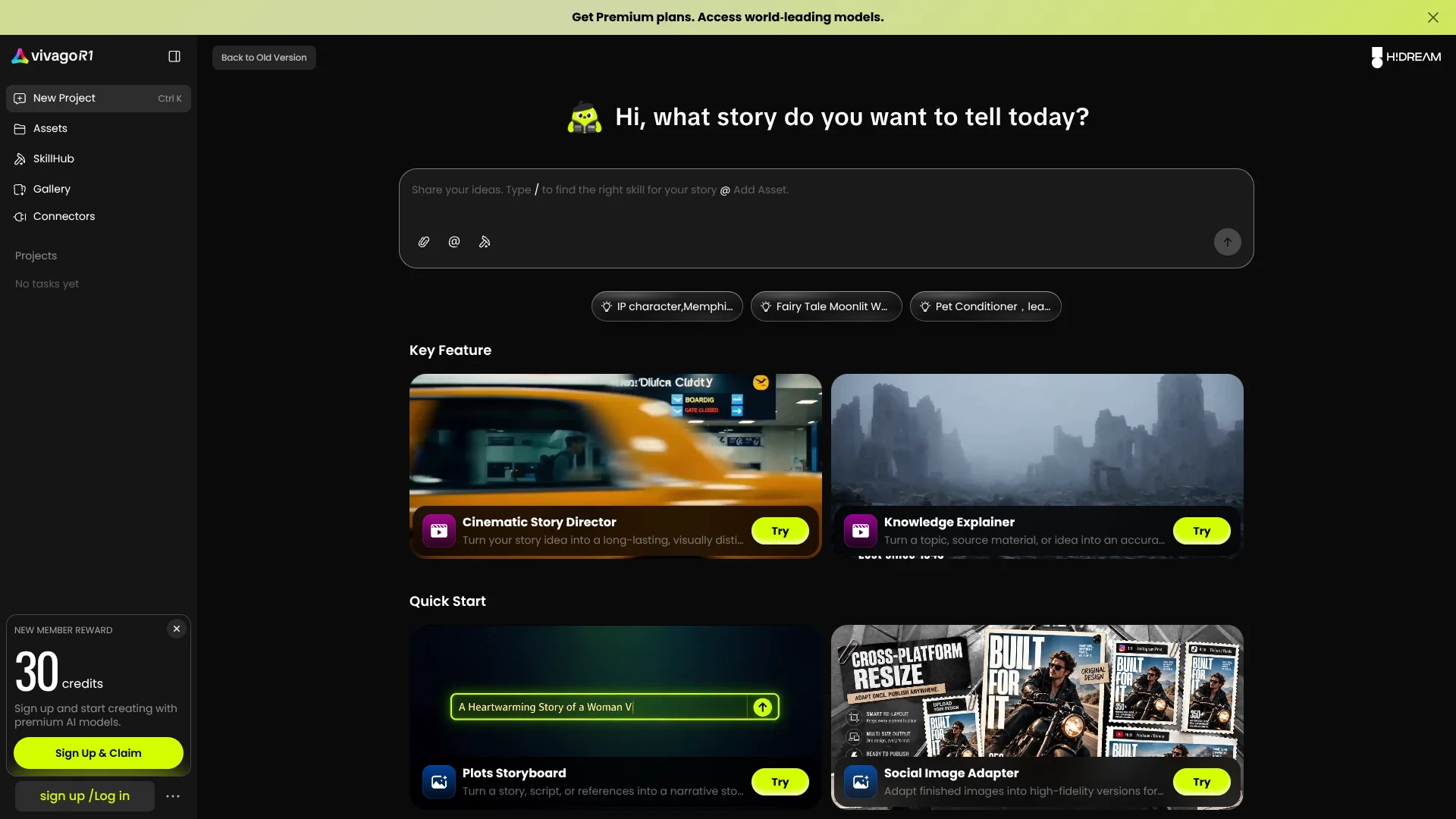
Turn story ideas into cinematic videos with a team of AI agents.
Watch vivago.ai in Action
Key Takeaways
- What it is
- Turn story ideas into cinematic videos with a team of AI agents.
- Pricing
- Freemium · $12.90 per month · $39.90 per month · $99.90 per month
- Best for
- Cinematic Story Director
- Knowledge Explainer
- Plots Storyboard
- Rating
- 4.1/5
What is vivago.ai?
A story idea can become a planned visual narrative and finished video in vivago AI Agent, which coordinates AI agents to handle creative steps together. Creators can also turn source material into explainer videos or lay out a script as a storyboard. This is useful when you want a generated story with structure, rather than a single image or an unplanned clip.
The Cinematic Story Director brings multiple AI agents into one creative process, taking a story idea toward a finished cinematic video. That end-to-end story workflow is the clearest reason to choose vivago AI Agent over a tool focused on generating one image or clip at a time.
It is best suited to creators making narrative videos, explainers, and storyboard drafts. The experience centers on visual creation, so it is not a general tool for coding or broad office work; reach for vivago when the goal is to turn an idea into a visual story.
Who is Using vivago.ai?
Video creators
A story idea becomes a cinematic video through the Cinematic Story Director.
Educators
Knowledge Explainer turns a subject or source material into a video lesson.
Storyboard artists
Plots Storyboard organizes scripts and visual references into a narrative grid.
Fashion creators
OOTD Advisor creates personalized styling ideas and virtual try-ons.
Uncommon Use Cases
Amazon Listing Designer creates listing content and SEO copy; Social Image Adapter adapts finished images for different platforms and aspect ratios.
Key Features
Rating Breakdown
Pricing Plans
Free
Free
- Daily generation credits
Basic
$12.90 per month
- 1,000 monthly credits
Plus
$39.90 per month
- 4,000 monthly fast-generation credits
Pro
$99.90 per month
- 15,000 monthly fast-generation credits
Which vivago.ai plan should you pick?
Start with Free to try the creative skills, then move to Basic, Plus, or Pro when your monthly generation needs exceed the free allowance.
Free
Good for trying the AI Agent and its visual creation workflows with daily credits.
Basic
Good for lighter regular generation with 1,000 monthly credits.
Plus
Good for higher-volume creation with 4,000 monthly fast-generation credits.
Pro
Good for frequent creation with 15,000 monthly fast-generation credits.
vivago.ai Use Cases
Cinematic story video
A rough story idea becomes a visually distinctive video with a planned narrative.
Outcome: A finished cinematic video.
Knowledge explainer
A topic, source material, or idea becomes an engaging explainer video.
Outcome: A video that makes complex knowledge easier to understand.
Short-video storyboard
A script or visual references are arranged into a storyboard grid before production.
Outcome: A narrative storyboard for short-video production.
Virtual try-on
A clothing item is shown in a generated try-on image.
Outcome: A photorealistic virtual try-on.
Social image adaptation
A finished image is adapted for different social platforms and aspect ratios.
Outcome: Platform-ready image versions.
Workflow Ideas with vivago.ai
Plan a short story video
- 1Write the story idea in the AI Agent.
- 2Choose Cinematic Story Director or Plots Storyboard in SkillHub.
- 3Review the generated visual story or storyboard.
Build an explainer from source material
- 1Upload the source file or add relevant assets.
- 2Choose Knowledge Explainer and describe the subject.
- 3Review the generated explainer video.
Prepare images for social channels
- 1Add the finished image as an asset.
- 2Choose Social Image Adapter.
- 3Generate versions for the intended platforms and aspect ratios.
How vivago.ai fits into your stack
Web creation
The web AI Agent is the main workspace for describing a story, adding files, and starting creative tasks.
SkillHub
SkillHub is where you choose a focused creative workflow, such as story direction, explainers, or storyboards.
Assets and references
Uploaded files and added assets can guide a project that needs source material or visual references.
Mobile continuation
Generated work stays in sync between web and mobile, so a project can continue across devices.
Coding-agent access
The vivago CLI connects the service with supported agents such as Codex and Claude.
Pros
- +Story structure: The Cinematic Story Director is built to turn an idea into a coherent visual narrative.
- +Purpose-built skills: Storyboards and knowledge explainers give creators specific starting points for common video tasks.
- +Cross-device continuity: Generated work stays in sync between web and mobile.
- +Free entry tier: You can try AI generation before paying for a subscription.
Cons
- −Credit budgeting: Paid plans provide a set monthly credit allowance, so frequent generation may call for a larger plan.
- −Narrow focus: The product is centered on visual storytelling and image or video creation, not general-purpose work.
Limitations & when to consider alternatives
Known limitations
- Free outputs are watermarked. The Free plan includes watermarked output and a five-second maximum video length.
- Free credits depend on ads or daily refreshes. Free usage is tied to daily credits or watching advertisements rather than a large fixed monthly allowance.
- Basic lacks commercial licensing. The pricing comparison marks commercial licensing unavailable on Basic and available on Plus and Pro.
- API image references have a size limit. The image-to-video API documentation limits image files to 10MB.
- Some generations may be blocked. The API documentation says politically sensitive, violent, or explicit requests may be rejected.
Look elsewhere when
- You need a browser extension rather than a web application.
- You need a dedicated Windows, Mac, or Linux application.
- Your organization requires SSO or SAML.
- You need named third-party integrations such as Slack, Zapier, or Notion.
How to Use vivago.ai
- 1
Start a project
Open the web AI Agent and begin a new project for your visual idea.
- 2
Describe the story
Explain the subject and the result you want so the agents have a clear creative brief.
- 3
Add references
Upload a file or add assets when your project depends on source material or specific visuals.
- 4
Choose a skill
Open SkillHub and select a tool such as Cinematic Story Director, Knowledge Explainer, or Plots Storyboard.
- 5
Review the result
Check the generated video or storyboard and refine the brief if the visuals do not match your idea.
- 6
Continue on mobile
Open vivago on mobile to access work that stays in sync across devices.
Who is vivago.ai For?
Creators
Narrative video tools help turn an idea into a planned visual story.
Storytellers
The Cinematic Story Director is aimed at people who want to shape a story into a cinematic video.
Educators and explainers
Knowledge Explainer can turn a topic or source material into a video explanation.
Short-video producers
Plots Storyboard helps organize a script or references into a grid before production.
Frequently Asked Questions
Is vivago AI Agent free?
A free plan is available. The official site describes free access with daily generation credits.
What do the paid plans cost?
The listed monthly plans are Basic at $6, Plus at $20, and Pro at $60.
What does the Plus plan include?
Plus includes 4,000 monthly fast-generation credits.
What does the Pro plan include?
Pro includes 15,000 monthly fast-generation credits.
Can I use vivago across web and mobile?
Yes. The product says generated work stays in sync across web and mobile, and vivago.ai has an iOS app.
Community reviews
2 reviews from people who use vivago.ai.
Sign in to leave a review for vivago.ai.
Vera Martin
Vũ Đức Tuấn
vivago.ai Alternatives
Looking for alternatives to vivago.ai? Here are similar tools in the same category: