
WeryAI
Generate and polish 4K-ready videos, images, music.
Key Takeaways
- What it is
- Generate and polish 4K-ready videos, images, music.
- Pricing
- $14.99 per month · $24.99 per month · $69.99 per month
- Best for
- Model aggregator for visual AI
- Text, image, and video workflows
- AI video utilities
- Rating
- 4.4/5
What is WeryAI?
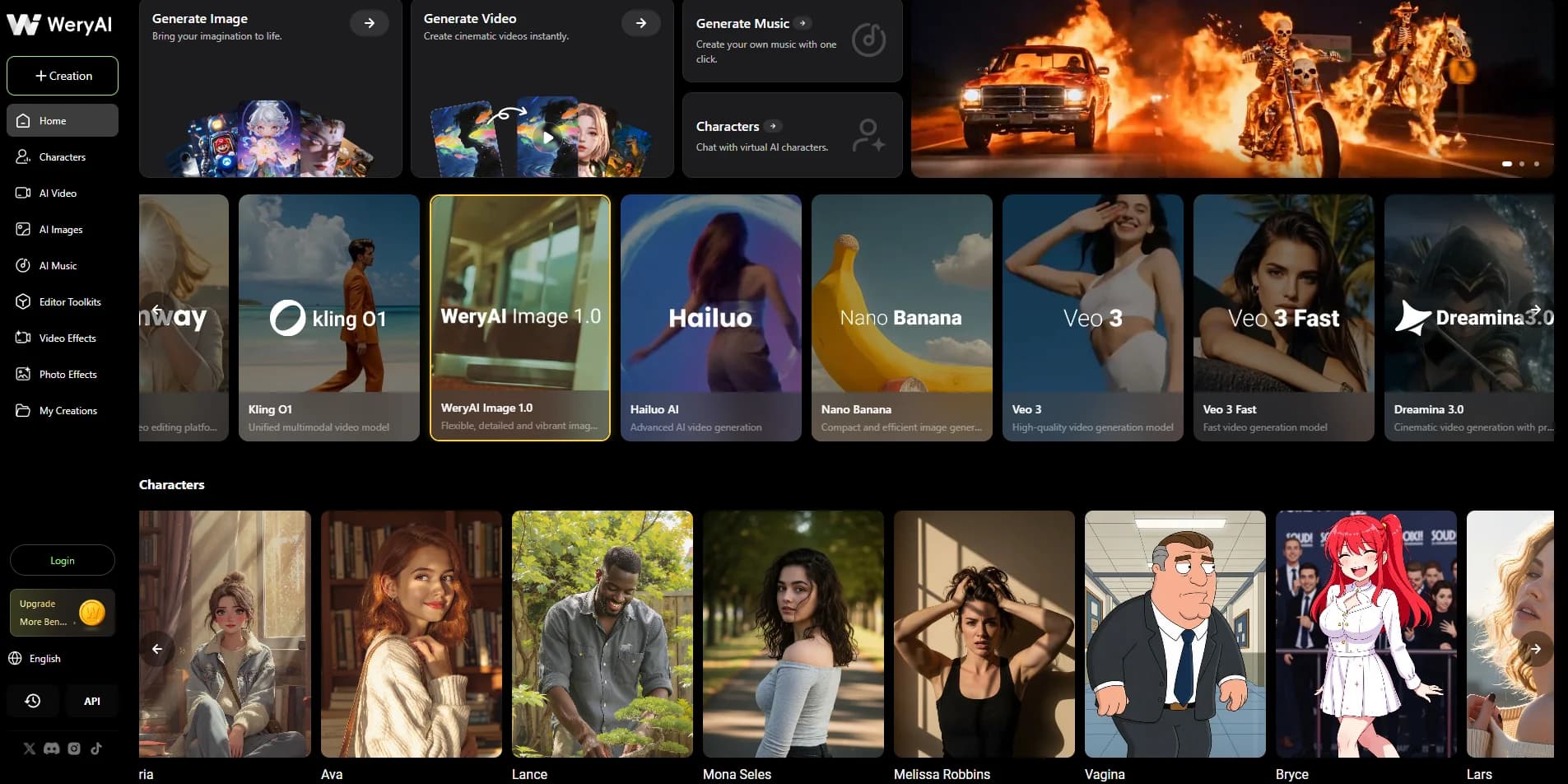
WeryAI is an all in one AI media studio that combines video, image, music, and character tools with a broad mix of third party and in house models. It targets creators, marketers, and developers who want 4K ready visuals from prompts, scripts, or reference files without maintaining multiple AI subscriptions or switching between many separate apps.
WeryAI distinguishes itself by acting as a neutral hub over many leading video and image models while also providing practical utilities such as subtitle eraser, motion imitation, lip sync, and e commerce focused tools. That mix of top tier engines plus very task specific post production helpers gives creators both variety and finished, usable outputs.
WeryAI gives individuals and small teams access to models and workflows that used to live in scattered, specialist tools. For anyone producing regular social, marketing, or product content, it offers a fast, model rich sandbox to test ideas, compare engines, and ship polished visuals without deep technical setup.
Who is Using WeryAI?
Content Creators & YouTubers
Turning scripts into B roll, stylized sequences, channel intros, and motion driven characters.
Social Media Teams
Producing vertical clips, memes, and quick edits for TikTok, Reels, and Shorts.
E commerce Brands
Generating product shots, lifestyle visuals, and short promotional videos from minimal source assets.
Agencies & Designers
Prototyping campaign visuals, pitch decks, and client concepts across video, images, and effects.
Developers & Indie Studios
Creating concept art, trailers, and character motion tests without large internal art teams.
Uncommon Use Cases
Used by educators for media literacy or marketing classes; adopted by event organizers for rapid promo and recap reels.
Key Features
Rating Breakdown
Pricing Plans
Basic
$14.99 per month
- 250 credits per month, up to 250 images, up to 50 videos, and 50% off the first generation with the first subscription
Standard
$24.99 per month
- 450 credits per month, up to 450 images, up to 90 videos, and 50% off the first generation with the first subscription
Pro
$69.99 per month
- 1,500 credits per month, up to 1,500 images, up to 300 videos, and 50% off the first generation with the first subscription
Which WeryAI plan should you pick?
Start with the free plan to test the tools; choose Basic for light recurring use, Standard for regular creation, Pro for high-volume work, and Ultra for the largest monthly quotas.
Basic
Good for individual users who need 400 monthly credits, up to two concurrent tasks, and core image, video, music, and editing features.
Standard
Good for regular creators who need 900 monthly credits, higher generation limits, watermark removal, and faster generation.
Pro
Good for high-volume creators and professionals who need 2,300 monthly credits, three concurrent tasks, and priority ultra-fast generation.
Ultra
Good for intensive production workloads that need 6,100 monthly credits, five concurrent tasks, and the highest listed generation quotas.
WeryAI Use Cases
Generate marketing visuals
Create product images, advertising assets, social posts, and promotional videos from prompts or reference media.
Outcome: Produce campaign-ready creative assets faster.
Animate still images
Upload a photo, choose a model, describe motion, and generate a video.
Outcome: Turn static images into animated clips.
Translate image text
Upload posters, menus, screenshots, or manga pages and replace the original text with a selected language.
Outcome: Localize visual content while preserving its layout and style.
Restore and upscale photos
Upload blurry, low-resolution, or damaged images for upscaling, denoising, deblurring, and restoration.
Outcome: Create sharper, higher-resolution images.
Transform video styles
Upload a short video and use a text prompt to apply an anime, claymation, or other visual style.
Outcome: Create stylized versions while preserving the source motion.
Workflow Ideas with WeryAI
Create an image-to-video clip
- 1Upload a JPG, PNG, or WEBP image
- 2Choose an available video model and describe the motion
- 3Generate, preview, and download the MP4 video
Localize visual content
- 1Upload a poster, menu, screenshot, or manga page
- 2Select the target language
- 3Generate and download the translated image
Build an API generation workflow
- 1Create a WeryAI account and API key
- 2Purchase credits and send a request to a documented endpoint
- 3Use webhook notifications when asynchronous generation completes
How WeryAI fits into your stack
Browser
WeryAI is primarily a browser-based creative studio for generating and editing images, videos, music, and visual assets.
Automation and APIs
Its documented REST API provides API keys, endpoints, webhooks, call history, and integration options for automated content-production pipelines.
Mobile
WeryAI also operates as a native Android app for conversational creation and generation of images, videos, and music.
Pros
- +All in one workflow: Reduces tool switching by combining generation, editing, effects, and upscaling in a single interface.
- +High quality outputs: Access to premium closed and open models gives strong fidelity for cinematic video, stylized shots, and detailed still imagery.
- +Creator friendly UX: Four step flow (choose tool, add prompt or upload, pick model, generate) keeps multi model pipelines approachable for non technical users.
- +Flexible credit system: Free access, subscriptions, rollover credits, and adjustable top up sliders suit both casual users and high volume production teams.
Cons
- −Model overload: New users may feel overwhelmed deciding which of the many engines and tools to use for a given task.
- −Limited native integrations: Work typically moves through manual export rather than deep integrations into editing or design software.
- −Third party dependence: Performance, uptime, and content policies partly depend on the external model providers that WeryAI aggregates.
Limitations & when to consider alternatives
Known limitations
- Short video generations. The text-to-video tool generates clips up to 8 seconds per generation, with longer results requiring extensions.
- Upload size limits. Several image and video tools limit uploaded files to 10MB.
- Video-to-video duration. Video-to-video style transfer is intended for short clips, generally around 5–10 seconds.
- Model-dependent results. Exact motion, identity consistency, audio availability, duration, and resolution depend on the selected model.
- Commercial-use restrictions. Commercial licensing is limited by subscription level; free users and Basic subscribers are restricted to personal use according to the FAQ.
Look elsewhere when
- You need a desktop installer rather than a browser-based platform.
- You need shared workspaces with named teammates and role-based collaboration.
- You need fine-tuning or model training on your own data.
- You need code generation or programming assistance.
How to Use WeryAI
- 1
Choose a creation tool
Open a text-to-image, text-to-video, image-to-video, image-editing, translation, or other tool based on the desired output.
- 2
Enter a prompt or upload reference media
Describe the scene or upload supported images, videos, or other reference inputs to guide generation.
- 3
Select a model and settings
Choose an available model, aspect ratio, resolution, duration, audio option, or other model-specific settings.
- 4
Generate the result
Click Create or Generate and wait for WeryAI to process the request using available credits.
- 5
Review and download
Preview the generated image or video, then download it or continue editing with another WeryAI tool.
- 6
Upgrade when limits become restrictive
Use the free plan for testing, then upgrade to Basic, Standard, Pro, or Ultra for more credits, concurrent tasks, speed, and advanced features.
Who is WeryAI For?
Creators
Generate images, videos, music, effects, and other visual content from natural-language ideas.
Marketers
Create advertising visuals, product imagery, social-media videos, and localized campaign assets.
Designers
Use image generation, image-to-image editing, background replacement, upscaling, and image extension.
Developers
Integrate WeryAI's image and video generation models through the documented REST API.
Beginners
Start with natural-language prompts, templates, free credits, and simplified generation workflows.
Frequently Asked Questions
What is WeryAI?
WeryAI is a one-stop AI video and image creation platform offering image generation, video generation, face swapping, character animation, and related tools.
Is WeryAI suitable for beginners?
Yes. WeryAI says it is designed for creators of all backgrounds and skill levels, including beginners.
Can I use WeryAI for free?
Yes. WeryAI provides a free plan with credits, while paid subscriptions add more credits, faster generation, more concurrent tasks, and advanced features.
Can WeryAI generate images and videos from uploads?
Yes. Users can upload images or videos as references for image-to-image, image-to-video, video-to-video, and other transformation tools.
Can I use WeryAI for commercial purposes?
Commercial licensing is available for paid-plan image and video outputs. Free users and Basic subscribers have personal-use limitations according to the FAQ.
Does WeryAI provide an API?
Yes. WeryAI provides a REST API with API keys, documented endpoints, webhooks, call history, and credit-based billing.
Community reviews
Be the first to share your experience.
Sign in to leave a review for WeryAI.
WeryAI Alternatives
Looking for alternatives to WeryAI? Here are similar tools in the same category:
Learn to Master WeryAI
With Skill Leap courses
Get in-depth training on WeryAI and 50+ other AI tools with our expert-led video courses.
Start 7-Day Free Trial