
Whacka
Describe an idea, get a tiny phone app.
Key Takeaways
- What it is
- Describe an idea, get a tiny phone app.
- Pricing
- Freemium · $9 per month · $29 per month · $79 per month · $9 · $39
- Best for
- AI Idea‑to‑App Creation
- Mobile‑First Workflow
- Simple Utility‑Style Apps
- Rating
- 4.1/5
What is Whacka?
Whacka helps people turn rough ideas into simple mobile apps directly from their phones using AI. Instead of learning a builder on desktop, users describe what they want in natural language and Whacka generates small, focused apps that can live on the home screen and be shared with others. It targets non technical users who want quick, personal tools rather than full scale commercial products.
Whacka leans hard into the idea of “personal little apps” generated on a phone, which sets it apart from traditional no‑code tools that often feel like condensed professional IDEs. Its focus on very small, focused utilities means users can treat app creation more like jotting down a note than “building a product.” The mobile‑first, AI‑driven flow encourages quick, casual experimentation, making it attractive for people who have many ideas but limited time or technical skills.
Whacka offers a focused path for anyone who wants simple mobile apps without learning traditional no‑code builders or writing code. By centering everything on the phone and narrowing the scope to small, highly specific tools, it turns “I wish I had an app for this” moments into something users can actually ship in minutes. For side‑project fans, busy small business owners, or everyday users who constantly hack their workflows in notes and spreadsheets, Whacka provides a refreshing, lightweight way to let AI do the heavy lifting and get useful mini apps onto the home screen.
Who is Using Whacka?
Solo Founders and Tinkerers
Testing micro SaaS or utility ideas quickly before investing in a full build.
Small Business Owners
Spinning up tiny tools like booking helpers, loyalty punch cards, or simple customer forms.
Creators and Influencers
Building little companion apps for audiences, such as content hubs, challenge trackers, or tip calculators.
Teachers and Coaches
Creating bite‑sized learning tools, habit trackers, or exercise timers for students and clients.
Uncommon Use Cases
Used by meetup organizers for lightweight event helpers; adopted by families to build shared household trackers or chore apps.
Key Features
Rating Breakdown
Pricing Plans
Free
Free
- No active subscription
Starter
$9 per month
- 200 credits per month and 15 free daily credits
Pro
$29 per month
- 800 credits per month and 15 free daily credits
Ultra
$79 per month
- 2,500 credits per month and 15 free daily credits
Credit Pack
$9
- 100 credits
- Credits are valid for 12 months
Credit Pack
$39
- 500 credits
- Credits are valid for 12 months
Which Whacka plan should you pick?
Start with Free to test the builder; upgrade to Starter for longer-lived apps, Pro for native mobile publishing and exports, or Ultra for enterprise-oriented support and infrastructure.
Free
Good for testing ideas and publishing a first app with limited credits and 14-day availability.
Weekly
Good for short projects that need more credits without a monthly commitment.
Starter
Good for a few real apps that need persistent hosting, a custom subdomain, and larger data limits.
Pro
Good for frequent builders who need native Android and iOS apps, app-store publishing, private apps, code export, and custom domains.
Ultra
Good for higher-volume or enterprise-oriented use requiring SLA, dedicated infrastructure, monitoring, and email support.
Whacka Use Cases
Bookings and scheduling
Customers open an app, choose an available time, and book appointments.
Outcome: Get booked while reducing no-shows with reminders.
Inventory management
Add products, count stock, and configure low-stock alerts.
Outcome: Keep live stock counts your team can update.
Online shops
Show products, accept orders, and keep business records in one app.
Outcome: Put a small shop online without a traditional e-commerce platform.
Teaching and courses
Create lessons, track students, and provide practice in multiple languages.
Outcome: Give students an app they can open and use.
Document analysis
Build apps that process papers, reports, and long documents with AI.
Workflow Ideas with Whacka
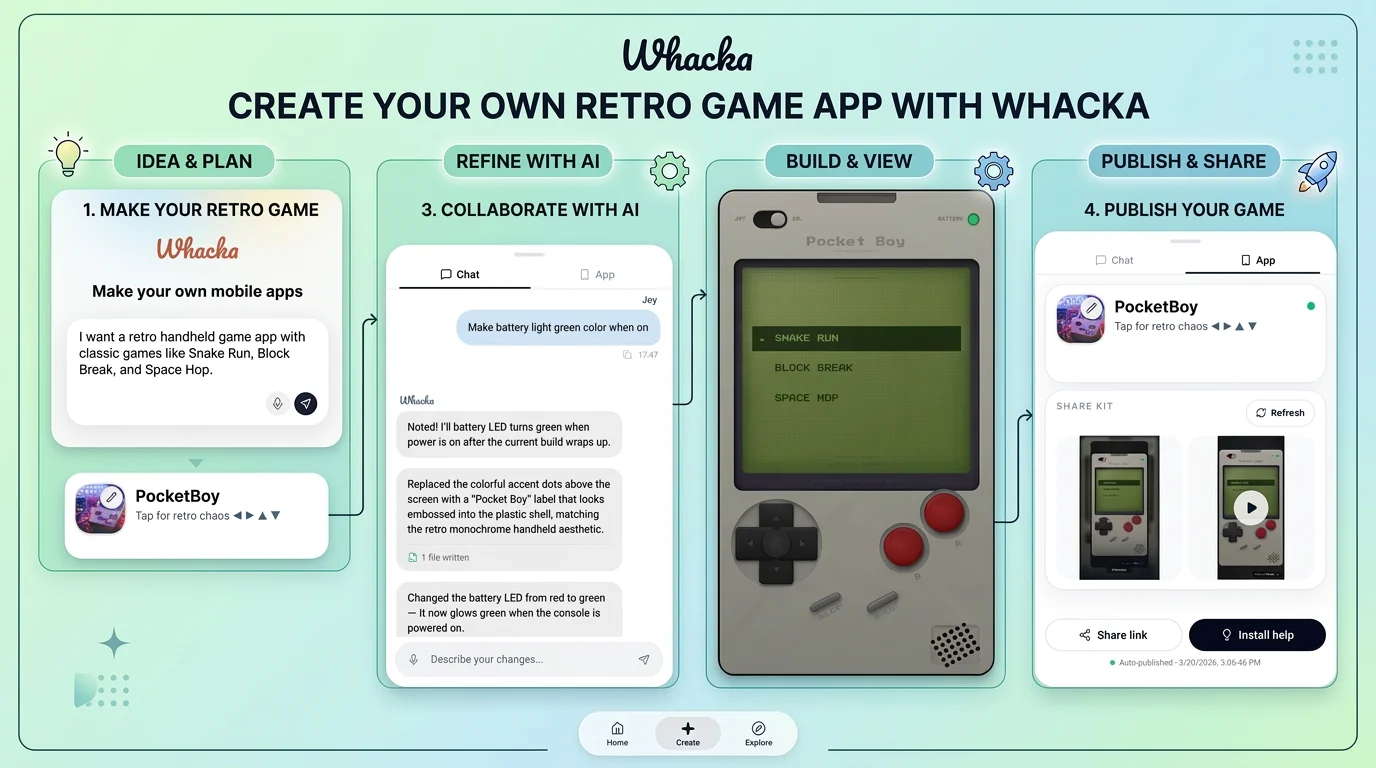
Describe, refine, publish
- 1Describe the app in plain language
- 2Review the live preview
- 3Request changes in the chat
- 4Publish the finished app
Booking notification workflow
- 1Create an app with booking availability
- 2Let a customer select and confirm a slot
- 3Send an automatic confirmation or reminder
Excel-to-app workflow
- 1Describe the data-driven app
- 2Request an Excel upload and column-mapping screen
- 3Upload the file and match columns
- 4Continue refining the app by chat
How Whacka fits into your stack
Browser
Whacka is primarily a browser-based AI app builder. Users describe an app in chat, preview the generated result, refine it conversationally, and publish it to a web link.
Knowledge and files
Users can upload Excel or CSV files into generated apps, preview column mappings, and import the resulting records for use in operational workflows.
Automation and APIs
Generated apps can receive inbound webhooks from services such as Zapier and connect to WhatsApp Business through YCloud. Whacka also supports event-driven notifications and scheduled reminders inside published apps.
Team chat and tickets
Generated apps can include team accounts, invitations, role-based permissions, and operational notifications through WhatsApp. These are app-level workflows for a business team rather than a shared Whacka project workspace.
Pros
- +Accessible for Non‑Coders: Designed so people with zero development background can still get a working app out of a short description.
- +Fast Prototyping: Ideal for quickly testing ideas, side projects, or personal tools without committing to a full no‑code stack.
- +Phone‑Native Experience: Creating on the same device where the app will live encourages casual experimentation and quick iteration.
- +Low Overhead: Focusing on tiny utilities rather than large products keeps scope manageable and reduces the chance of getting stuck in complex configuration.
Cons
- −Limited Complexity: Not suited for large, data‑heavy, or enterprise‑grade applications that need advanced integrations and workflows.
- −Mobile‑Only Editing: Users who prefer designing on a larger screen or doing detailed layout work on desktop may find the experience restrictive.
- −Early‑Stage Ecosystem: As a newer tool, it likely has less documentation, community content, and integration depth than mature no‑code platforms.
Limitations & when to consider alternatives
Known limitations
- Free published apps expire. Apps on the Free plan remain online for 14 days after publishing.
- The first version is only a draft. Whacka recommends evaluating the app after multiple rounds of corrections.
- Not suited to every project. The site identifies heavy hardware integrations, giant enterprise systems, and major game releases as poor fits.
- Exact AI model selection is unavailable. Whacka handles model routing rather than letting users choose the exact model.
- WhatsApp automation is not an inbox or auto-reply bot. Customer replies go to the connected phone; there is no WhatsApp inbox inside the app or automatic reply bot.
Look elsewhere when
- You need a native app experience without relying on Whacka’s app-store publishing plan.
- You need an app-store listing immediately without using Whacka’s web-app workflow.
- You need to select the exact underlying AI model.
How to Use Whacka
- 1
Describe the app
Write what you want in plain language, including who will use it and what they should be able to do.
- 2
Review the live preview
Whacka generates the first version with screens, data, logic, and a working preview.
- 3
Refine by chatting
Request individual changes such as new pages, styling adjustments, data fields, or permission rules.
- 4
Add data or integrations
Upload supported files such as Excel data or connect services such as WhatsApp through the app-building conversation.
- 5
Publish and share
Publish the app to its own link, install it on a phone’s home screen, or use Pro for native app-store publishing.
Who is Whacka For?
Small businesses
Build booking pages, storefronts, customer portals, and operational tools from a description.
Teachers and course creators
Create lessons, student tracking, practice tools, portfolios, and reports.
Teams and internal operations
Build inventory, attendance, inspection, point-of-sale, and operations dashboards.
Community and club organizers
Create member-facing apps where people find one another and stay connected.
Individuals
Make personal apps for budgeting, journaling, planning, reminders, and habit tracking.
Frequently Asked Questions
What is whacka?
Whacka is an AI platform that turns plain language into real, working apps without requiring code.
How does whacka work?
Describe what you need, and whacka generates the interface, data, logic, and a live link.
Can I use whacka for my business?
Yes. The site highlights booking pages, storefronts, internal tools, and customer portals.
Do I need to know how to code?
No. Whacka handles the layout and backend from a natural-language description.
Can apps use AI?
Apps can include chat, image generation, text-to-speech, transcription, voice changing, music, and sound.
Can I publish apps to app stores?
The Pro plan includes native Android and iOS apps and publishing to Google Play and the App Store.
Community reviews
Be the first to share your experience.
Sign in to leave a review for Whacka.
Whacka Alternatives
Looking for alternatives to Whacka? Here are similar tools in the same category:
Learn to Master Whacka
With Skill Leap courses
Get in-depth training on Whacka and 50+ other AI tools with our expert-led video courses.
Start 7-Day Free Trial