
WonderShare Media.io
Create stunning videos and images in an instant.
Key Takeaways
- What it is
- Create stunning videos and images in an instant.
- Pricing
- Freemium · $9.99 per month · $17.99 per month
- Best for
- AI Video Generation
- Image to Anime Conversion
- Audio Editing and Enhancement
- Rating
- 4.5/5
What is WonderShare Media.io?
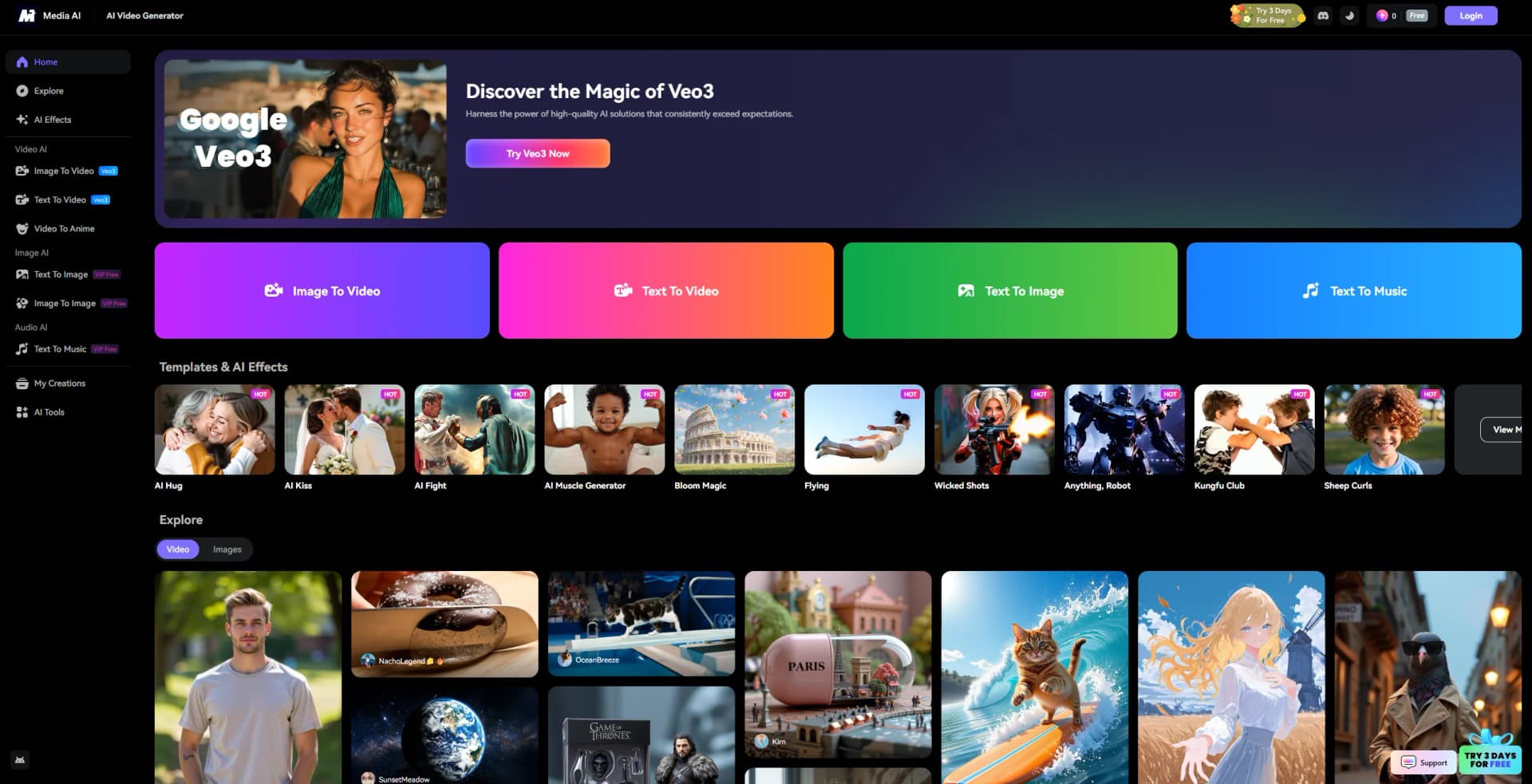
WonderShare Media.io is a versatile AI-driven platform designed to simplify and enhance the creation of video, audio, and image content. It offers a comprehensive suite of tools that cater to a wide range of creative needs, from transforming static images into dynamic videos to crafting music from text prompts. Tailored for content creators, marketers, and creative professionals, WonderShare Media.io provides innovative solutions for generating engaging and high-quality content with ease.
WonderShare Media.io distinguishes itself with its all-in-one platform that integrates a variety of AI-powered tools for video, image, and audio content creation. Its ability to transform static images into dynamic videos and convert text into music or anime-style visuals sets it apart, offering creative flexibility and innovation in one package.
WonderShare Media.io offers a powerful array of AI-driven tools that cater to a diverse range of creative needs. Its intuitive design and wide-ranging functionality make it an invaluable resource for anyone looking to enhance their multimedia content effortlessly. Whether you're a professional marketer or a casual creator, WonderShare Media.io provides the tools to elevate your creative projects to new heights.
Who is Using WonderShare Media.io?
Content Creators
Leveraging the platform for producing engaging multimedia content for social media and online platforms.
Marketing Professionals
Utilizing the tools for creating promotional videos and ads with minimal resources.
Educators and Trainers
Employing the software to develop instructional videos and learning materials.
Freelancers in Creative Industries
Adopting the platform for quick and efficient content creation tasks.
Uncommon Use Cases
Used by podcasters for enhancing audio quality; Employed by event organizers to create promotional materials.
Key Features
Rating Breakdown
Pricing Plans
Free Plan
Free
- Includes 1GB of storage, 720p exports with watermark, and access to a free trial of AI tools
Standard Plan
$9.99 per month
- Includes 20GB storage, 1080p export without watermarks, basic video editing features, 60 minutes of subtitles per month, access to high-quality asset resources, 1,000+ templates and effects, and tools for compressing and converting
Premium Plan
$17.99 per month
- Includes everything in the Standard plan plus 50GB storage, 120 minutes of automatic subtitles with translation, and access to 10+ AI features like audio denoiser, voice clone, AI music generator, and image enhancer
Which WonderShare Media.io plan should you pick?
Start with Free to test workflows; upgrade to Standard or Premium for higher limits and watermark-free exports, or use credit plans for flexible AI usage.
Free
Good for trying Media.io with limited credits, storage, generations, and watermarked 720p exports.
Standard
Good for regular creators who need more storage, faster generation, 1080p exports, and monthly subtitle minutes.
Premium
Good for heavier users who need the largest storage allowance, turbo generation, more subtitle minutes, and extra-credit discounts.
Pay As You Go
Good for occasional users who prefer purchasing credits without a recurring subscription.
Monthly Credit Plan
Good for users who want recurring monthly credits without selecting a full membership tier.
WonderShare Media.io Use Cases
Short-form social content
Create viral videos and images from social inspiration, prompts, and uploaded media.
Outcome: Publish-ready social content.
AI advertising
Generate product advertisements from product images or URLs with customizable characters and scenes.
Outcome: Campaign-ready product creatives.
Visual storytelling
Create characters, scenes, and narrative videos from a single prompt.
Outcome: Complete story videos.
Music videos
Combine a music track with AI-generated visuals, motion, and matching styles.
Outcome: Visual music content.
Corporate communications
Turn scripts, office footage, product photos, or presentation slides into branded business videos.
Outcome: Professional internal or external presentations.
Workflow Ideas with WonderShare Media.io
Create a product advertisement
- 1Upload a product image or provide a product URL
- 2Generate scenes and on-screen characters with the AI Ad Generator
- 3Customize branding, edit the result, and export the advertisement
Turn a concept into a story video
- 1Enter a story idea or screenplay prompt
- 2Create consistent characters and scenes
- 3Refine the generated narrative video and download it
Create a captioned social video
- 1Upload a video or audio file
- 2Generate and edit automatic subtitles
- 3Export the captioned video or subtitle file
How WonderShare Media.io fits into your stack
Browser
Media.io is primarily a browser-based creative workspace for generating, editing, translating, enhancing, and sharing video, image, and audio content. Its online tools support uploads, cloud storage, exports, and social sharing.
Browser extension
The Media.io Chrome extension captures screens, windows, tabs, webcams, and audio, then provides editing and export capabilities for recorded content.
Automation and APIs
Media.io provides a developer API for integrating AI video and image generation into applications, products, and services, with documented API reference materials.
Pros
- +Versatile Functionality: Offers a wide array of tools for video, image, and audio editing, accommodating diverse creative needs.
- +User-Friendly Design: Intuitive interface that simplifies the editing process, making it accessible to users of all skill levels.
- +Cost-Effective Solutions: Provides affordable pricing options compared to traditional software, with a free tier available for basic use.
- +High-Quality Output: Delivers professional-grade results with minimal effort, enhancing the quality of content across various media.
Cons
- −Watermark on Free Plan: The free version includes watermarks on exported content, which may limit its use for professional purposes.
- −Limited Third-Party Integrations: Currently, the platform has restricted compatibility with other software, which could hinder workflow integration.
- −Daily Usage Limits: Free users face restrictions on the number of content generations per day.
Limitations & when to consider alternatives
Known limitations
- Free video exports may contain watermarks. The free plan can add a Media.io watermark to video-editor exports; paid plans remove it.
- Free-plan usage is limited. The free plan includes limited credits, generation quantities, storage, and 720p watermarked exports.
- Uploaded content is automatically deleted. Uploaded files and generated content are automatically deleted from Media.io servers within seven days.
- Subscription credits expire by billing cycle. Annual-plan credit batches are valid for 30 days and unused credits do not carry forward.
- Some features require credits. Features that were temporarily free or included in trials may require credits after the trial period ends.
Look elsewhere when
- You need a native desktop editor with an installer
- You need coding or programming assistance
How to Use WonderShare Media.io
- 1
Choose a workflow
Select AI Story, Viral Studio, AI Ad Generator, Music Story, or an individual video, image, audio, or editing tool based on your goal.
- 2
Add a prompt or assets
Enter a text prompt or upload images, product assets, portraits, audio, or video to provide the creative starting point.
- 3
Select a model and settings
Choose an available AI model and adjust options such as duration, aspect ratio, resolution, language, or style.
- 4
Generate the result
Run the creation task and review the generated video, image, audio, captions, or visual effect.
- 5
Edit and refine
Use Media.io’s editor, effects, templates, subtitles, branding, or prompt controls to improve the result.
- 6
Export or share
Download the finished media, export subtitle files, save to Google Drive or Dropbox, or share the project with collaborators.
Who is WonderShare Media.io For?
Creators
Create short-form videos, visual stories, music videos, images, and social content with connected AI workflows.
Marketers
Turn product assets into advertisements, campaign variations, social posts, and promotional videos.
Educators
Create presenter-led lessons, translate course content, clean recordings, and produce focused learning clips.
Designers
Generate visual concepts, animate artwork, explore styles, and refine media with AI tools.
Businesses and teams
Create branded corporate videos, internal updates, investor presentations, and collaborative projects.
Frequently Asked Questions
Is Media.io free?
Yes. Media.io is free to get started, with free access to try its tools and optional paid plans.
Does Media.io add watermarks?
Free video-editor exports may include a watermark, while paid plans provide watermark-free exports.
Can I upload files from Google Drive or Dropbox?
Yes. Media.io supports uploads from local storage, Google Drive, and Dropbox, subject to file size and permissions.
Does Media.io work on Mac and Linux?
Yes. Media.io works through supported web browsers on Mac and Linux.
Can I use Media.io for AI video, image, and audio creation?
Yes. Media.io provides AI workflows for video, image, music, voiceovers, stories, ads, and visual effects.
How long are uploaded files retained?
The site says uploaded files and generated content are automatically deleted from its servers within seven days.
Community reviews
Be the first to share your experience.
Sign in to leave a review for WonderShare Media.io.
WonderShare Media.io Alternatives
Looking for alternatives to WonderShare Media.io? Here are similar tools in the same category:
Learn to Master WonderShare Media.io
With Skill Leap courses
Get in-depth training on WonderShare Media.io and 50+ other AI tools with our expert-led video courses.
Start 7-Day Free Trial