
Zonka Feedback
Use AI to unify feedback and drive actions.
Key Takeaways
- What it is
- Use AI to unify feedback and drive actions.
- Best for
- AI Feedback Intelligence
- Thematic & Entity Intelligence
- AI Co-pilot / Ask AI
- Rating
- 4.5/5
What is Zonka Feedback?
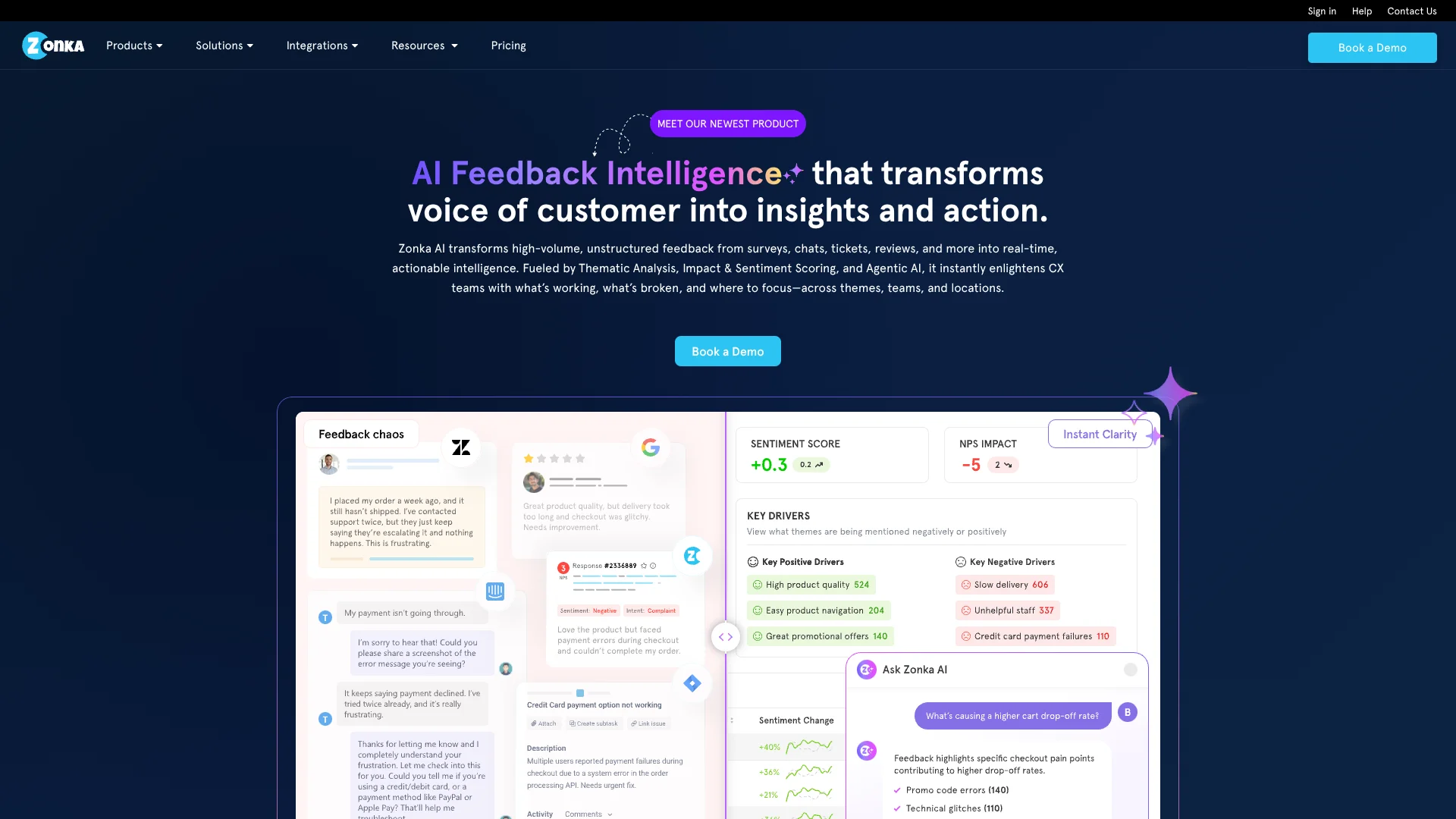
Zonka Feedback is a customer feedback and AI intelligence platform that unifies surveys, tickets, chats, reviews, and other signals into a single system of insight and action. It focuses on AI-driven thematic analysis, sentiment, and impact scoring, then routes role-specific insights and automated workflows to CX, product, and frontline teams.
Zonka Feedback stands out by combining serious AI analytics with very operational features. Instead of stopping at sentiment charts, it ties themes directly to business entities and CX metrics, then hands tailored dashboards and automated actions to the right teams. The AI is designed to be explainable, letting users trace insights back to source comments, and its ability to work across surveys, tickets, chats, and reviews gives organizations a much clearer, more granular picture of customer reality.
Zonka Feedback gives organizations a focused way to turn sprawling, noisy customer feedback into targeted, role-aware actions that can actually change outcomes. Its mix of multichannel survey collection, rich AI analysis, impact mapping, and workflow automation makes it especially appealing for CX, product, and support leaders who care about measurable improvements rather than vanity scores. For teams ready to invest in structured customer listening and need serious AI to keep up with feedback volume, it presents a strong, future-ready option.
Who is Using Zonka Feedback?
CX & Insights Teams
Centralizing voice-of-customer data, running analytics, and driving portfolio-level CX programs.
Customer Support & Success Teams
Mining tickets and chats to reduce repeat issues and improve resolution quality.
Product & UX Teams
Prioritizing roadmaps based on feature requests, app reviews, and in-product feedback.
Retail, eCommerce, and SaaS Companies
Tracking NPS/CSAT across journeys, locations, and digital properties.
Healthcare and Financial Services Providers
Meeting regulatory expectations while monitoring patient or client experience.
Uncommon Use Cases
Used by HR and people teams for employee experience feedback; adopted by universities and training providers to analyze learner satisfaction and course feedback with AI.
Key Features
Rating Breakdown
Pricing Plans
Feedback Management
- Omni-channel Voice of Customer programs (Email, SMS, WhatsApp, offline, digital), digital CX (website, in-app, in-product), NPS/CSAT/CES measurement, built-in survey distribution, advanced targeting, drag-and-drop survey builder, multilingual surveys, 20+ integrations, advanced analytics & dashboards, case management, real-time alerts, CX automation & workflows, and contact & user journey tracking
AI Feedback Intelligence
- Unified feedback from surveys, helpdesk, live chat & reviews, AI-driven insights, themes & entity extraction, sentiment & emotion analysis, insights assistant, impact analysis, customizable AI models, unified intelligence hub, pattern & trend detection, and CX automation & workflows
Enterprise Capabilities (Add-ons/Included in Custom Plans)
- ISO 27001:2022 certification, GDPR & HIPAA compliance, SSO & user permissions, historical data import, regional data hosting & localization (US, Europe, Australia, India), tailored onboarding, and priority support
Which Zonka Feedback plan should you pick?
Start with Survey & CX Starter for basic survey collection, then upgrade to Professional, Growth, or Enterprise as response volume, automation, integrations, SSO, and operational scale increase.
Survey & CX Starter
Good for smaller programs that need core survey distribution and feedback collection.
Survey & CX Professional
Good for growing teams that need higher survey and SMS capacity.
Survey & CX Growth
Good for established CX programs that need larger volumes, advanced workflows, and broader integrations.
Survey & CX Enterprise
Good for large organizations needing enterprise security, advanced roles, SSO, localization, onboarding, and priority support.
Zonka Feedback Use Cases
Customer satisfaction measurement
Create NPS, CSAT, or CES surveys and distribute them across digital, mobile, email, SMS, QR, or kiosk channels.
Outcome: Measure loyalty, satisfaction, and customer effort.
Healthcare and patient feedback
Collect inpatient, outpatient, clinic, hospital, and medical-practice feedback across touchpoints.
Outcome: Identify experience gaps and improve patient satisfaction and care pathways.
Product feedback
Gather feature requests, bug reports, usability feedback, and in-product responses.
Outcome: Prioritize product improvements and roadmap decisions.
Employee feedback
Use employee-feedback templates and surveys to collect workforce opinions.
Offline and kiosk surveys
Deploy surveys on iOS or Android devices for field research, trade shows, restaurants, hotels, and unattended kiosks.
Outcome: Collect responses without an internet connection and sync them later.
Workflow Ideas with Zonka Feedback
Automated detractor follow-up
- 1Create a workflow triggered by a low NPS, CSAT, or CES response.
- 2Send notifications or email to the assigned team member.
- 3Create a response task for follow-up and resolution.
Post-event feedback collection
- 1Distribute an event survey through email, SMS, QR code, or kiosk.
- 2Apply workflow conditions based on response attributes or survey answers.
- 3Route alerts, contact actions, or response actions automatically.
Salesforce-triggered survey workflow
- 1Connect Salesforce to Zonka Feedback.
- 2Trigger an email or SMS survey from Salesforce events such as a closed case or won deal.
- 3Sync response data back to Salesforce records.
How Zonka Feedback fits into your stack
Browser
Zonka Feedback operates as a web-based survey and feedback platform, with website widgets, embedded surveys, links, popups, and dashboards.
Mobile / kiosk
Native Android and iOS apps support offline, kiosk, tablet, and on-the-go feedback collection. Mobile SDKs also embed surveys inside customer applications.
Automation and APIs
REST APIs, webhooks, JavaScript client code, triggers, and workflow automation connect feedback data to custom applications and business processes.
Team chat and tickets
Named integrations include Slack, Microsoft Teams, Zendesk, Freshdesk, Help Scout, Intercom, and Jira for alerts, ticketing, and feedback workflows.
Pros
- +Deep AI analytics on unstructured feedback reduces manual coding and speeds up insight generation.
- +Unified feedback hub breaks silos between surveys, support, reviews, and product channels.
- +Role-centric dashboards and alerts help each team know exactly what to prioritize.
- +Strong automation and case management support genuine closed-loop CX, not just reporting.
- +Enterprise-ready security and compliance including ISO certification, GDPR and HIPAA support.
Cons
- −Initial configuration effort can be significant for complex taxonomies, entities, and workflows.
- −Advanced AI Feedback Intelligence pricing may be steep for very small or early-stage teams.
- −Technical resources are helpful to get full value from custom integrations and APIs.
Limitations & when to consider alternatives
Known limitations
- Free access is time-limited. The site advertises a 14-day free trial; the pricing page does not show a permanent free tier.
- Image uploads are limited to 5MB per response. The Image Capture help article documents a maximum image size of 5MB per response.
- Smart Send has fixed scheduling constraints. Smart Send uses three fixed weekday delivery presets and does not provide free-form windows or custom days.
- SSO requires an eligible plan. The SSO documentation states that an SSO-enabled Zonka Feedback plan is required.
- SMS usage has plan and credit limits. SMS sending depends on plan-specific monthly survey limits or SMS credits, with additional usage charged separately.
Look elsewhere when
- You need a native desktop app for Windows, macOS, or Linux.
- You need AI fine-tuning or model training on your own data.
How to Use Zonka Feedback
- 1
Create an account and choose a template
Start a trial account, select a template from the survey library, and choose a use case such as NPS, CSAT, healthcare, product feedback, or employee feedback.
- 2
Build and localize the survey
Use the visual survey editor to add questions, customize branding, configure logic, and add multiple languages.
- 3
Choose distribution channels
Publish through web, email, SMS, WhatsApp, QR codes, in-app or in-product channels, offline mobile apps, or kiosks.
- 4
Connect business systems
Open the Integrations area and connect tools such as Salesforce, Slack, Google Sheets, Mailchimp, Zendesk, HubSpot, or other supported systems.
- 5
Automate follow-up actions
Create workflow triggers and actions for alerts, response management, contact actions, tasks, and follow-up communication.
- 6
Analyze and close the loop
Review responses in the Response Inbox, use reports and dashboards to identify trends, and assign tasks or cases for resolution.
Who is Zonka Feedback For?
Business owners
Capture voice-of-customer feedback and understand customer experience.
Customer success and service teams
Measure service quality, issue-resolution efficiency, and agent performance.
Product teams
Collect product feedback and understand user reactions to features.
Human resource teams
Capture feedback from employees and visitors.
Marketing and digital transformation teams
Run surveys and market research or replace paper feedback processes with digital collection and workflows.
Frequently Asked Questions
What is the difference between Feedback Management and AI Feedback Intelligence?
Feedback Management covers survey creation, distribution, measurement, and closing the feedback loop. AI Feedback Intelligence unifies feedback from surveys, tickets, reviews, and other sources for AI-powered analysis and insights.
How are Zonka Feedback products priced?
Feedback Management pricing is primarily based on response volume, while AI Feedback Intelligence pricing is based on data credits. Zonka provides custom quotes.
Does Zonka Feedback support custom integrations?
Yes. Custom integrations are supported through APIs and middleware for connecting CRMs, help desks, and other systems.
Can historical feedback data be imported?
Yes. Past survey responses, feedback, and ticket data can be imported so historical and ongoing feedback can be analyzed together.
Is there a free trial?
The site offers a 14-day free trial rather than a permanent free plan.
Community reviews
Be the first to share your experience.
Sign in to leave a review for Zonka Feedback.
Zonka Feedback Alternatives
Looking for alternatives to Zonka Feedback? Here are similar tools in the same category:
Learn to Master Zonka Feedback
With Skill Leap courses
Get in-depth training on Zonka Feedback and 50+ other AI tools with our expert-led video courses.
Start 7-Day Free Trial